
To make music for a Roblox game, generate an original instrumental, download the MP3, import it through the Asset Manager in Roblox Studio or the Creator Dashboard, and play it from a Sound with Looped turned on. On RaoMusic, a Rao v1.0 run costs 20 credits and returns two full tracks, and a Sounds run costs 10 credits for two short loop clips. Full tracks can start quietly and end with a fade, so check both ends before looping.
Roblox sets its own rules for the file (format, length, size and sample rate), gives a free monthly import allowance, requires the legal rights to the audio and keeps uploads private until you grant your game permission. The rules table sits just before Step 4.
Last checked: November 8, 2026.
Step 1: Should you make a full track or a loop clip?
There are three ways to get music into a Roblox game: compose it yourself in a music program, use the free-to-use tracks in Roblox's Creator Store, or generate an original track with an AI music tool. This guide covers the AI route, using RaoMusic.
A full track is a complete piece with an intro and an ending. A loop clip comes from the Sounds tab, which makes short clips instead of songs; its Loop switch asks for a seamless loop instead of a one-shot. It's a request rather than a guarantee, so play the clip on repeat before you upload it. Pick by where the music plays:
- Full track: levels, rounds, boss fights. More variety, but you trim it before turning on Looped (Step 3).
- Loop clip: lobbies, shops, menus. Short and meant to repeat, so players hear the same few bars over and over.
Step 2: How do you describe the music for your game?
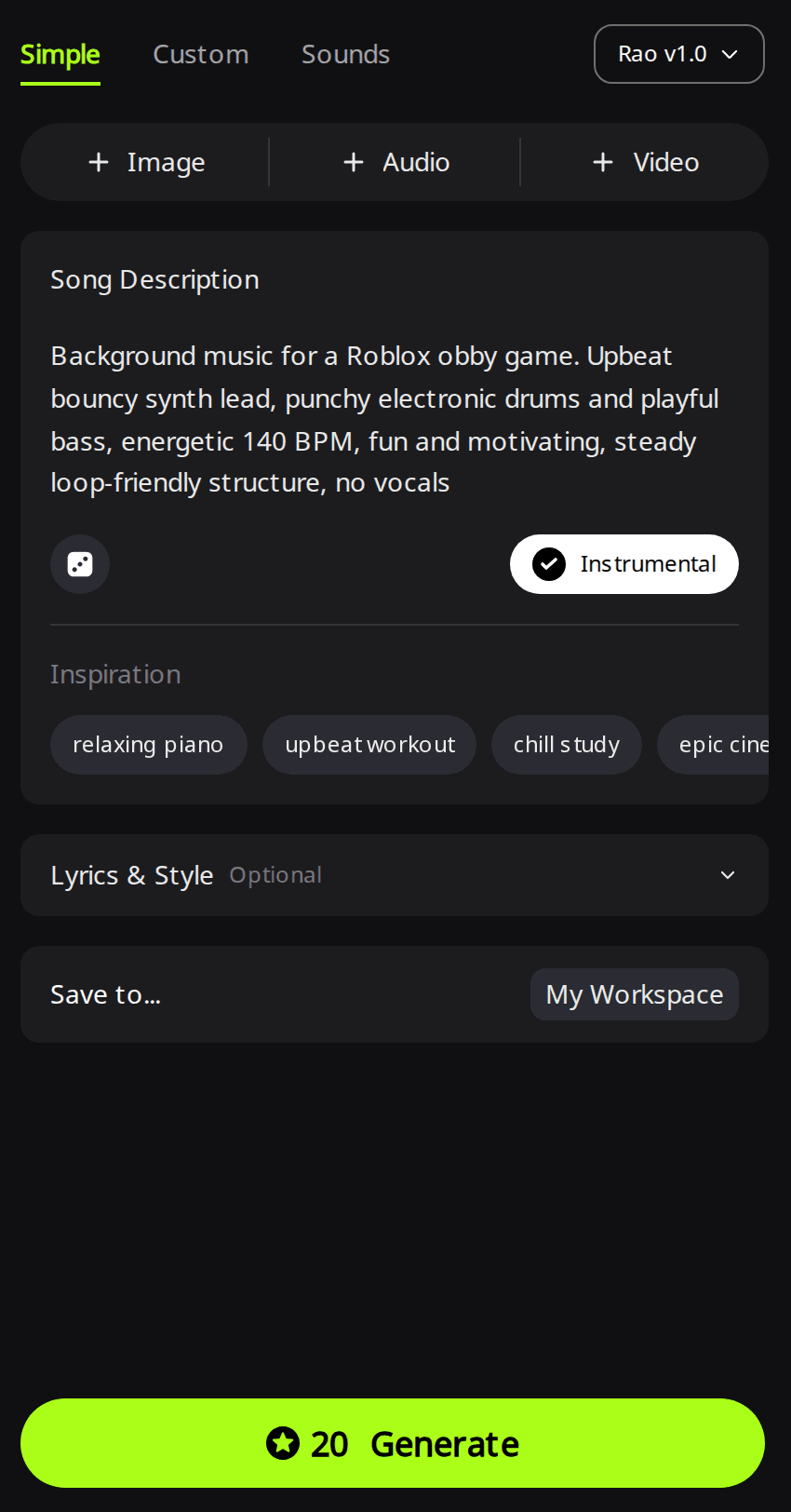
Open RaoMusic's Roblox music generator. It starts on the Simple tab, where you only fill in a Song Description. Name the game type first (obby, simulator, tycoon, horror, tower defense, lobby), then the instruments, the tempo and "no vocals", and leave Instrumental switched on to ask for a track without vocals. The engine stays on Rao v1.0, the default engine, which doesn't need a subscription. Click Generate.
For a loop clip, switch to the Sounds tab instead, describe the loop, turn on Loop, set a tempo if you want one and click Generate. The examples below show both kinds; after them, Step 3 covers trimming, Step 4 uploading and Step 5 playing the file in your game.
How did we make the examples?
On November 8, 2026 we ran three generations on RaoMusic: two Rao v1.0 runs with Instrumental on (an obby prompt and a horror prompt) and one Sounds run with Loop on and Tempo set to 85 BPM. We downloaded all six MP3 files and measured each one in a browser audio decoder for sample rate, channels, length, how quiet the first second is and when the ending fades. Each prompt is quoted above its players. The short listening note under a clip describes what that file sounds like; press play to judge for yourself.
What does obby music sound like?
Background music for a Roblox obby game. Upbeat bouncy synth lead, punchy electronic drums and playful bass, energetic 140 BPM, fun and motivating, steady loop-friendly structure, no vocals
Take 1 (3:00)
Listening note: Bright, bouncy synth leads and energetic electronic drums with no vocals, a good fit for an obstacle course. Trim its ending before you loop it (Step 3).
Take 2 (3:08)
Listening note: The same bouncy synth and punchy drums at a similar tempo. Use it as is for a timed course that plays once per round, or trim it before looping.
What does horror game music sound like?
Background music for a Roblox horror game. Low drones, eerie music box, distant metallic hits and tense strings, slow and unsettling, no big ending, no vocals
Take 1 (3:34)
Listening note: A fragile music box melody over low, muddy drones sets the horror mood, but the strings and metallic hits from the prompt are barely there. After trimming both ends (Step 3), it works as quiet background for exploring a dark room; for jump-scare hits, add separate game sound effects.
Take 2 (3:38)
Listening note: This take has everything the prompt asked for: music box, drones, tense strings and metallic hits. The music box sits a little too far forward and repeats, so prefer it for a short unsettling exploration scene over long background play, and trim both ends before looping.
What does a lobby loop clip sound like?
Chill lo-fi lobby music loop for a Roblox hangout game, warm Rhodes, soft vinyl texture, mellow bass
Settings: Sounds tab, Loop on, Tempo 85 BPM. Turn on looping in your browser player (or in Studio) to hear the join.
Clip 1 (0:21)
Listening note: Warm Rhodes chords, mellow bass and soft vinyl crackle, as asked. The end runs back into the start without a click, a jump in level or a cut-off note, so you can loop it as is in a lobby or menu.
Clip 2 (0:21)
Listening note: Like Clip 1, it joins with no click or gap. Because it is only 21 seconds long, it may feel repetitive in a long session; if players stay in the lobby for a while, use a longer, carefully trimmed loop.
Step 3: How do you trim a full track so it loops cleanly?
When Looped is on, Roblox plays the file again from the first second after the last one. Any fade, ringing final chord or quiet intro becomes a dip in the music every few minutes. Here is what the start and end of each file looked like when measured:
| File | Start | End |
|---|---|---|
| Obby, Take 1 | Music from the first second | Final chord dies away over the last 2 seconds |
| Obby, Take 2 | Music from the first second | Fades out over the last 3 seconds |
| Horror, Take 1 | About 1 second of near silence | Fades out over the last 6 seconds |
| Horror, Take 2 | About 1 second of near silence | Fades out over the last 5 seconds |
| Lobby loop clips | Music from the first second | No fade; the level at the end matches the start |
"No big ending" in the horror prompt did not stop either horror take from fading out. To fix a full track, drop any quiet opening and cut just before the ending starts, ideally at the end of a musical phrase. On RaoMusic you can do this with Trim in the song's Clip menu, which costs 2 credits and saves the result as a new song; our AI song editing guide walks through it. Then loop the trimmed file in Studio and listen to the join a few times. If you hear a jump, move the cut point by a beat and trim again.
What audio files does Roblox accept?
Roblox lists these import rules on its audio assets page. All six downloads made for this guide fit Roblox's format, length, size, sample rate and channel limits.
| Rule | Roblox limit | Our MP3 downloads |
|---|---|---|
| Format | .mp3, .ogg, .wav or .flac | .mp3 |
| Length | Under 7 minutes | 0:21 to 3:38 |
| File size | Under 20 MB | 0.4 to 5.0 MB |
| Sample rate | 48 kHz or lower | 48 kHz |
| Channels | Mono, stereo, 3.0 or 5.1 | Stereo |
| Imports per 30 days | 2,000 if ID verified, 100 if not | Free within that allowance |
| Rights | You must have the legal rights to the audio | See the last section, on using AI music in Roblox |
Step 4: How do you upload the MP3 to Roblox?
On RaoMusic, open the song's menu and choose Download, then MP3. Then import it to Roblox with either method from Roblox's audio assets documentation:
- In Roblox Studio: open the Asset Manager, click Import, and select and confirm the MP3. A successful import shows a green checkmark and a completed status.
- On the Creator Dashboard: go to Development Items, then Audio, click Upload Asset, choose the file, fill in Name and Description, and click Upload.
The file then goes into Roblox's moderation queue. If Studio can't process the file, check it against the limits above and export a fresh copy; Roblox notes that some older audio tools write invalid file headers.
Imported audio starts out private, so give your game permission to use it. Roblox's asset privacy guide lists these Creator Dashboard steps:
- Go to Development Items, then Audio, and select your track. Its Configure page opens.
- Select Permissions in the left-hand navigation.
- On the Experiences tab, click Add experiences, type your game's universe ID, click Add, then Done. To find the universe ID, hover over the game's thumbnail on the Creator Dashboard's Creations page, click the ⋯ button and choose Copy Universe ID.
Roblox warns that a game's permission to a restricted asset can't be revoked once granted. The universe ID identifies the game; the audio's own asset ID is a different number. To get the asset ID you'll paste in Step 5, right-click the track in Studio's Asset Manager and choose Copy Asset ID.
Step 5: How do you play the music in your game?
For background music that every player hears at the same volume anywhere on the map, Roblox's Sound object guide uses these steps:
- In the Explorer window, hover over SoundService, click the ⊕ button and insert a Sound.
- In the Properties window, set SoundId to your audio asset ID. Roblox's own script examples write it as rbxassetid:// followed by the number.
- Turn on Playing so the music starts when the game begins.
- Turn on Looped if this is the only track in the place.
Leave Volume low at first. Roblox notes the property is multiplicative, so a loud file rarely needs more than 2. Optional: Roblox now labels Sound objects as legacy. If you'd rather use the newer objects, follow Roblox's audio objects guide: it puts an AudioPlayer (turn on its Looping property), an AudioDeviceOutput and a Wire in SoundService, connects the Wire from the player to the output, and starts playback from a script.
Can you use AI-generated music in a Roblox game?
Roblox's import rules say you must have the legal rights to the audio you upload, and every upload goes through Roblox's moderation queue. Songs made on RaoMusic, including on the free plan, come with royalty-free commercial usage rights under the RaoMusic commercial license, which covers free and paid games. Subscribers can also download a license certificate PDF for each song. Don't upload covers or remixes of other people's songs unless you have permission for that use.
Frequently Asked Questions
Yes. Put the Sound inside a block, sphere or cylinder part instead of SoundService and set SoundService's VolumetricAudio property to Enabled. Players then hear it near that part, and RollOffMinDistance and RollOffMaxDistance set how far it carries.
Only if Roblox classifies it as a song and it meets extra conditions: it passes moderation and copyright checks, meets minimum duration, play count and platform age requirements, has a meaningful title, and the uploader is ID verified and has accepted the Audio Terms of Use.
Yes, with a script. Roblox's audio objects guide says you can trigger audio from scripts as players join or as a result of a gameplay event or UI interaction, so give each area or fight its own track and start and stop them from code.
Put the Sound objects in a sound group. Roblox's Sound object guide says a sound group lets you control the entire group's volume and apply effects to every track in it.
No. Roblox is a trademark of Roblox Corporation, and RaoMusic is an independent AI music tool that makes tracks you can upload to your own games.