

To make lofi music with AI, name each part of the sound rather than only the genre: a slow tempo, dusty swung drums, jazzy Rhodes chords, a soft bass and vinyl or tape noise. Turn on Instrumental and generate. On RaoMusic, a Suno v6 run costs 30 credits for two full tracks, and a seamless loop from the Sounds tab costs 10. Rain in the prompt came out nearly silent in our test, so add it as a sound effect.
Last checked: October 31, 2026
How did we make the clips in this guide?
Every clip was made on RaoMusic on October 31, 2026, with one run per setting: two music runs on Suno v6 in Simple mode with Instrumental on (a short prompt and a detailed prompt), one loop run in the Sounds tab with Suno v6, and one 30-second rain clip from the ElevenLabs sound effect form. Each Suno run returns two takes, so there are seven clips. The short listening note under a clip describes what that file sounds like; press play to judge for yourself. Prompts, settings, lengths and credits for every clip are in the table at the end.
Step 1: What should a lofi prompt describe?
A genre label alone leaves the instruments and texture up to the model; naming them tells it what you want. Write one short phrase for each part of the track you can hear in your head. Here is the detailed prompt from Step 2, split into its parts:
| Part | What we wrote |
|---|---|
| Use and mood | lo-fi hip hop instrumental for studying at night; mellow and nostalgic |
| Tempo | slow 75 BPM |
| Drums | dusty boom-bap drums with a lazy swing |
| Chords | warm Rhodes jazz chords |
| Bass | muffled upright bass |
| Texture | vinyl crackle and tape hiss |
| Background sound | soft rain in the background |
Join the parts into one comma-separated line. If you want a different flavor of lofi (jazzier, sadder, more ambient), swap one row at a time so you can hear what each change does. For other genres, start from our list of AI music prompts.
Step 2: How do I generate a lofi instrumental in Simple mode?
The same order works in any text-to-music tool that takes a written description. Describe the sound, ask for an instrumental, generate more than one version and keep the best. These steps use RaoMusic as the example.
- Open Create and stay on the Simple tab.
- In the model menu, choose Suno v6. Suno v6 needs a subscription; Suno v6 Wild (also 30 credits) and Rao v1.0 (20 credits) do not.
- Paste your prompt into Song Description.
- Turn on Instrumental to ask for a track without vocals. It is a request rather than a guarantee, as the short-prompt test below shows.
- Click Generate.
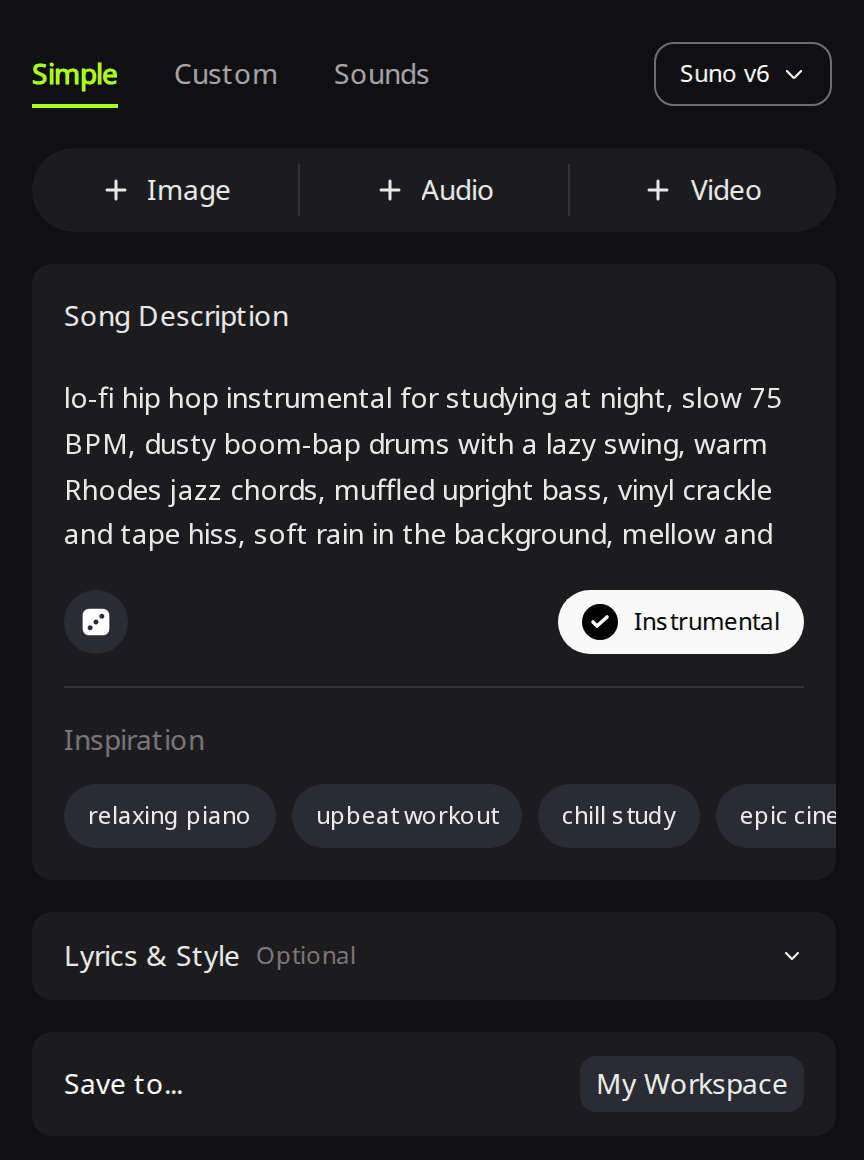
If you do not want to write the prompt yourself, the lofi music generator page opens with a lofi description already filled in.
Detailed prompt · Suno v6 · Simple mode · Instrumental on
Take 1
Take 2
Listening note: Both takes are slow, swung lofi grooves with jazzy keys and vinyl texture, with no vocals or sudden volume jumps, and both work as study background as they are. Take 1 has the Rhodes tone the prompt asked for, while take 2 leans toward acoustic piano, so keep take 1 if the electric piano sound matters to you. The rain is close to inaudible in both; Step 4 shows how to add it as its own layer.
What happens with a short prompt like "lofi hip hop beat"?
It gives you a lofi groove, though one take came out clean and the other picked up voices. These two takes came from the prompt lofi hip hop beat with the same engine and settings as Step 2.
Short prompt · Suno v6 · Simple mode · Instrumental on
Take 1
Take 2
Listening note: Take 1 has relaxed, jazzy electric piano chords over a steady downtempo beat but sounds clean, without tape warmth or crunchy drums; it suits quiet filler under a video or stream. Take 2 has the dusty drums and warm chords, plus faint vocal chops even though Instrumental was on.
If you need a track with no voices at all, keep the clean take or generate again. To get the worn sound back, add texture words such as vinyl crackle, tape hiss and dusty drums; they change the tone of the track rather than whether voices appear.
Step 3: How do I make a seamless lofi loop?
For a short beat that repeats under a stream, a game menu or a social clip, use the Sounds tab instead of a full song.
- On Create, switch to the Sounds tab. Suno v6 stays selected.
- Describe the loop under Describe your sound.
- Set Clip type to Loop.
- Type a tempo in Tempo (BPM) and pick a Key, or leave both on Auto.
- Click Generate.
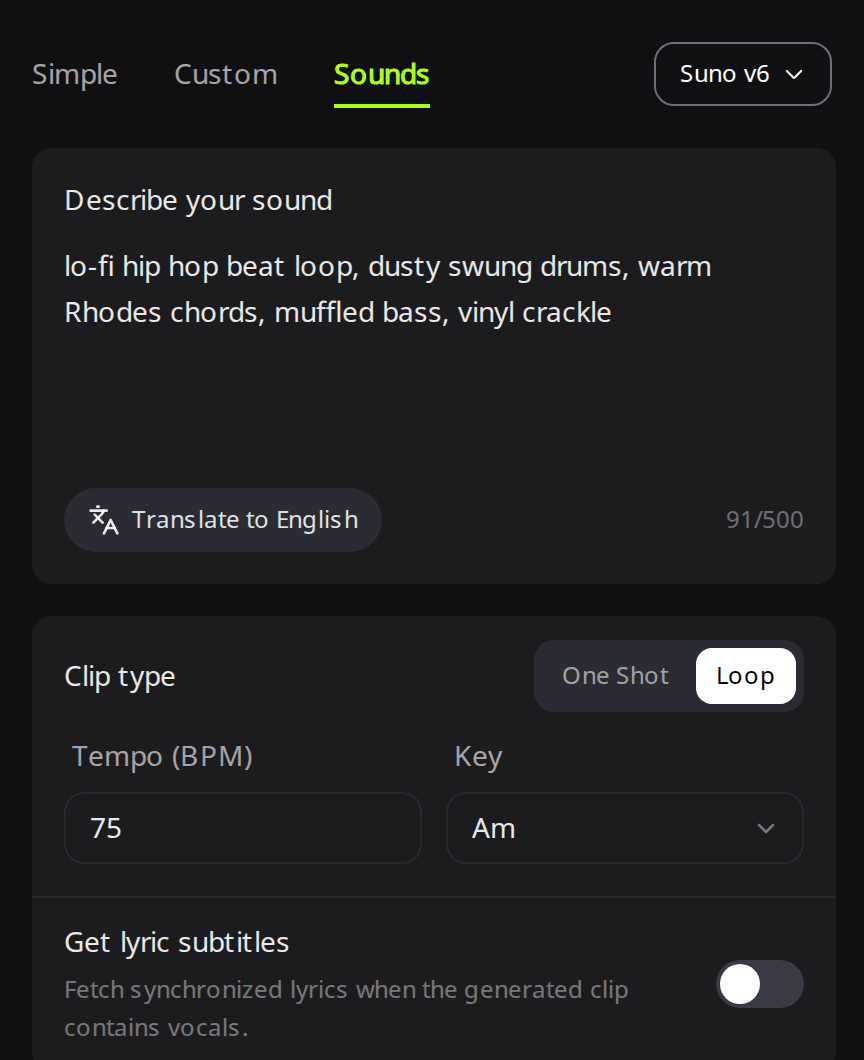
Loop · Suno v6 · Sounds tab · Loop · Tempo 75 · Key Am
Clip 1
Clip 2
Listening note: Both clips are lofi hip hop with warm electric piano, a subdued bass and laid-back drums, and neither has a click or gap where the end runs back into the start. The vinyl noise is subtle in clip 2 and very faint in clip 1, so pick clip 2 if you want some crackle. Before you build a long track from a loop, repeat it a few times in your video editor or DAW and listen to the seam.
If you want visuals for a study stream, the video loop maker turns a song and its cover into a seamless looping music video.
Step 4: How do I add rain or café noise under the beat?
Because the rain stayed buried inside the music, generate it as its own clip with the ElevenLabs engine.
- In the model menu, choose ElevenLabs, then switch to the Sounds tab.
- Describe only the ambience in Sound description, and add "no music" so the clip carries no melody of its own.
- Set Length (1 to 30 seconds) and turn on Seamless loop.
- Click Generate. ElevenLabs sound effects cost 1 credit per second, so 30 seconds costs 30 credits.
Rain · ElevenLabs sound effect · Length 30 s · Seamless loop on
Listening note: Calm, steady rain with soft patter and no thunder or music, quiet enough to sit under a beat as it is. It sounds more like rain outdoors than drops hitting a window, even though the prompt asked for a window, so if you want that close-up glass sound, generate it a few more times and keep the closest take.
To combine them, put the music on one track and the rain on a second track in your video editor or DAW, repeat the rain clip for the length of the song and lower it until it sits behind the drums. For café chatter or a crackling fire, follow the same steps and describe only that sound. The AI sound effect generator page covers foley and ambience clips like these.
Can I use AI lofi music on YouTube or a study stream?
Music made on RaoMusic comes with royalty-free commercial usage rights on every plan, including the free plan, and the license names YouTube among the places you can monetize it. The conditions are on the RaoMusic commercial license page, and YouTube's own monetization rules still apply to your channel. Subscribers can also download a license certificate PDF for each track, which is useful if a platform asks for proof.
What settings did we use for each clip?
| Clip | Engine and tab | Settings | Prompt | Length | Credits per run |
|---|---|---|---|---|---|
| Detailed prompt, takes 1 and 2 | Suno v6, Simple mode | Instrumental on | lo-fi hip hop instrumental for studying at night, slow 75 BPM, dusty boom-bap drums with a lazy swing, warm Rhodes jazz chords, muffled upright bass, vinyl crackle and tape hiss, soft rain in the background, mellow and nostalgic | 2:59 and 2:43 | 30 |
| Short prompt, takes 1 and 2 | Suno v6, Simple mode | Instrumental on | lofi hip hop beat | 2:44 and 2:43 | 30 |
| Loop, clips 1 and 2 | Suno v6, Sounds tab | Clip type Loop, Tempo (BPM) 75, Key Am | lo-fi hip hop beat loop, dusty swung drums, warm Rhodes chords, muffled bass, vinyl crackle | 0:21 each | 10 |
| Rain | ElevenLabs, Sounds tab | Length 30 s, Seamless loop on | gentle steady rain on a window at night, soft patter, no thunder, no music | 0:30 | 30 |
Frequently Asked Questions
Yes. Leave Instrumental off and RaoMusic can write the lyrics for you, or switch to Custom mode and paste your own lyrics with a lofi style description.
In Custom mode with a Suno v6 version, the Duration setting accepts a target length from 10 to 360 seconds. The song may still end early if your lyrics are short.
Generate a track you like, then use Extend to continue it from the point you choose; each extend run returns two new versions, and Extend works on the free plan. You can also repeat a loop from the Sounds tab in your editor.
The ACE-Step 1.5 engine has optional BPM (30 to 300) and Key fields for full songs; leave them empty to let the model pick. In the Suno Sounds tab, Tempo (BPM) and Key apply to short clips.
Yes. On RaoMusic, ElevenLabs also makes full songs, with an Instrumental option in Simple mode, and is priced by length at 40 credits per minute.
Tracks download as MP3. WAV export of a Suno track needs an active subscription and costs 4 credits per song.