

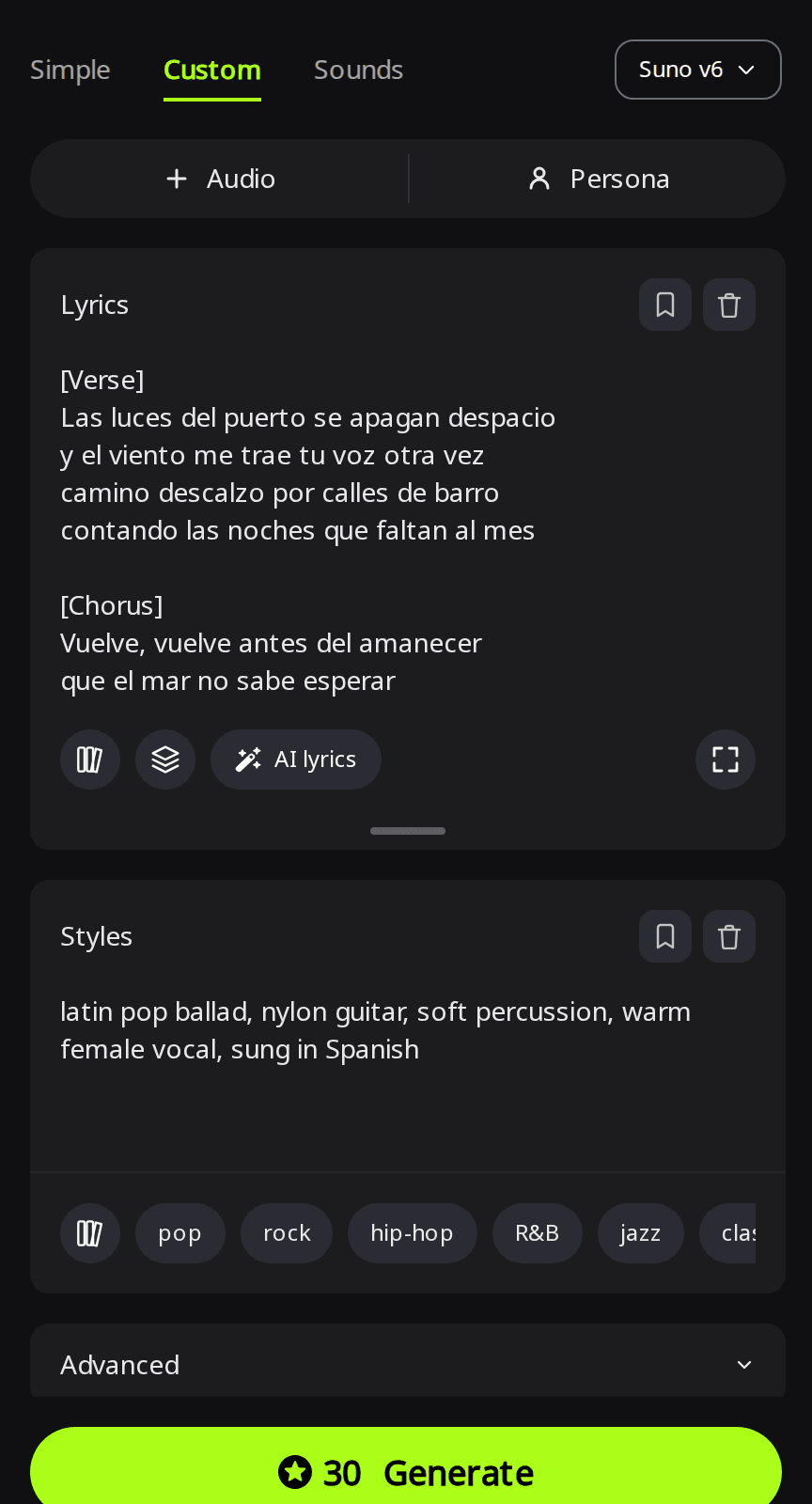
To make a song in another language with AI, paste lyrics written in that language into Custom mode and end the style with "sung in Spanish" (or your language). Every engine we tried sang in the lyrics' language, though one changed some words. If you don't speak it, use Simple mode: describe the song in English and ask for it "sung entirely in Spanish". On RaoMusic, a Suno v6 run costs 30 credits and returns two songs.
Last checked: November 6, 2026
What are the steps?
- Get lyrics in the target language. Write them yourself, ask a native speaker, or let Simple mode write them (see below). Keep section tags such as [Verse] and [Chorus] in English. If you write your own, the own-lyrics guide covers line length and structure.
- Open Create on RaoMusic and choose Custom. Paste the lyrics into the Lyrics box.
- Describe the sound in Styles. Write the genre, instruments and voice in English and end with "sung in <language>". Add a genre that suits the song, as we did with latin pop and J-pop. There are more style examples in our AI music prompts list.
- Pick an engine. We tried Suno v6, Google Lyria 3.5, ElevenLabs and ACE-Step 1.5. On RaoMusic only ACE-Step has a Vocal language setting (under Advanced); the others take the language from your lyrics and style.
- Generate, then read along. Play the song with your lyrics open and mark any line that was skipped, changed or sung wrong.
How did we test this?
On November 6, 2026 we wrote two short original songs, one in Spanish and one in Japanese, each with two verses and two choruses. We ran each setting once on RaoMusic: the Spanish lyrics on Suno v6, Google Lyria 3.5 and ElevenLabs v2; the Japanese lyrics on Suno v6 and twice on ACE-Step 1.5 with Vocal language set to Japanese (120 and 180 seconds); one Simple mode run with an English description; and one song mixing English and Spanish. The three Spanish Custom runs shared one style; for Japanese, ACE-Step used the Suno style without "sung in Japanese" and had Vocal language set instead. The full lyrics and settings are at the end. The short listening note under a clip describes what that file sounds like; press play to judge for yourself.
Can AI write the lyrics if you don't speak the language?
Yes. In Simple mode you describe the song in plain English and say which language to sing in. Suno v6 wrote a full set of Spanish lyrics from our one-sentence description, with a pre-chorus and a bridge, and titled it "Te espero junto al mar". Both takes are about 3:54 long, longer than the songs we got from our own shorter lyrics.
Suno v6 · Simple mode · description: "A warm latin pop ballad sung entirely in Spanish, about waiting by the sea for someone to come home"
Listening note: Sung entirely in natural-sounding Spanish over acoustic guitar, with no English lines slipping in. The second take (not shown) stayed in Spanish too. Have a Spanish speaker check the generated lyrics before you publish it.
You can't proofread lyrics in a language you don't read, so before you share the song, open its lyrics and run them through a translator or show them to a native speaker. To change a line, copy the lyrics into Custom mode, edit them and generate again with the same style.
How does Spanish sound on Suno, Lyria and ElevenLabs?
All three sang our Spanish lyrics with natural pronunciation and kept the words as written. They differed in length and in how much the arrangement moved. We left Suno v6's Duration setting on Auto, so its songs came out longer; set Duration to request a target length, then check the result.
| Engine | Length setting | Length we got |
|---|---|---|
| Suno v6 | Duration left on Auto | 2:47 and 2:42 |
| Google Lyria 3.5 | 120 s target | 2:09 |
| ElevenLabs v2 | 120 s | 2:00 |
Suno v6 · Custom mode · Spanish lyrics · style ends with "sung in Spanish"
Listening note: Take 1: Every Spanish line is sung with natural pronunciation, but the mix sounds static. Use it as background under a film or video scene; for a song people listen to on its own, try the Lyria version below.
Listening note: Take 2: Clear, natural Spanish with no lines dropped, over nylon guitar and soft percussion. It fits under a narrative video or an indie film scene.
Google Lyria 3.5 · Custom mode · same lyrics and style · 120 s target
Listening note: Every Spanish line comes through clearly with natural phrasing over a warm female vocal and nylon guitar. It works as a complete vocal track for a video or for listening on its own.
ElevenLabs v2 · Custom mode · same lyrics and style · 120 s
Listening note: Clear, natural Spanish and every line sung as written, but the arrangement stays at the same level from start to finish. It fits under a reflective travel or drama scene; for more lift, add something like "builds into a bigger final chorus" to the style and generate again.
Does it work with a different script, like Japanese?
Paste the lyrics the way the language is normally written. We used kanji and kana, the same lines a Japanese reader would see, and added "sung in Japanese" to the style for Suno v6.
Suno v6 · Custom mode · Japanese lyrics · style ends with "sung in Japanese"
Listening note: Take 1: All four sections are sung in Japanese with correct pronunciation and no dropped lines. It works as background for a visual novel or a game scene.
Listening note: Take 2: Every line is sung, and 夕焼け, 五時, 明日 and 遠回り are all read correctly. Use it as an anime-style ending theme or under a video.
ACE-Step 1.5 has a Vocal language setting with Auto, English, Chinese, Japanese, Korean, Spanish, French and German; Auto detects the language from the lyrics. We set it to Japanese. Its ACE-Step 1.5 guide covers the other settings.
ACE-Step 1.5 · Custom mode · Vocal language: Japanese · Length 120 s · Thinking on
Listening note: The Japanese is clear and natural, but the second chorus is cut short and the last minute is wordless vocals and an instrumental outro. Raising Length to 180 seconds (below) did not fix the lyrics either, so when every word matters, use the Suno takes above.
ACE-Step 1.5 · same settings · Length 180 s
Listening note: Still clear Japanese with piano and strings, but the chorus line 季節が変わっても is replaced with other words and the transitions lean on wordless vocals. If the exact words matter, compare what is sung against your lyrics line by line before you use an ACE-Step take; for background music it can stay as is.
Can one song mix two languages?
Yes. Write each section in the language you want it sung in, then say how they are split in Styles. We wrote the verses in English, kept the Spanish chorus from the test above, and ended the style with "bilingual: verses in English, chorus in Spanish".
Suno v6 · Custom mode · English verses, Spanish chorus
Listening note: English verses, a smooth switch into the Spanish chorus, warm vocal over nylon guitar. Use it as a bilingual podcast theme or under an indie film scene.
What can you do when a word comes out wrong?
- Compare the takes first. If the run gave you two, keep the one that sings the line right.
- Write ambiguous words the way they are said. In Japanese, 明日 can be read ashita or asu, so write あした in the lyrics if that is the reading you want.
- Shorten crowded lines. A translated line often has more syllables than the original. Trim it so it fits the melody instead of being rushed or skipped.
- Get one native listener before you publish. Ask someone who speaks the language to listen once with the lyrics in front of them.
What lyrics and settings did we use?
"Vuelve" (original Spanish lyrics, used on Suno v6, Lyria 3.5 and ElevenLabs v2). English meaning: the harbor lights go out, and the singer counts the nights until the other person comes home; the chorus asks them to come back before dawn, because there is still coffee and a chair by the sea.
[Verse]
Las luces del puerto se apagan despacio
y el viento me trae tu voz otra vez
camino descalzo por calles de barro
contando las noches que faltan al mes
[Chorus]
Vuelve, vuelve antes del amanecer
que el mar no sabe esperar
vuelve, vuelve, todavía hay café
y una silla junto al mar
[Verse 2]
Guardé tu sombrero colgado en la puerta
la radio cantando la misma canción
la abuela pregunta si llegas mañana
le digo que sí con el corazón
[Chorus]
Vuelve, vuelve antes del amanecer
que el mar no sabe esperar
vuelve, vuelve, todavía hay café
y una silla junto al mar
"また会おうね" (See you again) (original Japanese lyrics, used on Suno v6 and ACE-Step 1.5). English meaning: walking a bike up a hill at sunset, unable to say "see you tomorrow" at the station; the chorus promises to meet again even when the seasons change.
[Verse]
夕焼けの坂道 自転車押して
君の名前を 小さく呼んだ
駅前の時計は 五時を指して
明日の約束 まだ言えない
[Chorus]
また会おうね 季節が変わっても
同じ空の下で 笑っていよう
また会おうね 涙は風に預けて
帰り道 少しだけ遠回り
[Verse 2]
改札の向こう 手を振る君に
言葉の代わりに 頷いた
ポケットの中の 切符を握って
夏の終わりを 数えていた
[Chorus]
また会おうね 季節が変わっても
同じ空の下で 笑っていよう
また会おうね 涙は風に預けて
帰り道 少しだけ遠回り
"Back Before the Dawn" (bilingual version):
[Verse]
The harbor lights are fading out one by one
I hear your voice come rolling in with the wind
I walk the muddy streets without my shoes
Counting every night until you're home again
[Chorus]
Vuelve, vuelve antes del amanecer
que el mar no sabe esperar
vuelve, vuelve, todavía hay café
y una silla junto al mar
[Verse 2]
Your old hat is hanging by the door
The radio still plays the same old song
Grandma asks me if you're coming home tomorrow
I tell her yes, I tell her it won't be long
[Chorus]
Vuelve, vuelve antes del amanecer
que el mar no sabe esperar
vuelve, vuelve, todavía hay café
y una silla junto al mar
| Clip | Engine | Style description | Other settings |
|---|---|---|---|
| Spanish | Suno v6 | latin pop ballad, nylon guitar, soft percussion, warm female vocal, sung in Spanish | Custom mode |
| Spanish | Google Lyria 3.5 | latin pop ballad, nylon guitar, soft percussion, warm female vocal, sung in Spanish | Custom mode, Length 120 s |
| Spanish | ElevenLabs v2 | latin pop ballad, nylon guitar, soft percussion, warm female vocal, sung in Spanish | Custom mode, Length 120 s |
| Spanish, Simple mode | Suno v6 | no style; description: A warm latin pop ballad sung entirely in Spanish, about waiting by the sea for someone to come home | Simple mode |
| Japanese | Suno v6 | j-pop ballad, piano and strings, gentle drums, clear female vocal, sung in Japanese | Custom mode |
| Japanese | ACE-Step 1.5 | j-pop ballad, piano and strings, gentle drums, clear female vocal | Vocal language Japanese, Length 120 s, Thinking on |
| Japanese | ACE-Step 1.5 | j-pop ballad, piano and strings, gentle drums, clear female vocal | Vocal language Japanese, Length 180 s, Thinking on |
| English and Spanish | Suno v6 | latin pop ballad, nylon guitar, soft percussion, warm female vocal, bilingual: verses in English, chorus in Spanish | Custom mode |
Credits per run: Suno v6 30, Lyria 3.5 20, ElevenLabs v2 80 for 120 seconds, ACE-Step 1.5 20 for 120 seconds and 29 for 180 seconds.
Frequently Asked Questions
Yes, as a new generation: translate the lyrics, have a native speaker check them, and paste them into Custom mode with the same style description. The engine sings a new performance, so the melody and arrangement can change; compare it with the original before you replace it.
Paste one verse and one chorus and set a short Length on ElevenLabs or ACE-Step 1.5, which charge by length, so the test costs less than a full song. Check the words, then generate the whole thing.
Leave Vocal language on Auto, which detects the language from the lyrics. Detection doesn't mean the language is sung well, and we only tested Japanese on ACE-Step, so treat other languages as untested and try a short clip first.
Yes. Songs made on RaoMusic come with royalty-free commercial usage rights under the RaoMusic commercial license, whatever language they are sung in.