
To improve the audio quality of an AI song, first find out what is wrong. If the file sounds dull and narrow because it was saved at a low bitrate, an AI repair pass can generate new highs and a stereo image (not the original detail). On RaoMusic, Improve Audio Quality costs 20 credits for two versions, free accounts included. Harsh cymbals or a wrong word from the generation itself need EQ, a new take or a redone section.
Last checked: November 10, 2026
How do I tell what is wrong with my AI song's audio?
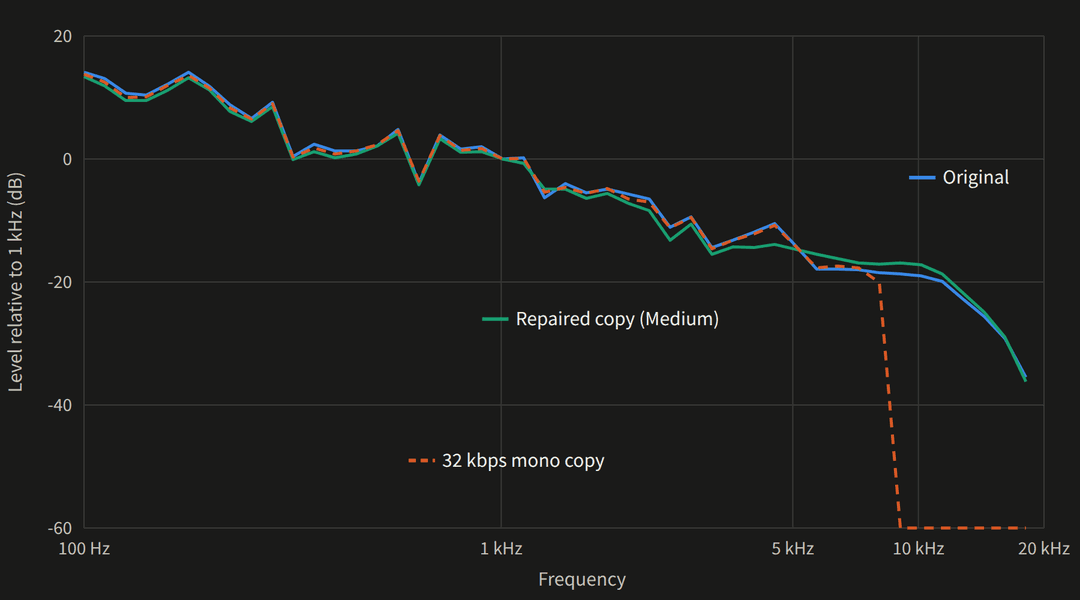
Some problems come from the generation itself, such as a harsh cymbal sound or a wrong word. Others come from what happened to the file afterwards, such as a low-bitrate copy. Listen on headphones and name the problem, then look at the file. In Audacity, select the whole song and choose Analyze > Plot Spectrum. The 32 kbps copy in the chart further down shows the pattern: its curve ends in a sharp wall that the original song does not have. A wall like that, or a lower cutoff than another copy of the same song, points to a file that lost its top end along the way.
| What you hear | What to check | What to try |
|---|---|---|
| Dull or muffled, cymbals and breaths missing, everything in the middle | The spectrum ends in a sharp wall well below other copies of the song, or a stereo song turned into mono | Download the original file again; if you can't, run a repair pass (Step 2) |
| Fizzy or grainy cymbals on a file that reaches the top of the graph | Whether other takes of the song do the same | Generate a new take, or turn the harsh range down with EQ |
| One wrong word or a glitch in one section | Where in the song it happens | Redo that section instead of repairing the whole song |
Step 1: Start from the best copy of the song
Go back to where the song was made and download it again instead of using a copy that went through a video editor, a messaging app or a screen recording, since any of those may have re-encoded it along the way. Saving a dull MP3 as WAV keeps it dull, because the converter can only copy what is still in the file. On RaoMusic, MP3 downloads are free on every plan.
Step 2: Run Improve Audio Quality on the song
- Open Create and find the song in your library.
- Click the ⋮ button on the song's row, then Edit > Improve audio quality.
- Pick a Strength: Light ("Stays closest to the original"), Medium ("Recommended, restores detail") or Strong ("For very low-quality audio"). All three cost the same.
- Click Improve quality.
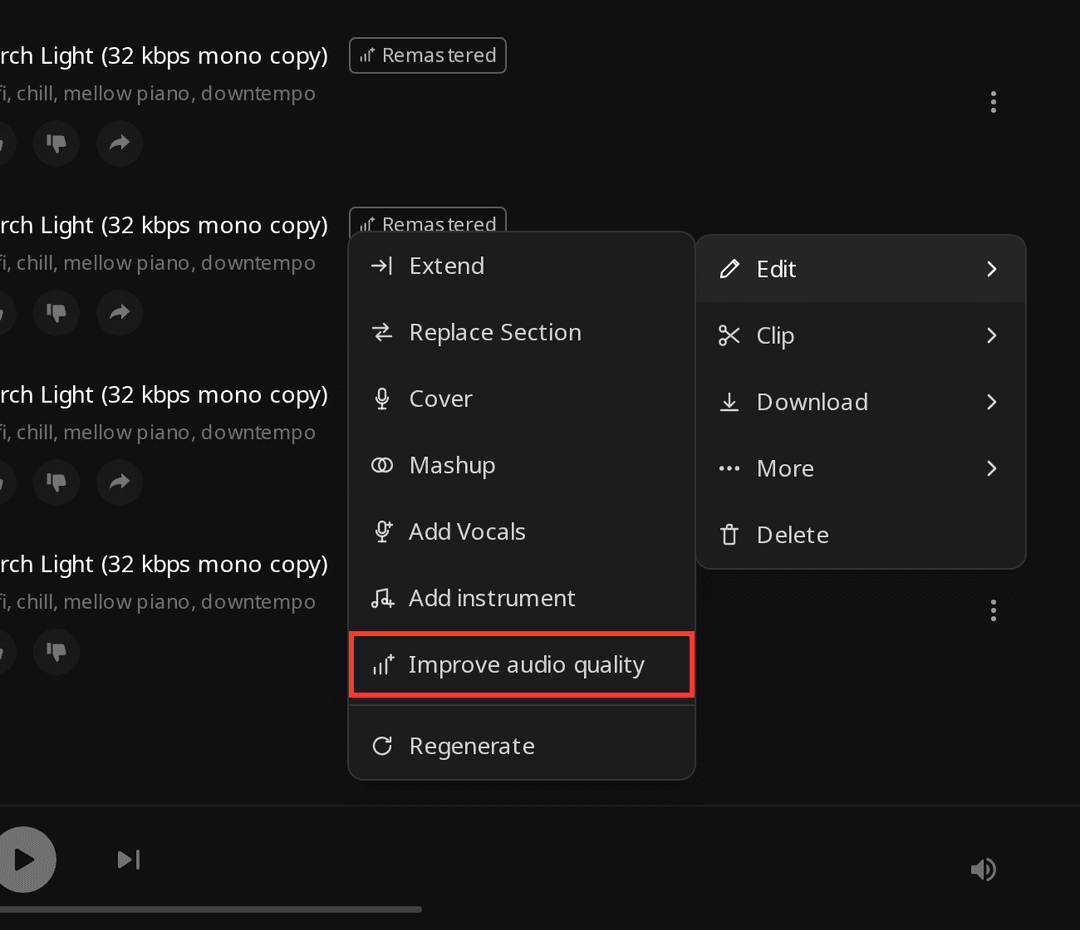
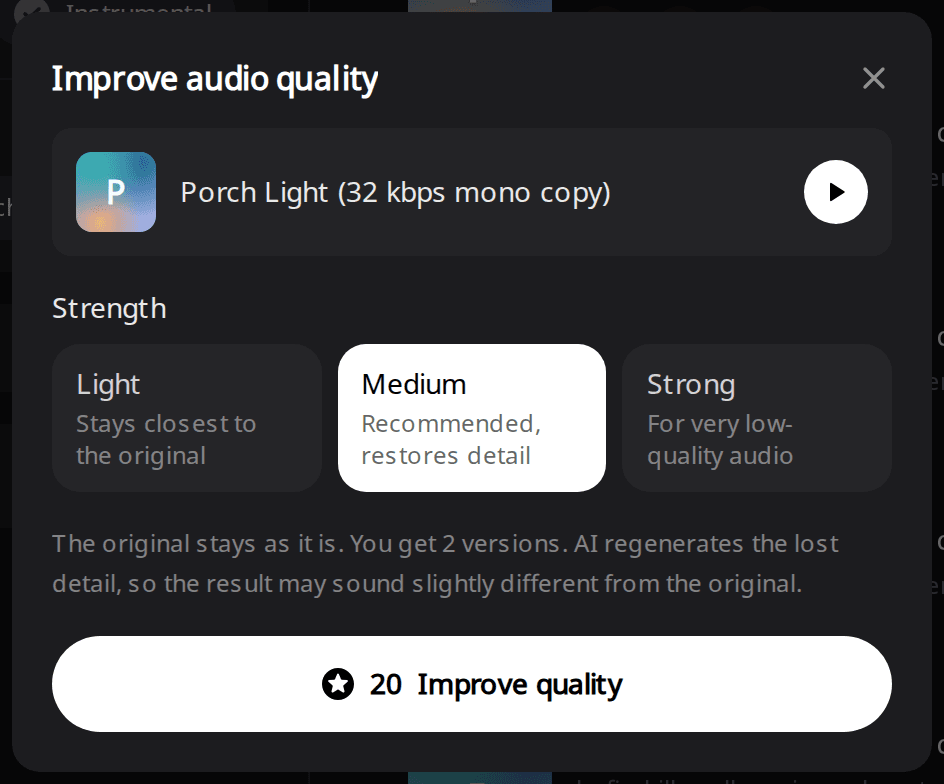
The original stays as it is. The two new versions appear in your library with a Remastered badge. For a file made somewhere else, upload it on the Improve Audio Quality page instead (up to 10 minutes per song) and pick a strength there.
Step 3: Compare both versions with the original
Play one of the new versions and click Compare with original on its row. The player switches between the repaired file and its source at the same point in the song, so you can flip back and forth on one chorus. If one version sounds louder, turn your device volume down to match before you judge clarity. Check that the words and the melody did not change, then keep the version you prefer. A WAV of a repaired version costs 4 credits and needs a subscription.
How did we test it?
The three steps above are the whole workflow. The rest of this guide shows what each strength did to a real song, so you know what to listen for.
On November 10, 2026 we took a soul-pop song made with Suno v6 in Custom mode (you write the lyrics and the style yourself) on RaoMusic: "Porch Light B", 3:22, with a female vocal, Rhodes, bass, drums and tenor saxophone (full lyrics and style are at the end). To stand in for audio pulled from a video or a chat app, we made a low-quality copy: mono, 22.05 kHz, 32 kbps MP3. Then we ran Improve Audio Quality on the copy once at each strength, and once at Medium on the untouched original. That is four runs and eight versions. Checking every 5 seconds, each run was ready by the 85- to 103-second check.
We decoded every file in a browser to measure where its high frequencies stop, whether it is stereo, how much level it has around 8 kHz (more level there sounds brighter and can turn harsh), and how closely its loudness curve follows the source. Highest frequency detected is the top of the highest band still within 40 dB of the midrange: a rough bandwidth estimate, not a quality score. Any top end a repair adds is newly generated, not the original detail recovered. The short listening note under a clip describes what that file sounds like; press play to judge for yourself.
What did each strength do to the 32 kbps copy?
| File | Highest frequency detected | Stereo | Level around 8 kHz vs the original |
|---|---|---|---|
| Original song | 18.25 kHz | Yes | Reference |
| 32 kbps mono copy | 8.5 kHz | No (mono) | -2.7 dB |
| Light, versions 1 / 2 | 18.0 / 18.25 kHz | Yes / Yes | +2.2 / +2.1 dB |
| Medium, versions 1 / 2 | 18.25 / 18.0 kHz | Yes / Yes | +2.5 / +4.6 dB |
| Strong, versions 1 / 2 | 18.0 / 18.25 kHz | Yes / Yes | +4.6 / +4.4 dB |
The chart shows Medium version 1. All six versions kept the copy's timing with no shift, and each one is as long as the source.
Original song (full quality)
Listening note: Clear vocal, Rhodes and saxophone, with audible compression artifacts on the cymbals. Those were generated with the song, so they call for a new take or EQ rather than a repair pass (see the next section).
32 kbps mono copy
Listening note: Muffled, with clear low-bitrate artifacts and everything in the center. Before you repair a file like this, check whether you can still download the original again (Step 1); if you can't, repair it at Medium.
Light, version 2
Listening note: The words, melody and instruments are all intact, but the highs still sound muffled and watery. If your Light result sounds like this, run Medium on the original low-quality file (a repaired version can't be repaired again).
Medium, version 1
Listening note: The vocal and instruments match the original, with a slight phasey sheen in the restored highs. Flip to the original on the same chorus; if the sheen bothers you, try the other version.
Strong, version 1
Listening note: Stereo and highs are back, but the cymbals and the top of the vocal gained a metallic sizzle and some phase smearing. On this copy Strong went too far, so keep Medium version 1 instead.
In the measurements, all three strengths regenerated a top end and a stereo image. In the listening notes for the three clips above, Light version 2 still sounded watery and Strong version 1 added sizzle, so on this copy Medium version 1 was the one to keep. Medium version 2 measured as bright as Strong, so play both versions before you pick. Start with Medium. If the result is still dull or watery, run Strong on the original low-quality file; if it sounds fizzy or harsh, run Light.
What does it do to a full-quality file?
We also ran Medium on the full-quality original (the first player in the section above). Both versions kept its timing and came back brighter, with 4.8 and 6.4 dB more level around 8 kHz than the source. The top end and the stereo width barely moved, since the original was not missing either.
Original song after Medium, version 2
Listening note: Brighter, with an unnatural sizzle on the top of the vocal and the cymbals. For this song, keep the original. On your own song, play the problem passage before and after, and keep a repaired version only if that defect is gone.
How does Remaster work on suno.com?
If your song lives in a Suno account, Suno has its own Remaster, opened from the Create menu. Suno's Help page lists three variation strengths: Subtle ("Very close to the original"), Normal (the default) and High ("Creates more noticeable differences, including possible changes to musical elements and vocals"). It also says "Remaster is not intended for changing lyrics or drastically altering the musical style." Check for the Remaster option in your own Suno account, and compare each result with the original before you keep it.
What fixes the problems a repair pass doesn't?
- A wrong word or a glitch in one section: regenerate just that part with Replace Section and keep the rest of the song.
- Harsh cymbals across the whole song: generate a new take with the same lyrics and style, or turn the harsh range down with EQ. In Audacity that is Effect > EQ and Filters > Filter Curve EQ. Loop the harshest passage, lower the range that stings by a few dB, and compare with the EQ off at the same volume. The extra brightness a repair pass added to our test song sat around 8 kHz, which is one place to start listening.
- One instrument too loud or too harsh: split the song into stems, fix that part on its own and rebuild the mix, as in the stems-to-DAW guide.
- Too quiet next to other songs: raise the loudness when you master or export it. In every run the repair pass changed the overall level by 1.2 dB or less.
What lyrics and style did the test song use?
Engine: Suno v6, Custom mode. Style: soul pop, 92 bpm, female vocals, Rhodes, bass guitar, live drums, tenor saxophone. Lyrics:
[Verse]
Porch light on at a quarter to nine
Your shoes by the door in a crooked line
The kettle is singing an old refrain
I hear your keys in the evening rain
[Chorus]
Come on home, the light is on
I kept it burning since you've been gone
Come on home, it won't be long
The porch light's on
[Saxophone Solo]
[Verse]
The radio's low and the window's wide
The street is shining from the other side
I saved you a plate and a slice of pie
I'll hear you whistle when you're walking by
[Chorus]
Come on home, the light is on
I kept it burning since you've been gone
Come on home, it won't be long
The porch light's on
[Outro]
The porch light's on
Frequently Asked Questions
It isn't aimed at that. In our test the bass range (about 63 to 250 Hz) of every version stayed within 1.2 dB of the original, so fix a muddy low end with EQ or a new take.
Yes. They keep the same lyrics and cover as the source song.
It is built for music. The tool page lists speech, podcasts and voice memos as a poor fit.
If both versions fail, your credits are refunded automatically.
The repair adds no restrictions to the file, so a repaired song keeps the license its source already had. For songs made on RaoMusic that means royalty-free commercial usage rights under the RaoMusic license.