

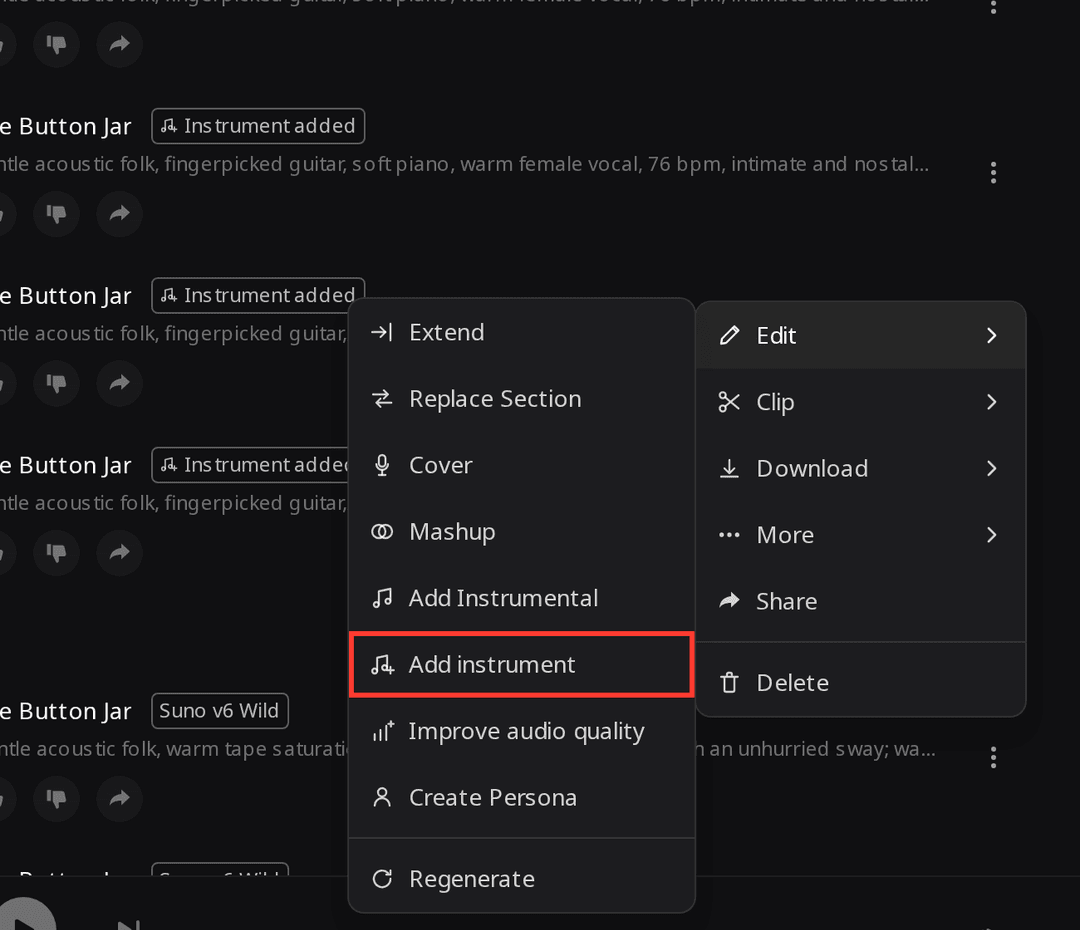
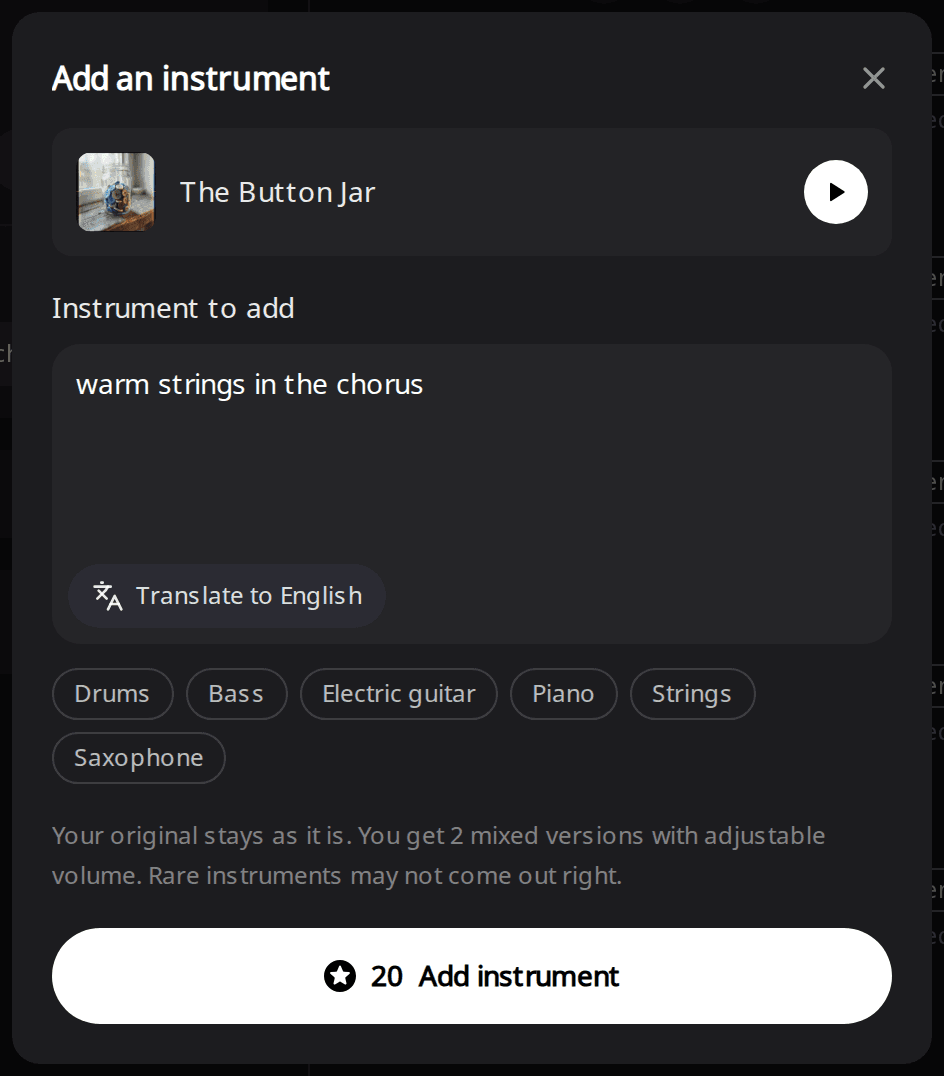
To add an instrument to a song with AI on RaoMusic, open the song's menu, choose Edit, then Add instrument, and type one instrument such as "drums" or "warm strings". Each run costs 20 credits and returns two mixed versions; the original isn't changed, and it works on the free plan. In our tests the two-instrument request was the least predictable, and strings asked for "in the chorus" got louder there but kept playing softly in the verses.
Last checked: November 9, 2026
What do you need before you start?
You need a finished song and 20 credits for each run. The song can be one you made on RaoMusic with any model, or an MP3 or WAV you upload. It must be 10 minutes or shorter, and sound effects can't be used. Uploads that match a released recording are rejected and the credits are refunded, so use a song you made or have the rights to.
If you play an instrument, recording the part yourself or programming it as MIDI gives you control over every note. The AI route fits when the song already works and you want to hear it with one more part. This tool adds instruments only. If your track has no vocal yet, see how to add vocals to an instrumental.
How do I add an instrument to a song on RaoMusic?
- Open Create and find the song in your library. To use your own recording, upload it there first.
- Click the ⋮ button on the song's row, hover Edit, and choose Add instrument.
- In the Instrument to add box, type the instrument, or tap one of the quick picks: Drums, Bass, Electric guitar, Piano, Strings or Saxophone. You can add a short direction such as "in the chorus". The box takes up to 500 characters.
- Click Add instrument. The new versions appear in your library with an "Instrument added" label, next to the original.
How did we test it?
We used "The Button Jar", a 3:06 song made on RaoMusic with Suno v6 Wild (one of the Suno engines in the model menu) on November 3, 2026, styled as gentle acoustic folk with fingerpicked guitar, soft piano and a female vocal. It has no drums and no bass. On November 9, 2026 we ran Add instrument on it three times with different instructions, once each, and kept both versions of every run. Every version came back 3:06 long, the same as the original. We also measured how loud each instrument track is section by section and where it goes silent. On the third run, both versions were ready by the 52-second status check (we checked every 5 seconds).
The short listening note under a clip describes what that file sounds like; press play to judge for yourself.
The original song (before adding anything)
Listening note: Fingerpicked acoustic guitar, light piano and an intimate female vocal, with no drums or percussion anywhere.
What happens when you add drums?
Instruction: drums · Version 1
Listening note: A soft acoustic kit sits under the vocal and keeps the song's tempo.
Instrument track (the drums alone) · Version 1
Listening note: A stick-played kit with a punchier feel than the song, much quieter in the first verse and with abrupt drop-outs, the longest from 1:36 to 1:46. If you want fewer gaps, use Version 2.
Instruction: drums · Version 2
Listening note: A restrained acoustic kit that fits the tempo and stays balanced under the vocal.
Instrument track (the drums alone) · Version 2
Listening note: A plain groove of kick, closed hi-hat and cross-stick played with sticks, with one gap between 2:38 and 2:45 and nothing after about 2:58, so the last bars of the outro have no drums. Typing "drums" gave sticks both times; the only brushes we got came from the bass-and-drums run below, so if you try "brushed drums", check the instrument track.
Does "in the chorus" keep a part out of the verses?
We typed warm strings in the chorus. Both versions made the strings fuller in the choruses, but neither kept them out of the verses.
Instruction: warm strings in the chorus · Version 1
Listening note: Warm strings come in on every chorus, and in the verses this mix leaves them too quiet to notice. The instrument track below shows they are still playing there, so keep this version as is only if you don't plan to turn the strings up.
Instruction: warm strings in the chorus · Version 2
Listening note: The same shape as Version 1 in the mix, with string pads on the choruses and nothing you'd notice in the verses. The table below shows its verses and choruses are closer in level, so pick Version 1 if you want the choruses to lift more.
Instrument track (the strings alone) · Version 1
Listening note: The strings keep playing soft sustained chords through both verses and get fuller and louder in the choruses. Raise New instrument in Adjust mix and those verse strings become audible.
| Strings track | Verses | Choruses |
|---|---|---|
| Version 1 | Still playing, about 5 dB quieter than the first chorus | Fuller and louder |
| Version 2 | Still playing, about 3 dB quieter than the first chorus | Fuller and louder |
So these takes were louder in the choruses and, on the instrument track, still played softly in the verses; the automatic mix made the verse strings quiet, not absent. If you plan to turn the strings up, or the verses must be truly bare, download the instrument track and cut the verse sections in an audio editor.
Can you add two instruments in one run?
We typed upright bass and brushed drums. Each version gave one combined track for the new part: one had both the bass and brushed drums, the other only bass.
Instrument track (the new part alone) · Version 1
Listening note: Only an upright bass playing a mellow line; the brushed drums are missing. To get drums as well, run Add instrument again on this version with "brushed drums".
Instrument track · Version 2
Listening note: An upright bass with light brushed drums underneath, and nothing else on the track. If you want both parts from one run, this is the version to keep.
Mixed version · Version 1
Listening note: Only the original guitar, piano and vocal come through; the added bass can't be heard. In this test the second automatic mix also left the bass inaudible. Open Adjust mix and raise New instrument, or listen to the instrument track, before you decide whether a run worked.
For the most predictable result, try one instrument per run; in this test one version left out the drums. For a second part, run Add instrument again on the new version, for example bass first and then drums.
How do I change the volume or get the instrument on its own?
The automatic mix puts the new part a little below the original, which can make a quiet part hard to hear, so check the instrument track before you decide a run failed. To change the balance, open Adjust mix on the new version and move the Original song and New instrument sliders. You hear the change right away, and previewing is free. When you like it, click Save as new song, which costs 2 credits and keeps the version you started from.
To mix the part yourself, open the song's Download menu and pick Instrument track (MP3), which is free. Instrument track (WAV) is for subscribers and costs 4 credits the first time. Place it at the start of the original in your editor and check that the two line up before you mix. Our guide to moving AI stems into a DAW covers importing it.
What can't Add instrument do?
- It can't remove or replace an instrument that's already in the song. To take one out, use the Stem Splitter.
- Folk and rare instruments, such as the erhu, often don't come out right. Common instruments like drums, bass, guitar, piano, strings and saxophone are the safer picks.
- It doesn't follow section boundaries exactly. Directions like "in the chorus" change the part's level, and gaps can show up where you didn't ask for them, so listen through each version before you keep one.
Frequently Asked Questions
Yes, including on the free plan, if the original song was made on RaoMusic or is your own original recording that you uploaded, under the <a href="/commercial-license">RaoMusic commercial license</a>. For a recording someone else owns, you need the rights to it first.
Yes. The new part doesn't change the song's timing, so the lyrics shown with the original carry over to the new version.
If both versions fail, your credits are refunded automatically. If the song doesn't pass the content check, you'll see a message and the credits come back too.
Your original song stays in your library, so you can simply delete the new version. You can also open Adjust mix, drag New instrument all the way down and save that as a new song, but that save costs credits and adds another song, so deleting is the free option.
Yes. Each new version is saved as its own song with its own files, so it counts toward your plan's storage like any other song. Delete the version you don't keep to free the space.