

To make an EDM song with AI, name the subgenre and tempo, then describe the build-up and the drop in plain words. To guide the order of builds and drops, use Custom mode and put [Build] and [Drop] tags in your lyrics. For a track without singing, turn on Instrumental. On RaoMusic, a Suno v6 run costs 30 credits and returns two songs. Tags kept the section order in our tests, but vocals still got into the drops.
Last checked: November 7, 2026
Which subgenre and BPM should I put in the prompt?
The word "EDM" alone leaves the drums, bass and tempo to the model. A subgenre plus a number gives it a target. The tempos below are the ones the RaoMusic EDM generator page suggests, and the drum and bass row is the tempo used in the drum style test below.
| Subgenre | BPM to type | Sound words to add |
|---|---|---|
| Big room | about 128 | snare roll build, huge supersaw drop |
| Progressive house | 124 to 128 | piano chords, sidechain pumping, long build-up |
| Future bass | near 150 | wide chord stabs, vocal chops |
| Dubstep | 140, half-time feel | half-time drums, growling bass |
| Liquid drum and bass | 174 | fast rolling breakbeats, reese bass, airy pads |
Put the subgenre and BPM at the start of the line, then the sounds. For ready-made lines in other genres, see our list of AI music prompts.
How do I describe the build-up and the drop?
Write the energy curve into the prompt: how long the build is, what rises (a snare roll, a white noise riser), what hits in the drop (supersaw chords, sidechain pumping) and where the breakdown sits. These steps use RaoMusic.
- Open Create and stay on the Simple tab.
- In the model menu, choose Suno v6. It needs a subscription; Suno v6 Wild does not.
- Paste your prompt into Song Description. Leave Instrumental off for a song with vocals.
- Click Generate and listen to both takes.
If you would rather start from a filled-in prompt, the AI EDM generator page opens with a big room description ready to go.
How did we make the examples?
Every clip was made on RaoMusic on November 7, 2026, with Suno v6, one run per setting: two Simple-mode runs with vocals, three Custom-mode runs with our own lyrics, one Simple-mode instrumental run and one Sounds loop run. The short listening note under a clip describes what that file sounds like; press play to judge for yourself. The full lyrics and settings are at the end.
Short prompt "EDM song" · Suno v6 · Simple mode
Listening note: A build-and-drop structure with a melodic female vocal, so two words do get you EDM. The vocal is harsh at the top and the low end sounds flat; it works as background for a casual vlog. For more control over the arrangement, try a detailed prompt like the one below; for a cleaner vocal and low end, compare fresh takes and keep the best one. Simple mode writes the lyrics for you, and the other take from this run sang unrelated text instead of song lyrics, so read the lyrics of any Simple-mode song before you post it.
Detailed prompt · Suno v6 · Simple mode
Take 1 (starts on the beat)
Listening note: The euphoric female vocal and sidechained supersaw drops are there, but the song skips the piano intro and starts straight on the beat, and the risers are muddy rather than a clear snare build. Skip this take if the build-up is the part you care about.
Take 2 (synth pluck intro, has the breakdown)
Listening note: Energetic builds, sidechained drops and the emotional breakdown all land, though the intro uses synth plucks instead of piano. This is the take to keep from this run.
Both mixes are crowded. Use either as background music or a songwriting demo; to adjust individual parts before a release, separate the stems and rework them in an audio editor. To get a specific intro, use a section tag as shown in the next section.
How do I control where the builds and drops land?
Use Custom mode. The Lyrics box takes your words plus section tags in square brackets, and the Styles box takes the genre line. The RaoMusic custom lyrics guide lists [Build], [Drop] and [Breakdown] as the tags for dance styles and notes that the model treats tags as strong hints rather than commands.
- On Create, click Custom and choose Suno v6 in the model menu.
- In Lyrics, put one tag per line in the order you want: [Intro], [Verse], [Build], [Drop], [Breakdown], [Build], [Drop], [Outro]. Write the sung lines under the sections that should have them, and leave each [Drop] empty.
- In Styles, paste the subgenre, BPM and sound words.
- Optionally open Advanced and set Vocal Gender.
- Click Generate.
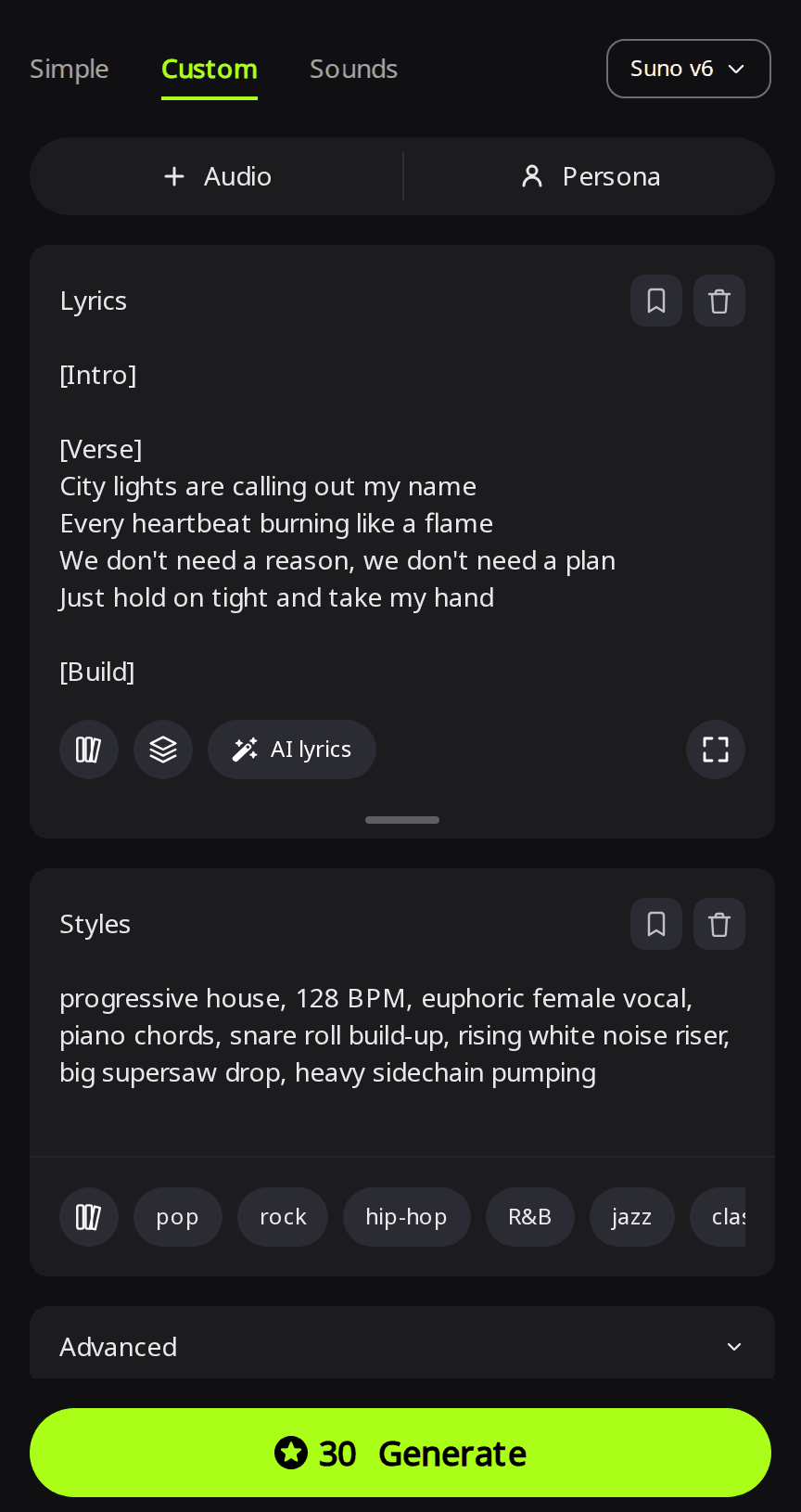
Custom mode with tags · progressive house style · Suno v6
Take 1 (compressed mix)
Listening note: It follows the tag order, with snare builds into sidechained supersaw drops and the female vocal on the verse, but the mix sounds compressed and muddy. Use it as background for a social or gaming clip, and generate again only if you need a cleaner mix for a release.
Take 2 (ad-libs in the drops)
Listening note: Good builds and sidechained supersaws in the tag order, but stray vocal ad-libs reach the empty drops and the piano chords are missing. Keep it if ad-libs in the drops are fine for you; otherwise use the stem separation step below or generate again.
Can a tag ask for a piano intro or a vocal-free drop?
A tag can carry a short description. We changed two tags and kept everything else: [Intro: solo piano chords] instead of [Intro], and [Instrumental Drop] instead of each empty [Drop].
Custom mode · [Intro: solo piano chords] and [Instrumental Drop] · Suno v6
Take 1 (solo piano intro)
Listening note: It opens on solo piano chords as asked, but both drops carry continuous vocals over the supersaws.
The second take from this run added ambient synth textures to the intro and also kept vocals and vocal chops in both drops. So a tag can steer the intro sound, but in both takes it did not clear the vocal out of a drop.
When you need a drop without vocals, one method to try is the AI stem separator: split the finished song, mute the vocal stem under each drop in your audio editor, then play the drops with the vocal muted and listen for leftover chops before you export.
How do I get drums other than a four-on-the-floor kick?
Change the subgenre and tempo in Styles. House and big room are built on a kick on every beat. To get breakbeats or half-time drums, name a style that uses them, such as drum and bass or dubstep. In Custom mode, we kept the same Lyrics and section tags and changed only Styles to liquid drum and bass, 174 BPM, fast rolling breakbeats, deep reese bass, female vocal and airy pads.
Same lyrics and tags · liquid drum and bass style · Suno v6
Take 1 (stronger first drop)
Listening note: Rolling 174 BPM breakbeats, airy pads and a clean female vocal, so the style line changed the drums while the tags kept the song shape. Keep it for the rolling breaks. The reese bass is light on sub-bass, so choose another take or adjust the bass stem if you need more weight; some vocal also reaches the drops, so mute the vocal stem there if they must be vocal-free.
Take 2 (weak first drop)
Listening note: The vocal and pads are clear, but the first drop is underwhelming and the rolling breaks only arrive later. Pick take 1 if the first drop has to hit.
How do I make an instrumental or a drop loop?
For a track without singing, go back to the Simple tab, leave the vocal out of your prompt and turn on Instrumental.
Instrumental · Suno v6 · Simple mode · Instrumental on
Take 1 (no vocals)
Listening note: Builds and supersaw drops with no vocals, opening on synth plucks instead of piano. It suits a festival recap or sports video as it is.
Take 2 (piano intro, faint vocal chops)
Listening note: It opens on piano chords with a rising snare build, but faint vocal chops slip in even with Instrumental on. Choose take 1 if the track must have no voice at all.
Neither take starts or ends on a drums-only section, which DJs use to mix one track into the next, so edit an intro and outro yourself before you play one in a set.
For a short drop loop at a set tempo and key, to put under your own vocal or a video, use the Sounds tab:
- On Create, switch to the Sounds tab. Suno v6 stays selected.
- Describe the loop under Describe your sound.
- Set Clip type to Loop.
- Type the BPM from your song prompt in Tempo (BPM) and pick a Key.
- Click Generate.
Drop loop · Suno v6 · Sounds tab · Loop · Tempo 128 · Key Am
Clip 1 (supersaw drop)
Listening note: It matches the prompt with a kick on every beat, offbeat hats and pumping supersaw chords at festival energy. Use it as a drop bed under your own vocal or behind sports and gaming clips.
Clip 2 (thin plucked riff)
Listening note: The kick and hats are there, but a thin plucked riff replaces the supersaws. It fits a low-key tech house track better than a festival drop, so generate again if you wanted the big chords.
Can I release or play an AI EDM track?
Songs generated on RaoMusic come with royalty-free commercial usage rights on the free plan as well as paid plans, and subscribers can download a license certificate PDF for each track. The conditions are on the RaoMusic commercial license page. This does not cover songs made from audio you upload. Streaming services and DJ platforms have their own rules for AI music, so check them before you release.
What lyrics and settings did we use?
| Clip | Mode | Prompt or Styles line | Other settings | Length |
|---|---|---|---|---|
| Short prompt | Simple | EDM song | Instrumental off | 3:58 |
| Detailed prompt, takes 1 and 2 | Simple | progressive house festival anthem, 128 BPM, euphoric female vocal, piano chords in the intro, 8-bar build-up with a snare roll and a rising white noise riser, big supersaw drop with heavy sidechain pumping, emotional breakdown before the second drop | Instrumental off | 5:00 and 4:52 |
| Custom with tags, takes 1 and 2 | Custom | progressive house, 128 BPM, euphoric female vocal, piano chords, snare roll build-up, rising white noise riser, big supersaw drop, heavy sidechain pumping | Lyrics below, Vocal Gender Female | 3:05 and 3:28 |
| Piano intro tag, takes 1 and 2 (take 1 shown) | Custom | progressive house, 128 BPM, euphoric female vocal, piano chords, snare roll build-up, rising white noise riser, big supersaw drop, heavy sidechain pumping | Lyrics below with [Intro: solo piano chords] and [Instrumental Drop], Vocal Gender Female | 3:34 and 3:33 |
| Drum and bass, takes 1 and 2 | Custom | liquid drum and bass, 174 BPM, fast rolling breakbeats, deep reese bass, female vocal, airy pads | Lyrics below, Vocal Gender Female | 3:18 and 3:03 |
| Instrumental, takes 1 and 2 | Simple | progressive house festival instrumental, 128 BPM, piano chords in the intro, 8-bar build-up with a snare roll and a rising white noise riser, big supersaw drop with heavy sidechain pumping, breakdown before the second drop | Instrumental on | 3:34 and 3:29 |
| Drop loop, clips 1 and 2 | Sounds | progressive house drop loop, detuned supersaw chords, heavy sidechain pumping, four-on-the-floor kick, offbeat open hi-hats, festival energy | Clip type Loop, Tempo (BPM) 128, Key Am | 0:21 each |
Each Suno v6 song run cost 30 credits, and the Sounds loop run cost 10.
Lyrics used for the three Custom-mode runs (the piano intro version swaps the tags as noted above):
[Intro]
[Verse]
City lights are calling out my name
Every heartbeat burning like a flame
We don't need a reason, we don't need a plan
Just hold on tight and take my hand
[Build]
Higher, higher, higher
We're taking off tonight
[Drop]
[Breakdown]
When the music fades I still feel you here
Every echo brings you near
[Build]
Higher, higher, higher
We're taking off tonight
[Drop]
[Outro]
Frequently Asked Questions
Yes. Write the sung lines in any language and keep section tags such as [Build] and [Drop] in English, which is what the RaoMusic lyrics guide recommends.
In Custom mode on a Suno v6 version, the Duration setting under Advanced takes a target from 10 to 360 seconds. The song may end early if your lyrics are short.
Yes, with a subscription: WAV export of a Suno song needs an active subscription and costs 4 credits per song. MP3 downloads are free.
Yes. Extend continues a song from the point you choose, and it works on the free plan.
Yes. Suno v6 Wild and Rao v1.0 don't need a subscription; choose one of them in the model menu instead of Suno v6.