
To get a specific instrument in a new AI song, name it and its job in the style description, and tag solos in the lyrics, such as [Saxophone Solo]. In our Suno v6 tests, the tag alone gave a guitar solo twice; tag plus "tenor saxophone" in Styles gave a sax solo twice. "no kick drum" with Variety set to Off gave two kick-free takes. On RaoMusic a Suno v6 run costs 30 credits for two takes.
Last checked: November 9, 2026
What should the instrument part of a prompt say?
Give each instrument you care about three things: its name, its role and how it is played. "Rhodes chords", "tenor saxophone lead" and "walking upright bass" tell the engine more than a bare list of instruments.
A template you can copy into the Styles box:
[genre], [tempo] bpm, [lead instrument and how it plays], [chord instrument], [bass], [drums or "no drums"]
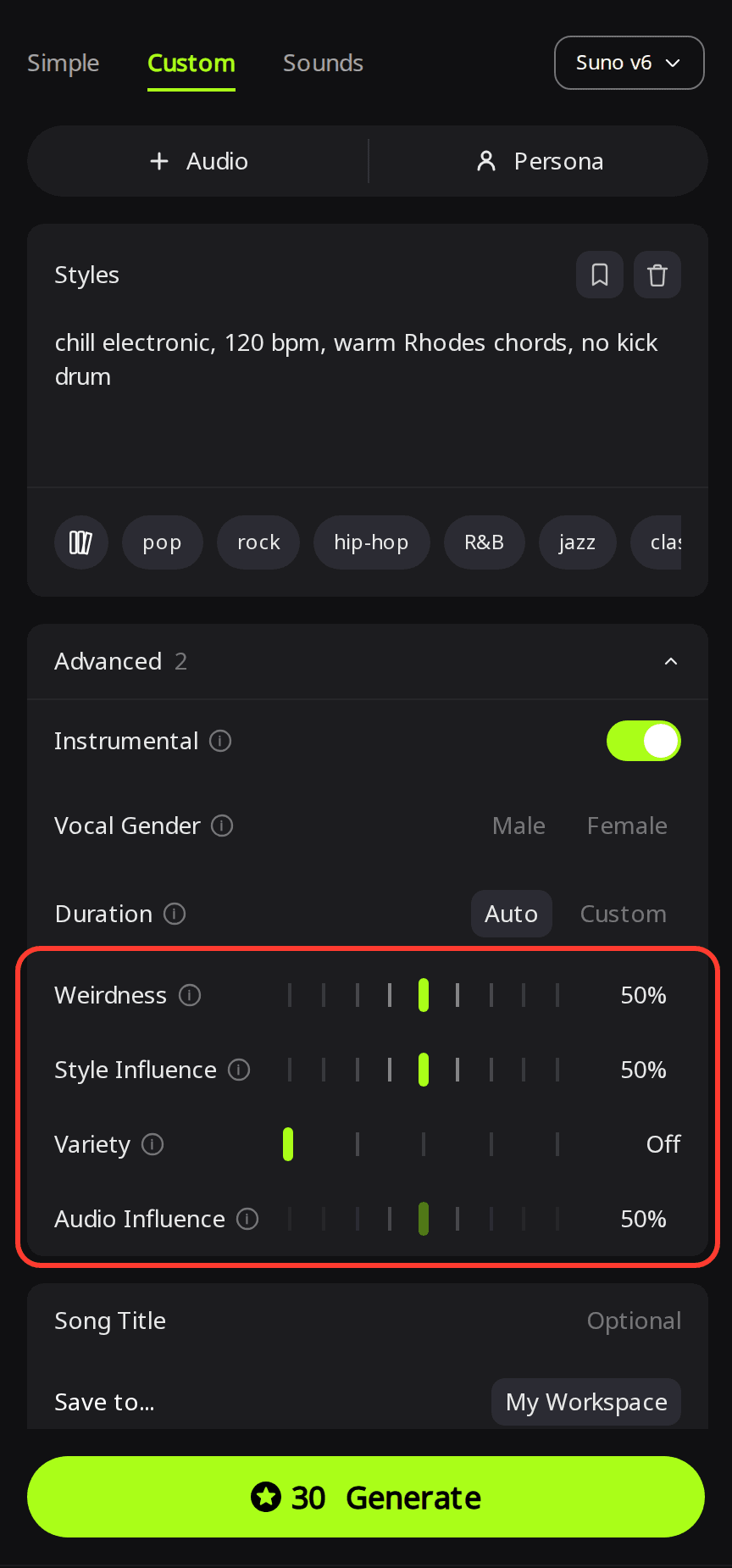
On RaoMusic this goes in Custom mode. Open Custom, pick Suno v6 in the model menu (it needs a RaoMusic membership; Suno v6 Wild and Suno v6 Mini are open to free accounts), write the line in Styles, and open Advanced. Turn on Instrumental if you want no vocals. Variety sets how far each take may drift from your description; at Normal the engine rewrites your style text for each take, and Off sends your words as typed. It doesn't change the price.
If you write prompts on Suno's own site, its Custom mode has a separate Exclude box under Advanced Options for instruments you don't want. On RaoMusic, put the "no …" wording at the end of Styles, as in the tests below.
How did we make the examples?
All takes were made on RaoMusic on November 9, 2026: nine Suno v6 runs in Custom mode and one ElevenLabs v2 run, 19 takes in total, 8 of them playable below. Each Suno comparison changes one thing, the instrument wording or the Variety setting. The ElevenLabs clip is an extra check of the same synth description on another engine. Every run was made once and we did not try other genre words, so read the results as what these takes did, not as odds. The short listening note under a clip describes what that file sounds like; press play to judge for yourself. Every style line, the lyrics and the Variety setting of each run are in the full settings at the end.
How do I get a saxophone solo where I want it?
Put the solo tag in the lyrics where it should happen, and name the instrument in Styles as well. We tested a short soul-pop song with an empty [Saxophone Solo] section between the first chorus and the second verse.
Tag only. Styles: soul pop, 92 bpm, female vocals, Rhodes, bass guitar, live drums · Variety Normal
Listening note: the break after the first chorus (about 1:21 to 1:56) is an electric guitar solo, and there is no saxophone anywhere in the song. The other take did the same, with a clean guitar solo from about 1:01 to 1:47.
The style text the engine actually used for that second take even mentions "a saxophone solo between verses", yet a guitar played it. A word inside the rewrite was not enough.
Tag plus the instrument in Styles. Styles: soul pop, 92 bpm, female vocals, Rhodes, bass guitar, live drums, tenor saxophone · Variety Normal
Listening note: a tenor saxophone takes the solo from about 1:06 to 1:36 and also plays melody lines in the intro and outro. The other take also has a sax solo, shorter and later (about 1:26 to 1:46), so keep this one if you want the longer solo.
Write the instrument twice: once in Styles so the engine brings it into the band, once as a tag so it knows where to feature it.
How do I keep an instrument out, like the kick drum?
On RaoMusic with Suno v6, add "no" plus the instrument to the end of Styles and set Variety to Off: both takes at Off came back without a kick. We used a chill electronic beat with Rhodes chords, and the working version comes first.
"no kick drum", Variety Off. Styles: chill electronic, 120 bpm, warm Rhodes chords, no kick drum
Listening note: no kick from start to finish. The beat is closed hi-hats, a soft shaker and subtle rim snaps under the Rhodes. The other take is kick-free too.
For comparison, the same Styles line at Variety Normal:
"no kick drum", Variety Normal. Styles: chill electronic, 120 bpm, warm Rhodes chords, no kick drum
Listening note: a four-on-the-floor kick enters at 0:48 despite the instruction. The first take had no kick at all, only shaker and rim clicks, so at Normal you may need to generate again.
Two more runs at Normal kept the kick in both takes: the line without any instruction (a four-on-the-floor kick from 0:16), and one that described the drums instead, "rhythm from shaker and finger snaps only" (shaker and snaps came through, but a kick joined them at 0:16). Positive wording alone did not keep the kick out. All runs are in the table at the end.
The song list shows why Variety matters here. At Normal, each take's style text was rewritten before generation, and in both "no kick drum" takes at Normal the rewrite left those three words out. At Off the text stayed exactly as typed.
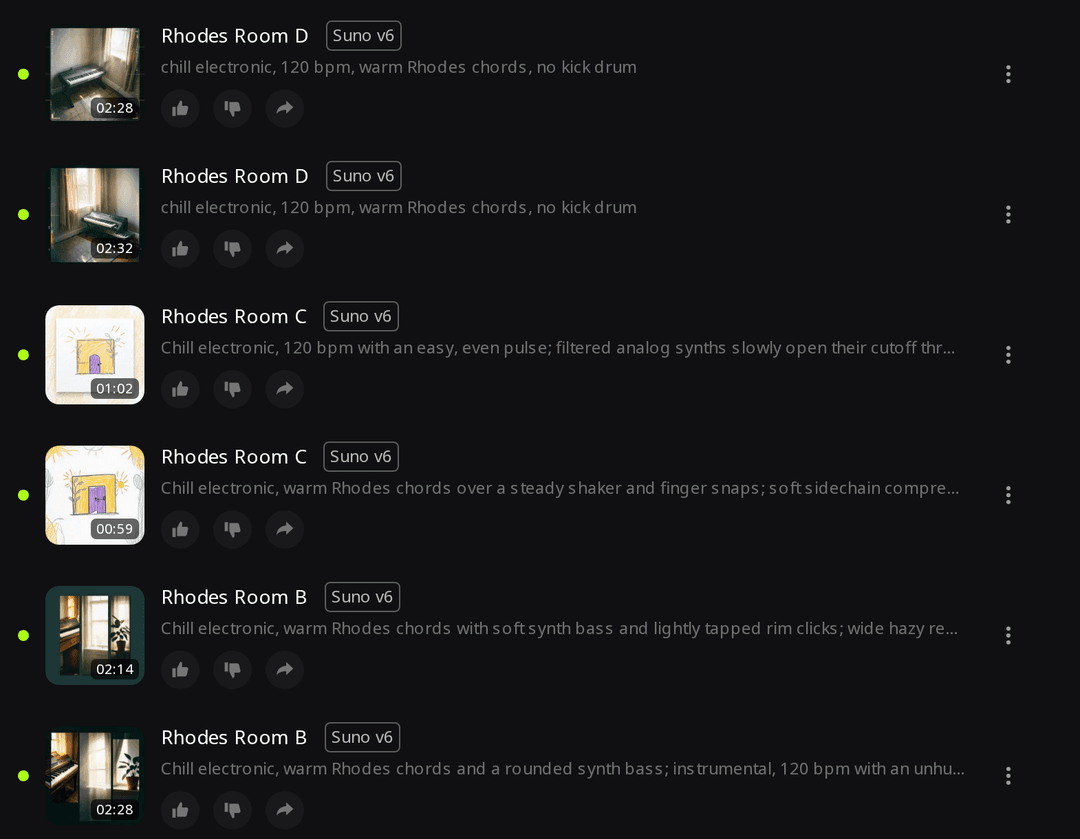
After a run, read the style line under each take before you judge the prompt. If the instrument you asked for, or the "no", is missing there, switch Variety to Off and generate again. If you want to keep a kick but change its pattern instead, our AI EDM drum-pattern examples show prompts for other drum styles.
Can adjectives change the sound of a synth lead?
Not toward the sound we asked for. A detailed description of a soft, round sine-wave lead with glide came back as a bright saw-style lead at Variety Normal, at Variety Off and on ElevenLabs.
Generic, Suno v6, Variety Normal. Styles: synthwave, 110 bpm, synth lead
Listening note: a bright, clean saw-like lead with smooth glide between notes. This is the default sound the next prompts tried to change.
Detailed, Suno v6, Variety Normal. Styles: synthwave, 110 bpm, lead melody on a soft, round sine-wave synth with gentle glide between notes
Listening note: still bright and buzzy, now with no audible glide. The other take sounds the same.
Detailed, Suno v6, Variety Off. Same Styles: synthwave, 110 bpm, lead melody on a soft, round sine-wave synth with gentle glide between notes
Listening note: the same bright lead without glide in both takes, so Variety Off didn't help with tone.
Detailed, ElevenLabs v2. The same text in Simple mode (one description box, no lyrics), Instrumental on (no vocals), Length 60 seconds.
Listening note: a bright saw-style lead with almost no glide, so switching engine didn't help either.
None of the five takes with the detailed wording sounded soft or sine-like. The one audible difference went the wrong way: the generic takes had smooth glide, the detailed ones little or none. If you need a particular lead tone, two untested next steps are naming an acoustic instrument instead of a waveform (flute, vibraphone) or trying a different genre word. Another route is to generate the track without the lead and layer a new part on afterwards with Add Instrument, which adds one more instrument to a finished song as mixed versions, keeps your original unchanged and costs 20 credits per try. It takes an instrument name and a short description, not synth settings, and we did not test it for this sine-wave tone.
What should I try first when an instrument won't show up?
- Check that the instrument is named in Styles, not only in a lyrics tag.
- Read the style line under the finished take. If your words were rewritten away, set Variety to Off.
- Generate once more before rewriting the prompt. Two takes from the same settings can disagree, as the "no kick drum" run at Normal did.
For more on how Variety and other settings change a Suno v6 prompt, see our Suno v6 prompt tests.
What settings and lyrics did we use?
All Suno v6 runs used Custom mode with Weirdness (how unexpected the result may get) and Style Influence (how closely it matches your style description) left at 50%. The vocal song left Duration on Auto; the instrumentals asked for 60 seconds and still came back between 0:59 and 2:53 long, so treat Duration as a target and trim the take to the length you need. Each Suno v6 run cost 30 credits and returned two takes; the ElevenLabs v2 run cost 40 credits for one 60-second clip.
| Run | Styles | Variety | Result |
|---|---|---|---|
| Solo, tag only | soul pop, 92 bpm, female vocals, Rhodes, bass guitar, live drums | Normal | Guitar solo in both takes |
| Solo, tag + Styles | soul pop, 92 bpm, female vocals, Rhodes, bass guitar, live drums, tenor saxophone | Normal | Sax solo in both takes |
| Kick, no instruction | chill electronic, 120 bpm, warm Rhodes chords | Normal | Kick in both takes |
| Kick, "no kick drum" | chill electronic, 120 bpm, warm Rhodes chords, no kick drum | Normal | Kick in 1 of 2 takes |
| Kick, positive wording | chill electronic, 120 bpm, warm Rhodes chords, rhythm from shaker and finger snaps only | Normal | Kick in both takes |
| Kick, "no kick drum" | chill electronic, 120 bpm, warm Rhodes chords, no kick drum | Off | No kick in either take |
| Synth, generic | synthwave, 110 bpm, synth lead | Normal | Bright saw-like lead |
| Synth, detailed | synthwave, 110 bpm, lead melody on a soft, round sine-wave synth with gentle glide between notes | Normal | Bright saw-like lead in both |
| Synth, detailed | synthwave, 110 bpm, lead melody on a soft, round sine-wave synth with gentle glide between notes | Off | Bright saw-like lead in both |
| Synth, ElevenLabs v2 (Simple, 60 s) | synthwave, 110 bpm, lead melody on a soft, round sine-wave synth with gentle glide between notes | n/a | Bright saw-like lead |
Lyrics for both saxophone runs (vocal gender set to Female):
[Verse]
Porch light on at a quarter to nine
Your shoes by the door in a crooked line
The kettle is singing an old refrain
I hear your keys in the evening rain
[Chorus]
Come on home, the light is on
I kept it burning since you've been gone
Come on home, it won't be long
The porch light's on
[Saxophone Solo]
[Verse]
The radio's low and the window's wide
The street is shining from the other side
I saved you a plate and a slice of pie
I'll hear you whistle when you're walking by
[Chorus]
Come on home, the light is on
I kept it burning since you've been gone
Come on home, it won't be long
The porch light's on
[Outro]
The porch light's on
Frequently Asked Questions
That is a different job from the prompting in this guide, which shapes new songs generated from text. Converting a played or hummed part into another instrument needs an audio-to-instrument tool.
We left it at 50% here. In our <a href="/blog/suno-v6-prompts">Suno v6 prompt tests</a>, raising it to 90% with Variety Off still didn't bring back a brushed snare the description asked for, so try Variety Off and a clearer instrument name first.
We ran those two tests on Suno v6 only. On ElevenLabs we only checked the synth description, which came back as the same bright lead, so test one run before you rely on a tag elsewhere.
Duration is a target, not a hard limit. Our instrumental runs asked for 60 seconds and came back between 0:59 and 2:53, so pick the take that fits and trim it to the length you need.
Songs you generate on RaoMusic come with royalty-free commercial usage rights on free and paid plans. The terms are on the <a href="/commercial-license">commercial license page</a>.