

To make a sad song with AI, name the loss, give the AI one or two real details, and ask for a slow sound with a soft voice and few instruments. Then read the lyrics and keep the take that feels true. On RaoMusic, the Sad Song Generator writes and sings the lyrics from a name and a short message for 20 credits per run (two songs on Rao v1.0). Custom mode sings lyrics you wrote yourself.
Last checked: November 7, 2026
What are the steps to make a sad song with AI?
- Pick the feeling: a breakup, missing someone, grief, loneliness, regret or an apology.
- Write down one or two real details: a name, a place, an object you still have. These are what make the song sound like yours.
- Decide who writes the words. Let the AI write them from a short message, or write them yourself and paste them in.
- Describe the sound: a slow tempo, a soft vocal, few instruments and a quiet ending.
- Generate, then check: read the lyrics, listen to both takes and generate again if neither one lands.
- Trim and download the take you keep.
How did we make the examples?
All clips below were generated on RaoMusic on November 7, 2026, once per setting: one Sad Song Generator run on Rao v1.0, three Custom-mode runs on Suno v6 (the same lyrics with two different style lines, plus a 30-second chorus-only version), and one ACE-Step 1.5 instrumental. Checked every 5 seconds, the 30-second run was complete by the check at about 23 seconds. Takes from the same run are labeled Take 1 and Take 2. The lyrics we wrote and every setting are listed at the end of this article. The short listening note under a clip describes what that file sounds like; press play to judge for yourself.
How do I turn a few details into a sad song?
Use the Sad Song Generator. Fill in Name (the person the song is about), add what happened in Message (optional), then choose an Emotion, a Music style, a Vocal and a Language. The generator writes the lyrics and sings them in one step. Put physical details in the message so the lyrics have something specific to work with.
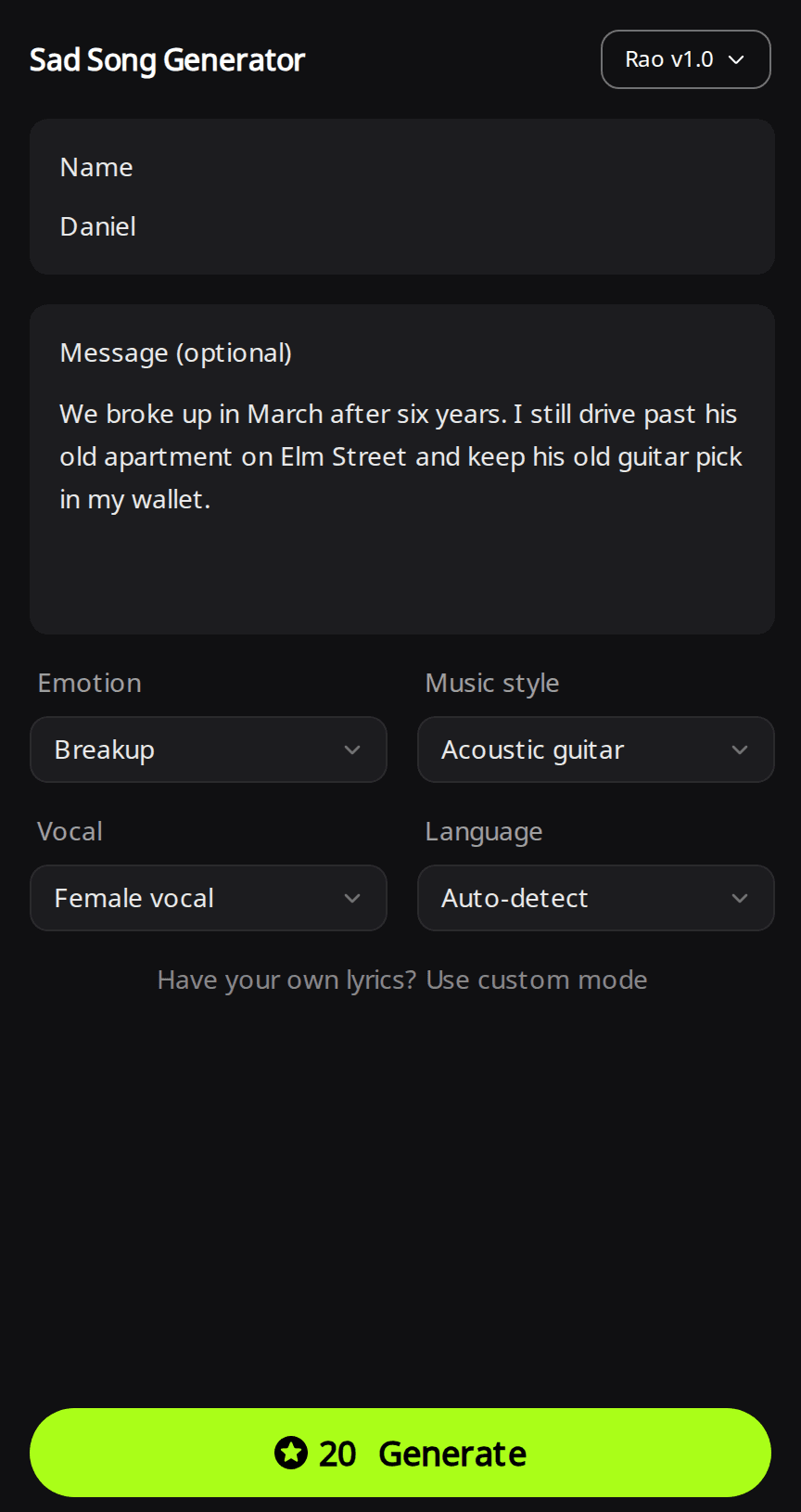
Sad Song Generator · Rao v1.0 · Emotion: Breakup · Music style: Acoustic guitar · Vocal: Female vocal
Take 1 (4:28)
Listening note: An intimate female vocal over fingerpicked acoustic guitar sings the written lyrics, with Daniel's name and the guitar pick in the chorus. Elm Street appears in the title but in none of the lines. If a detail has to be sung, write that line yourself in Custom mode.
Take 2 (4:03)
Listening note: The same lyrics over a clean acoustic guitar part. Either take works for a private listen or a video; pick the voice you like better, since the words are identical.
Read the written lyrics before you share the song. In this run they included a returned key ("Your key came back in a envelope, no note"), his grey sweatshirt and the line "it's March and the ground is going soft", along with one grammar slip, "a envelope". To fix a line, copy the lyrics, open Custom mode, correct it and generate again.
How do I write sad lyrics that feel real?
Write the lyrics yourself when every line has to be true. These habits keep them specific:
- Show the loss through an object. "Your coat is still on the hook by the door" says more than "I miss you so much".
- Let the pre-chorus admit something. "I tell my friends I'm doing fine / I say it slower every time" sets up the chorus without naming the feeling.
- Say the feeling plainly once, in the chorus, and repeat the chorus unchanged so the listener can sing it back.
- Change one small thing in the bridge. "Maybe someday I will give the coat away / Maybe someday, just not today" moves the story without resolving it.
- End with a short outro line and an [End] tag to ask for a clear stop, then listen to the last few seconds.
For other ways to stop a song cleanly, see the guide to ending an AI song.
Open Create, switch to the Custom tab and choose a model; the examples below use Suno v6, which needs a subscription. Paste the lyrics into Lyrics and describe the sound in Styles. To keep both takes close to your style line, open Advanced and set Variety to Off; its tooltip says "Off keeps both versions strictly on-style".
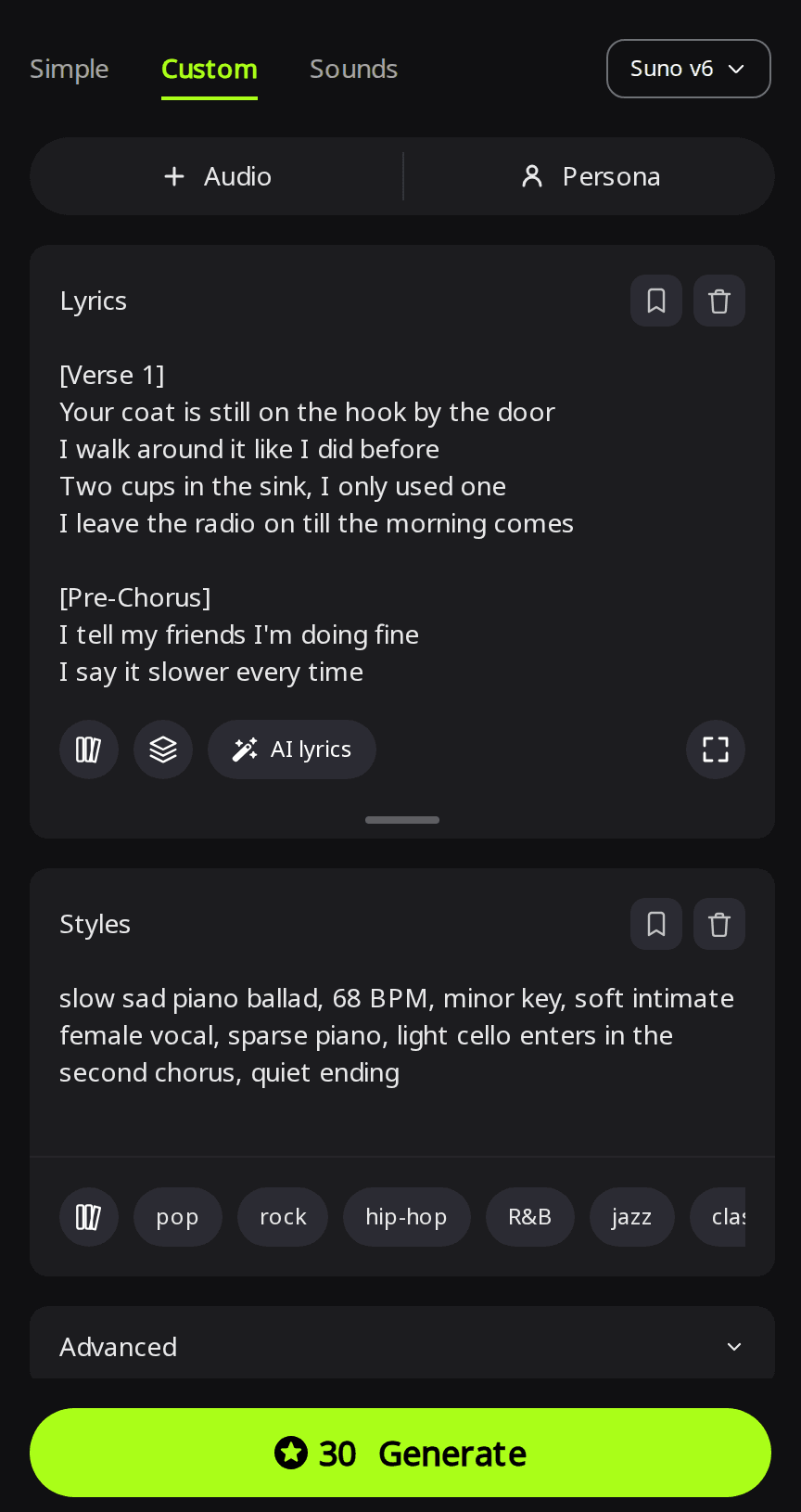
More on section tags and keeping lines exactly as written is in the guide to making a song with your own lyrics.
Which style words make a song sound sad?
Describe five things in the style line: a slow tempo (as a BPM number if you have one in mind), a minor key, the voice ("soft intimate female vocal"), a short list of instruments, and how it ends. On Suno v6 in Custom mode, the lyrics above were sung with this line:
slow sad piano ballad, 68 BPM, minor key, soft intimate female vocal, sparse piano, light cello enters in the second chorus, quiet ending
Take 1 (3:40)
Listening note: A slow minor-key piano ballad that follows the verse, pre-chorus and chorus order of the lyrics. The cello came out as a vague string pad rather than a clear cello, so if you need a real cello sound, generate again or add one later in a music editor.
Take 2 (3:38)
Listening note: Sparse piano and a mournful pace like Take 1, but no cello appears in the second chorus. Use it if you want the barest version; choose Take 1 if you want a soft string pad underneath.
Can a sad song have upbeat music?
Yes. The style line sets the sound of the music, so the same lyrics can become a bittersweet dance track, as the two takes below show. Keep the words and change only Styles, for example:
bittersweet dance-pop, 122 BPM, four-on-the-floor beat, bright synth chords, breathy female vocal, sad lyrics over an upbeat groove
Take 1 (3:10)
Listening note: The bittersweet 122 BPM dance-pop groove with bright synths and a breathy vocal comes through, and the sad lyrics sit on top of it. The singing starts at about 0:17 and the kick drum joins at about 0:33. The chorus sounds flat and squashed in volume and the voice has a phasey edge, so use it as background music or generate again for a release.
Take 2 (2:42)
Listening note: Same mood and tempo, and the four-on-the-floor beat stays out during the verses. If a clip needs the beat at once, start Take 1 at about 0:33, where its kick comes in.
How do I make sad instrumental music for a video?
Use a model that lets you set the length, tempo and key. ACE-Step 1.5 has an Instrumental switch, a Length slider and, under Advanced, optional BPM and Key settings. With Length at 90 seconds and Thinking on, a run costs 15 credits. The settings used here were BPM 66 and Key A minor, with this description: sad instrumental for a farewell video, solo felt piano with soft cello, slow and spacious, rain-like quiet atmosphere, gentle swell in the middle, ends on a long fading chord.
Listening note: Sparse felt piano, a patient swell in the middle and a fading tail, as described. The strings rise into higher, synthetic-sounding violin lines instead of staying a solo cello. It fits a farewell montage or a quiet documentary scene; if you need a lone cello, generate again. More about this model is in the ACE-Step 1.5 guide.
How do I make a 30-second version for a reel or a story?
To keep the original melody, trim the full song with the Clip options described in the next section. For a new 30-second song in the same mood, generate a chorus-only version. With a Suno v6 model in Custom mode:
- Paste only the chorus into Lyrics and end it with an [End] tag.
- Open Advanced, choose Custom next to Duration and move the slider to 30s. The tooltip warns that "the song may end early if your lyrics are short".
- Reuse the tempo, key, voice and main instruments from the full song's Styles line to ask for a similar sound. The melody is generated again, so expect a new short song in the same mood rather than an exact cut.
Take 1 (0:30)
Listening note: Sparse piano under a soft vocal, ending in a quiet resolve instead of a hard cut at 30 seconds. The opening words "And I" of the chorus are dropped, so use Take 2 if every word has to be there.
Take 2 (0:30)
Listening note: Every chorus line is sung over intimate piano, and it also resolves quietly at the end. Pick this take for a reel or a story when every word has to be heard.
How do I finish the song before I share it?
- Cut what you don't need. Both Sad Song Generator takes ran past four minutes. The song menu's Clip options (Trim, Fade Out and others) save the edited audio as a new song; the guide to editing an AI song shows each tool.
- Download the MP3 from the song's menu.
- Play it once on the speakers or phone where people will hear it, and check that the quiet parts are still audible.
Songs you generate on RaoMusic come with royalty-free commercial usage rights under the RaoMusic commercial license, so you can put the song in a video, a podcast or a release under its terms.
What lyrics and settings did we use?
| Example | Engine and mode | Settings |
|---|---|---|
| Breakup song about Daniel | Sad Song Generator, Rao v1.0 | Name: Daniel · Message: "We broke up in March after six years. I still drive past his old apartment on Elm Street and keep his old guitar pick in my wallet." · Emotion: Breakup · Music style: Acoustic guitar · Vocal: Female vocal · Language: Auto-detect |
| Piano ballad | Suno v6, Custom | Lyrics below · Styles: slow sad piano ballad, 68 BPM, minor key, soft intimate female vocal, sparse piano, light cello enters in the second chorus, quiet ending · Vocal: female · Variety: Off |
| Upbeat version | Suno v6, Custom | Same lyrics · Styles: bittersweet dance-pop, 122 BPM, four-on-the-floor beat, bright synth chords, breathy female vocal, sad lyrics over an upbeat groove · Vocal: female · Variety: Off |
| 30-second version | Suno v6, Custom | Chorus only, ending with [End] · Styles: slow sad piano ballad, 68 BPM, minor key, soft intimate female vocal, sparse piano, quiet ending · Vocal: female · Variety: Off · Duration: Custom, 30s |
| Instrumental | ACE-Step 1.5, Simple | Instrumental on · Length: 90 s · Thinking on · BPM: 66 · Key: A minor · Description: sad instrumental for a farewell video, solo felt piano with soft cello, slow and spacious, rain-like quiet atmosphere, gentle swell in the middle, ends on a long fading chord |
Each Suno v6 run cost 30 credits. The Sad Song Generator wrote its own lyrics for the Daniel song, so they are not repeated here.
Lyrics for the piano ballad and the upbeat version ("Your Coat Is Still on the Hook"):
[Verse 1]
Your coat is still on the hook by the door
I walk around it like I did before
Two cups in the sink, I only used one
I leave the radio on till the morning comes
[Pre-Chorus]
I tell my friends I'm doing fine
I say it slower every time
[Chorus]
And I don't know how to let you go
When the house still knows your name
Every light I leave on low
Is waiting for you all the same
Oh, I don't know how to let you go
[Verse 2]
Your number's still the first one in my phone
I almost call it when I'm driving home
The winter came and no one said
Which side is mine now of the bed
[Pre-Chorus]
I tell my friends I'm doing fine
I say it slower every time
[Chorus]
And I don't know how to let you go
When the house still knows your name
Every light I leave on low
Is waiting for you all the same
Oh, I don't know how to let you go
[Bridge]
Maybe someday I will give the coat away
Maybe someday, just not today
[Final Chorus]
And I don't know how to let you go
When the house still knows your name
Every light I leave on low
Is waiting for you all the same
Oh, I don't know how to let you go
[Outro]
Just not today
[End]
Frequently Asked Questions
Yes. In the Sad Song Generator, choose a language in the Language menu instead of Auto-detect. In Custom mode, write the lyrics in the language you want; you can also name the language in Styles.
Yes. Choose Grief / loss as the Emotion and put a few things you remember about the person in the message, such as a habit, a saying or a place you shared. Read the lyrics before playing the song for family, and change any line that doesn't sound like them.
In most countries, free accounts get 50 credits every month, and the Sad Song Generator's default Rao v1.0 model doesn't need a subscription. Suno v6 needs a subscription.
Yes. In the Sad Song Generator, choose Male vocal in the Vocal menu. In Custom mode, describe the voice in Styles, for example "warm low male vocal".
Yes, with a subscription. WAV conversion costs 4 credits per song; MP3 download is included.