

To make a graduation song with AI, decide who it is for (one graduate, the whole class or a preschool class), collect names and three or four real school memories, then write short lyrics or describe the story. If the song plays under a slideshow, set its length before you generate. Check that every name is sung, then pick the better take. On RaoMusic, a Suno v6 Wild run costs 30 credits for two takes, with no subscription needed.
Last checked: November 2, 2026
What are the basic steps?
The planning steps apply to most AI music generators; the button names further down are RaoMusic's.
- Pick the kind of song: a song from family to one graduate, a class song, a song for small children to sing, or music with no vocals for a slideshow (table below).
- Collect the details: names, a study-night story, a teacher, a funny first day, what comes next.
- Write the lyrics or a description. Your own lyrics put every name and line into the song as you wrote them; a description lets the generator write the words.
- Describe the sound: genre, instruments, the kind of voice and the tempo.
- Set the length if the song has to fit a slideshow or a walk across the stage.
- Generate, listen to both takes and keep the one that sings every name clearly.
Which kind of graduation song should I make?
Choose by where the song will play. Each row has a worked example further down.
| Song | Where it plays | Style words we used | Setup on RaoMusic |
|---|---|---|---|
| From a parent to the graduate | Party, card, family video | heartfelt acoustic pop ballad, piano, acoustic guitar, warm male vocal | Suno v6 Wild, Custom mode, your lyrics, Duration Auto |
| Class song | Senior slideshow, last day of school | upbeat indie pop anthem, group vocals on the chorus, 120 bpm | Suno v6 Wild, Custom mode, your lyrics, Duration set to the slideshow length |
| Preschool or kindergarten song | Children sing it at the ceremony | bright children's choir, ukulele, hand claps | Suno v6 Wild, Simple mode, description only |
| Slideshow music, no vocals | Under photos or speeches | warm piano, soft strings, light drums that build | Suno v6 Wild, Custom mode, Instrumental on, Duration set to the slideshow length |
What details should go into the lyrics?
- Names spelled the way you say them. If a name is often misread, respell it in the lyrics; our birthday song guide tests a respelled name before and after.
- One scene per verse, such as chemistry notes on the kitchen floor at 1 a.m. or the first day lost on the second floor. One clear picture is easier to sing than a list of five memories.
- Someone else in the family or the school: a brother who "won't miss you", a coach with a whistle, a teacher who taught the alphabet.
- What comes next: college, a first job, kindergarten.
- The year written out in words. We wrote "twenty twenty-seven" so the singer has no digits to interpret.
- A chorus that repeats word for word, so a class can sing along by the second time through.
If you would rather start from a draft, the AI lyrics generator can turn your notes into verses that you then edit.
How did we make the examples?
All examples were made on RaoMusic on November 2, 2026, with Suno v6 Wild and one run per setup, plus one Vocal Remover pass. Lengths were read from the downloaded files. The full lyrics we wrote for the parent and class songs are at the end of this guide. The short listening note under a clip describes what that file sounds like; press play to judge for yourself.
How do I make a song from a parent to the graduate?
Write it as a personal letter with a few concrete memories, rhyming only where it sounds natural: one verse about the late study nights, one about a memory from growing up, and a bridge about a brother or sister. The setup is Custom mode with Suno v6 Wild, your words in Lyrics, the sound in Styles and Duration left on Auto. We wrote "Go On, Amara" for a daughter finishing high school, with her brother Theo in the bridge.
- Open Create, switch to Custom and choose Suno v6 Wild in the model menu.
- Paste your words into the Lyrics box, with section tags such as [Verse 1] and [Chorus].
- Describe the sound in the Styles box, leave Duration on Auto under Advanced, then press Generate.
Parent's song · Suno v6 Wild · Custom mode · Duration Auto
Take 1 (2:46)
Take 2 (2:38)
Listening note: Both takes sing the lyrics as written with a warm male voice over piano and acoustic guitar, and both add drums that were not in the style line: take 1 adds pop percussion after the first verse, and take 2 adds a drum kit and a fuller pop arrangement in the second half. Either works for a family video; if you want the song to stay soft from start to finish, add "no drums" to Styles and generate again.
How do I make a class song that fits the slideshow?
Decide the length first. If each photo stays on screen for five seconds, a three-minute song holds about 36 photos. In Custom mode, open Advanced, set Duration to Custom and drag the slider to your length (10 to 360 seconds). On Auto, the length follows your lyrics instead. If you have more photos than the song can carry, shorten each photo's time in your slideshow app or set a longer Duration.
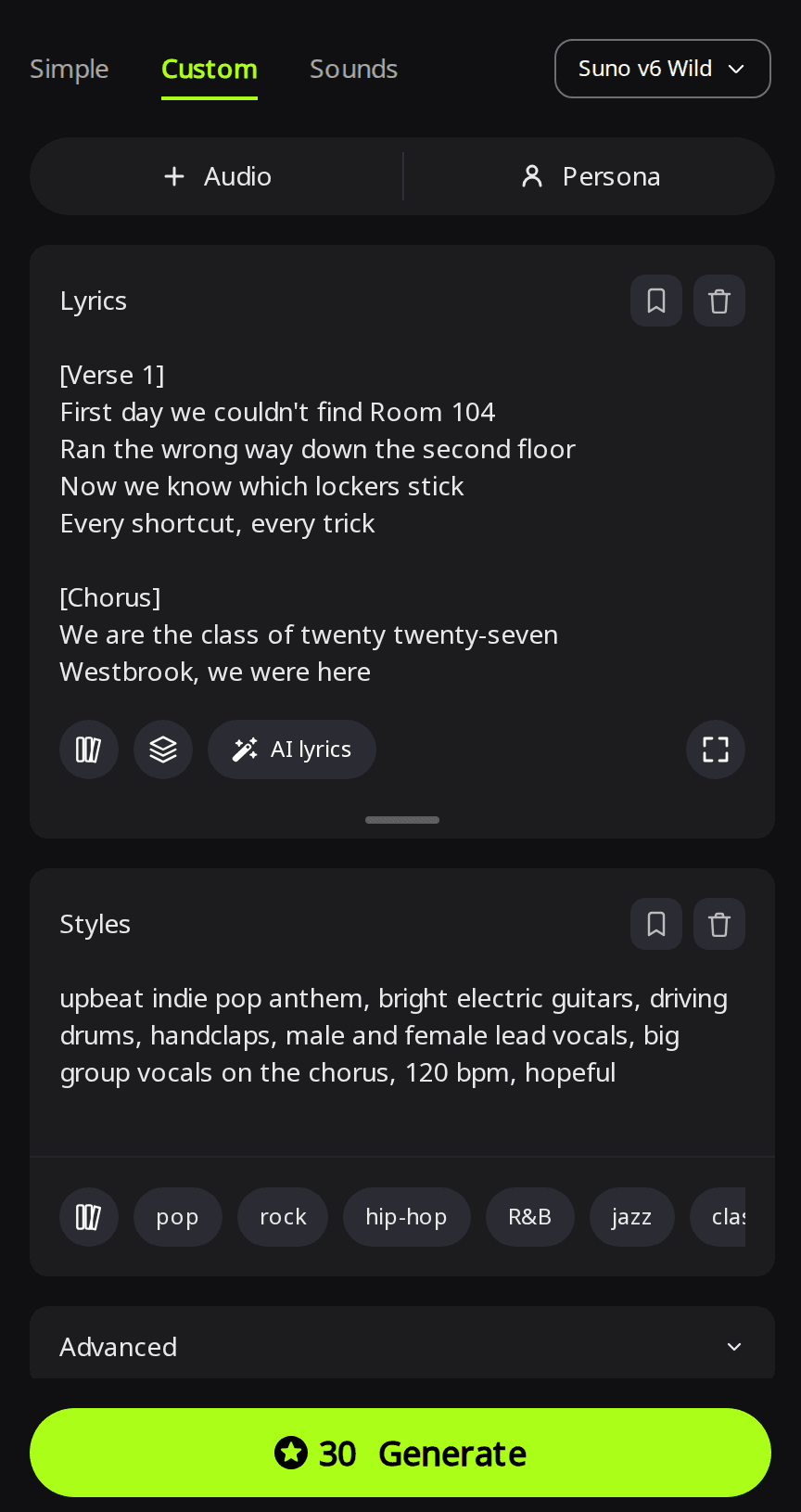
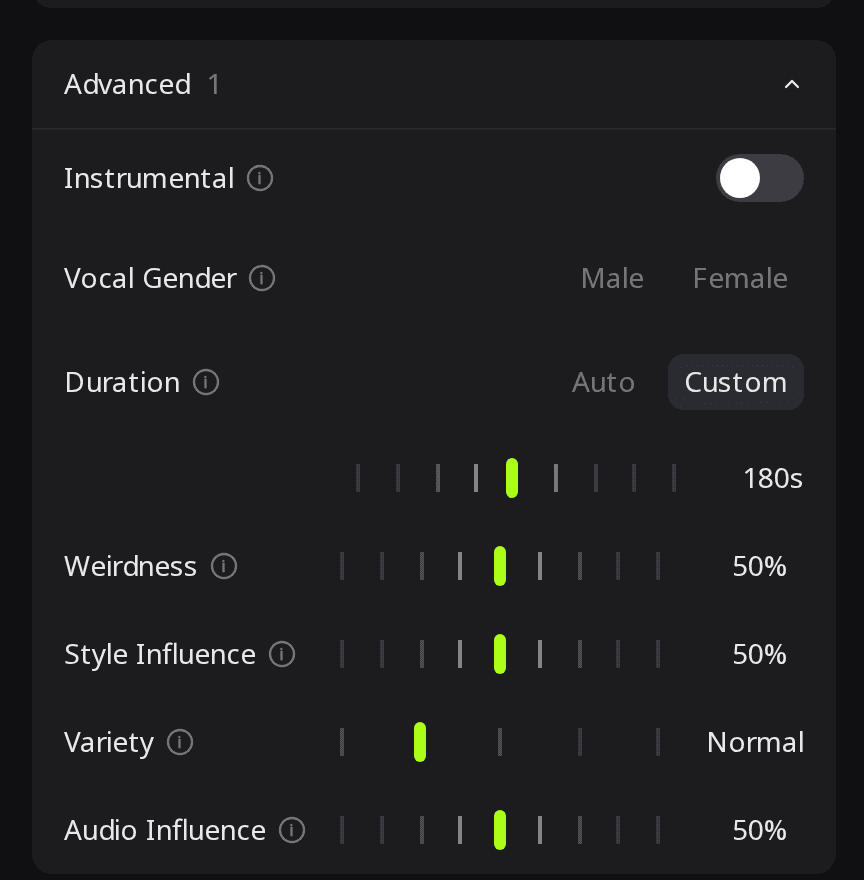
We set 180 seconds for "Westbrook, We Were Here", a class song with two verses, a short bridge and three choruses. Both takes came back at three minutes.
Class song · Suno v6 Wild · Custom mode · Duration 180 s
Take 1 (3:00)
Take 2 (3:00)
Listening note: Take 1 follows the lyrics and ends cleanly, but it is sung by a male voice only, with no female lead. Take 2 alternates male and female voices; after a natural ending around 2:40 it starts the chorus again and is cut off at 3:00. Use take 1 as is for a three-minute slideshow, or use take 2 for the duet and fade it out at about 2:41, with the slideshow cut to match. Our guide to ending an AI song covers trims and fades.
How do I make a preschool or kindergarten graduation song?
For small children you can skip writing lyrics. Switch to Simple mode and put the class name, the teacher and two or three things the children did into Song Description; the generator writes the words. This is the description we used:
A bouncy preschool graduation song for the Sunflower Room at Little Oaks Preschool. Thank their teacher Ms. Lopez, mention learning the ABCs, nap time on the blue mats, and going to kindergarten next year. Bright children's choir, ukulele, hand claps, a short simple chorus kids can sing along to.
Preschool song · Suno v6 Wild · Simple mode
Take 1, "Sunflower Kids" (1:30)
Take 2, "Sunflower Kids" (1:26)
Listening note: Both takes sing the same generated lyrics over ukulele and hand claps, with every detail from the description and a two-line chorus: "We're growing, growing, hooray, hooray! Kindergarten's coming our way!" Take 1 sounds like children singing; in take 2 the lead sounds like one synthetic child's voice, so pick take 1 if you want the sound of a class.
How do I get a backing track the children can sing over?
Run the finished song through the Vocal Remover and keep the instrumental part. It costs 5 credits per minute of audio, rounded up, and works on any plan.
Backing track · Vocal Remover on take 1
Listening note: The children's voices are gone, with almost nothing left behind, and the ukulele and hand claps stay. No instrument plays the tune, so at the ceremony an adult should sing along to keep the children on pitch; rehearse with the version that has vocals and switch to this one on the day.
How do I make background music for the slideshow or ceremony?
For music under photos or a speech, turn on Instrumental in Advanced, describe the sound in Styles and set Duration the same way as for the class song. We used 180 seconds and this style line:
Hopeful instrumental for a graduation slideshow: warm piano, soft strings and light pulsing drums that slowly build to a big, uplifting final section, steady tempo, no vocals
Slideshow music · Suno v6 Wild · Custom mode · Instrumental · Duration 180 s
Take 1 (3:00)
Take 2 (3:00)
Listening note: Both takes have no vocals, start with piano and strings, build to a full section with drums and end cleanly at 3:00. Either fits a three-minute slideshow without trimming; save the last photos, such as the cap toss, for the loudest part near the end.
How do I share the song on graduation day?
- Download the MP3 (no subscription needed) and play it from a phone or a laptop connected to the room's speakers. Play it once on those speakers before guests arrive.
- Put it under the slideshow. Our guide to turning an AI song into a music video covers the options.
- Print your song's chorus on the program so the class and families can join in.
- Send it to relatives who can't attend, together with a few photos from the day.
What lyrics did we write for the parent and class songs?
"Go On, Amara" (parent's song)
Style line: "heartfelt acoustic pop ballad, piano and acoustic guitar, warm male vocal, gentle strings, 78 bpm, proud and tender".
[Verse 1]
Amara at the kitchen table
Chemistry notes across the floor
Coffee cold at one a.m.
Saying just one chapter more
[Pre-Chorus]
I never said it out loud
But I was proud of you
[Chorus]
Go on, Amara, walk across that stage
Turn the tassel, turn the page
Wherever this road takes you
There's a light on here for you
[Verse 2]
You learned to drive in that old blue Corolla
Took out the mailbox on day one
You ran the mile in the April rain
And never quit until it was done
[Chorus]
Go on, Amara, walk across that stage
Turn the tassel, turn the page
Wherever this road takes you
There's a light on here for you
[Bridge]
Your brother Theo swears
He won't miss you at all
But he's the one who asked to keep
Your jersey on his wall
[Final Chorus]
Go on, Amara, walk across that stage
Turn the tassel, turn the page
Wherever this road takes you
There's a light on here for you
[Outro]
Go on, Amara
"Westbrook, We Were Here" (class song)
Style line: "upbeat indie pop anthem, bright electric guitars, driving drums, handclaps, male and female lead vocals, big group vocals on the chorus, 120 bpm, hopeful". Duration: Custom, 180 seconds.
[Verse 1]
First day we couldn't find Room 104
Ran the wrong way down the second floor
Now we know which lockers stick
Every shortcut, every trick
[Pre-Chorus]
Four years went by in a camera flash
Hold on tight, it's going fast
[Chorus]
We are the class of twenty twenty-seven
Westbrook, we were here
Sign the yearbook, throw the caps up high
Shout it loud and clear
[Verse 2]
Friday lights and the marching band
Coach Diaz with the whistle in his hand
Rainy prom and the bus that broke down
Best night ever in a small town
[Chorus]
We are the class of twenty twenty-seven
Westbrook, we were here
Sign the yearbook, throw the caps up high
Shout it loud and clear
[Bridge]
Some of us are leaving, some of us will stay
But we'll meet back here on reunion day
[Final Chorus]
We are the class of twenty twenty-seven
Westbrook, we were here
Sign the yearbook, throw the caps up high
Shout it loud and clear
[Outro]
Westbrook, we were here
Frequently Asked Questions
Yes. Write the lyrics in that language and keep the section tags, such as [Verse] and [Chorus], in English.
In most countries, eligible free accounts get 50 credits every month. That covers one Suno v6 Wild run, with 20 credits left for a run on Rao v1.0.
Yes, with extra steps. AI Voice Cloning on RaoMusic trains a voice model from 8 to 15 minutes of one person singing (from 150 credits), and the AI cover generator can then re-sing a finished song in that voice.
Yes. Songs made on RaoMusic include worldwide, royalty-free commercial usage rights for videos, on the free plan as well as paid plans. The full terms are at raomusic.com/commercial-license.
Yes. Use the parent’s song setup and swap in the teacher’s name, the subject and one classroom moment, such as a running joke or the day the experiment went wrong.