
In 2026 you can produce a complete song — vocals, instruments, arrangement, and mix — with no instruments, no digital audio workstation (DAW), and no music theory. AI music production has lowered the barrier so far that the hard part is no longer making the audio; it is knowing what you want and describing it. This guide is the beginner workflow, from first prompt to a finished track you can actually use.
We will use RaoMusic for the steps, but the workflow applies to any capable AI music generator. If you want a wider tool comparison first, see our best AI music generators ranking.
The short answer: how do I start making music with AI?
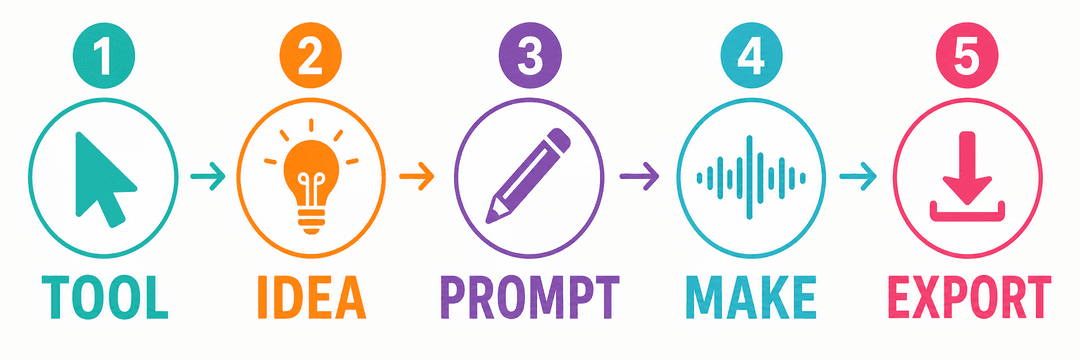
The beginner workflow in five steps, from idea to an exported track.
The entire beginner workflow is five steps:
Pick an AI music tool and create a free account.
Decide what you want — a style, a mood, a use (background music, a full song with vocals, a jingle).
Write a prompt or your own lyrics describing the song you want.
Generate, listen, and refine — pick the best take, regenerate, or edit sections.
Export and use it — download the track and use it under the tool's license.
You do not need a DAW (like Ableton or FL Studio), you do not need to read music, and you do not need a microphone unless you want to add your own voice. A browser and an idea are enough to start.
What you actually need to begin
Far less than most beginners assume:
A device with a browser. A laptop is ideal; a phone works for generating on the go.
An AI music generator account. Free credits are enough to make your first tracks.
An idea of what you want. A genre, a mood, a scene, or some lyrics. Vague is fine to start — you will refine it.
Optional but helpful: your own lyrics or a reference. The more specific your input, the closer the output lands.
You do not need a DAW, samples, plugins, an audio interface, or any music training. Those matter for advanced production later, not for your first song.
Step 1: Pick an AI music tool
For beginners, the right tool is one that is easy to use, generates full songs (vocals or instrumental), and gives you commercial-use rights if you might publish the track. RaoMusic does all three and works in 10 languages, which makes it a strong default for this guide.
Create a free account so you have credits to experiment with. You will not need to pay anything to make your first few songs and decide whether the workflow suits you.
If you are comparing options, our AI music generator comparison covers Suno, Udio, Mureka, Soundraw, and Boomy alongside RaoMusic, including which plans grant commercial rights.
Step 2: Decide what you want to make
Before you write a prompt, get clear on three things. Vague answers are fine — you will sharpen them as you go.
Format: A full song with vocals, an instrumental bed, a short loop, or a jingle?
Genre and mood: Pop, lo-fi, cinematic, rock, EDM, hip-hop, ambient? Happy, sad, energetic, calm, nostalgic?
Use case: Personal enjoyment, a YouTube video, a podcast intro, a client project, or a release to streaming?
The use case matters for licensing later. If there is any chance you will publish or monetize the track, keep that in mind from the start — see our guide on whether you need a license for AI music.
Step 3: Write a prompt or your own lyrics
This is the core skill of AI music production: describing the song you want clearly. Two approaches:
Write a prompt describing the song. Include genre, mood, tempo feel, instrumentation, and vocal style. Example: "An upbeat lo-fi pop song with warm electric piano, soft drums, and a female vocal, about a quiet Sunday morning, nostalgic and hopeful."
Write your own lyrics and let the AI build the music around them. This gives you more creative control and strengthens your copyright position, because the lyrics are your human authorship. Need help writing lyrics? Try an AI lyrics generator, or see our guide on how to write a love song for lyric structure that transfers to any genre.
A few tips that immediately improve results:
Name a genre and a mood in every prompt — these two shape the output more than anything.
Specify vocals or instrumental explicitly so you do not get one when you wanted the other.
Mention instruments you want (piano, acoustic guitar, synth, strings) and ones to avoid.
If you want a specific structure (verse-chorus, intro-build-drop), say so.
Step 4: Generate, listen, and refine
When you generate, RaoMusic produces a pair of takes so you can compare and pick the stronger one. Treat the first generation as a draft, not a final.
Pick the better take and ignore the weaker one.
Regenerate if both miss. Small wording changes to the prompt — swapping the mood word or naming a different instrument — often fix a track that feels off.
Refine specific sections. If you like most of the song but one part fails, use section-level editing (change lyrics in a verse, extend a chorus, or strip vocals to get an instrumental version) instead of regenerating the whole thing.
Try variations. Generate an instrumental version of a vocal track for use as background, or swap the style to hear the same song in a different genre.
This refine loop is where beginners level up fastest. Most satisfying tracks come from two or three rounds of tweaking, not from the first click.
Step 5: Export and use your track
Once you are happy with a take, export it. Before you publish or monetize, confirm what rights you have:
Personal use needs nothing beyond the tool's basic terms.
YouTube, podcasts, social, client work, or streaming needs commercial-use rights. RaoMusic includes commercial-use rights with generated tracks without requiring a subscription — but always confirm the current terms for your specific use.
Keep a record of the track, the prompt or lyrics you used, and the license terms, in case of a dispute or Content ID claim.
For the licensing details, see do I need a license for AI-generated music. If you plan to release the track to Spotify or Apple Music, see our guide on monetizing AI music on YouTube and beyond.
Beginner mistakes to avoid
Skipping the genre or mood. Without these, the AI guesses, and the result usually feels generic.
Treating the first generation as final. The refine loop is where good tracks become great.
Publishing without checking rights. Free tiers on some tools are non-commercial; publishing that output can cause takedowns or lost monetization.
Overloading the prompt. Ten conflicting instructions confuse the model. Two or three clear directions beat ten vague ones.
Ignoring human authorship. Your own lyrics, arrangement choices, or performance are the parts you can actually own and defend.
Frequently Asked Questions
No. AI music production replaces most of the traditional technical work — chord progressions, arrangement, mixing — so you can start with no theory. What helps far more is knowing what mood and style you want and being able to describe it.
No. You can generate, refine, and export a finished track entirely in a browser. A DAW only matters later if you want advanced editing, multi-track mixing, or to combine AI output with your own recordings.
Yes. Write or paste your own lyrics and let the AI build the music and vocals around them. Using your own lyrics also strengthens your copyright position, because the lyrics are your human-authored contribution.
Yes. Most AI music tools, including RaoMusic, offer free credits that let you make your first tracks without paying. Free generation is enough to learn the workflow; commercial use may require credits or a paid plan depending on the tool.
It depends on the tool and plan. RaoMusic includes commercial-use rights with generated tracks without requiring a subscription. Some tools restrict commercial use to paid plans, and free-tier output may be non-commercial. Always confirm the current terms before publishing or monetizing.
A first draft usually takes a few minutes from prompt to finished audio. The refine loop — regenerating and editing sections — is where you spend most of your time, and a polished track often takes a few rounds.
Yes. It is one of the most beginner-friendly ways to make music, because the AI handles the technical layer and you focus on ideas and direction. Many people produce their first full song within an hour of starting.
Yes. You can regenerate the whole track, or refine specific sections — change lyrics in one verse, extend or replace a section, or strip vocals to get an instrumental. Section-level editing is usually more efficient than starting over.