
To make a wedding song with AI, write down the couple's names, one or two real moments from your story and the sound you want, then generate a few versions and keep the best one. On RaoMusic, Simple mode writes the lyrics from a short description; Custom mode sings your own lyrics and, on Suno v6, lets you set the length so a first dance fits your plan. For the aisle, generate an instrumental with a set length.
Last checked: October 28, 2026
What are the steps to make a wedding song with AI?
Work through these steps in order:
- Pick the moment and time it: first dance, walk down the aisle, parent dance or a surprise at the reception. Time your choreography or your walk with a phone stopwatch.
- Decide on vocals: a first dance or a gift usually has lyrics; pick instrumental for the aisle if you want no words during the entrance.
- Write the lyrics or a short description with the names, who sings to whom, one or two real moments and the sound you want.
- Choose a model that can set the length if the song has to fit a fixed time.
- Generate several takes and keep the best one.
- Trim or fade it, then test it through the venue speakers.
The examples, settings and prices below are from RaoMusic.
What is the quickest way to turn my story into a song?
Describe the couple in one paragraph and let RaoMusic write the lyrics. The Love Song Generator asks only for a name, an optional message and a language. On the Create page, Simple mode takes a longer description and lets you pick the model.
Suno v6 · Simple mode · two takes (4:04 and 4:09) · description: "A tender first-dance song for our wedding, sung by the bride to her husband James. We met in a college choir ten years ago, he still sings off-key in the car, and we adopted a gray cat called Pepper. Soft acoustic pop ballad, warm female vocal, piano and light strings."
Listening note: Both takes are gentle piano ballads that clearly sing James's name and the choir, the off-key car singing and Pepper the cat. Either take works for a private first dance or a wedding highlight video; read the auto-written lyrics once before the day so nothing surprises you.
For Suno, the Duration setting sits in Custom mode's Advanced panel. If a Simple-mode take runs longer than your dance, use Trim or Fade Out in the song menu's Clip options, or generate again in Custom mode with a target length. Simple mode suits a quick draft from a paragraph; Custom mode suits songs where the words or the timing must be exact.
How do I write first-dance lyrics from my own story?
Write the lyrics yourself when you want every line to be true. Keep the lines short:
- Put a name in the chorus so it comes back every time the chorus does ("Elena, dance with me").
- Use one specific memory per verse: where you met, a habit, a small joke. "Ninth Street" and "a blue umbrella" say more than "the day we met".
- Save the promise for the bridge, then repeat the chorus.
- End with an [Outro] line and an [End] tag. The guide to ending an AI song compares ways to stop cleanly.
Open Create, switch to the Custom tab and choose a model. Paste the lyrics into Lyrics and describe the sound in Styles. For a slow first dance, name the feel and the instruments, for example "slow romantic waltz in 3/4 time, warm male vocal, fingerpicked acoustic guitar, soft piano".
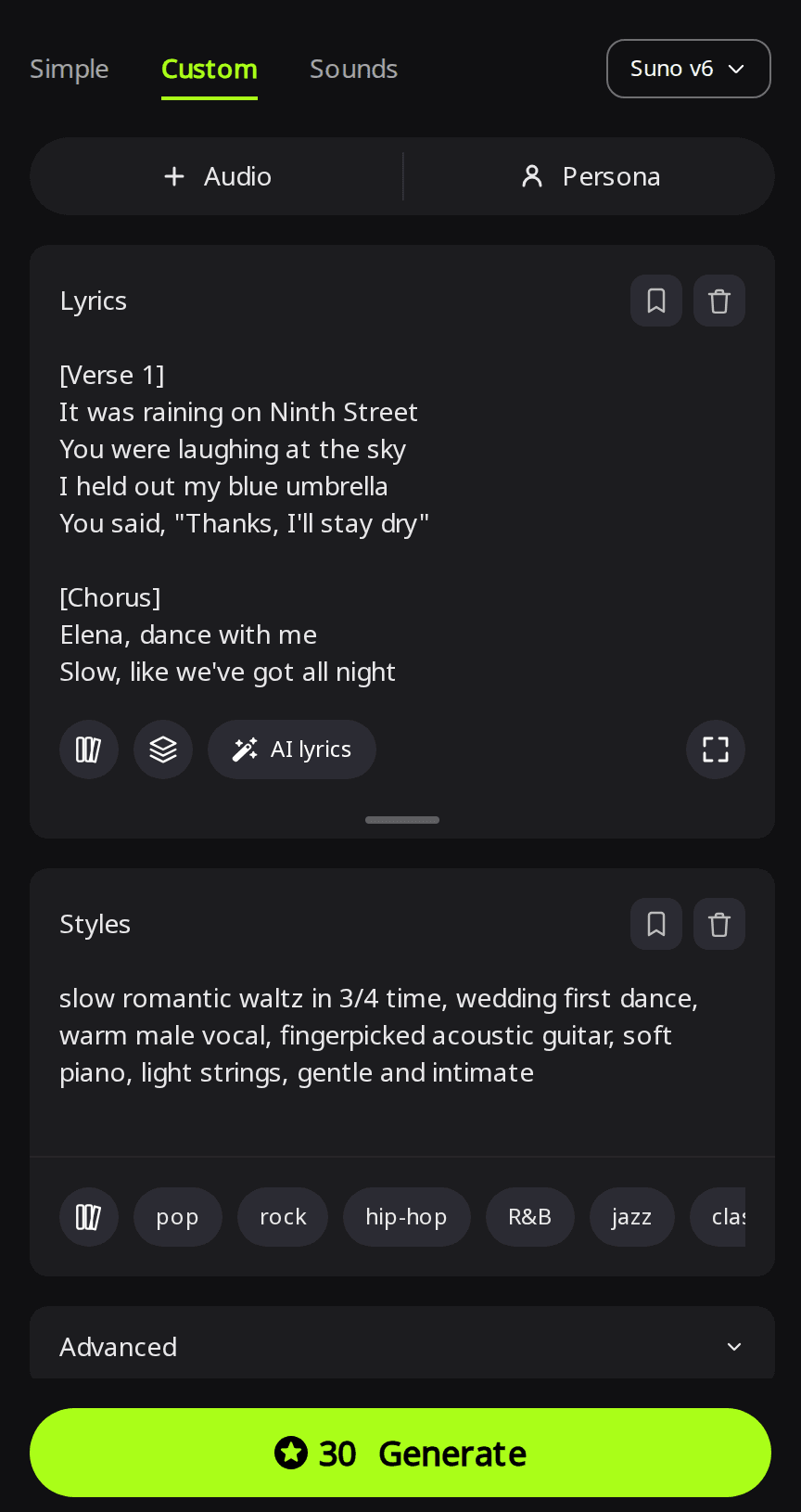
For more on section tags and keeping your lines exactly as written, see how to make a song with your own lyrics.
How do I make the song fit the length of my first dance?
Set the length before you generate. With Suno v6 selected in Custom mode:
- Open Advanced.
- Next to Duration, choose Custom and move the slider to your target (180s is three minutes). The tooltip warns that "the song may end early if your lyrics are short", so write enough verses to fill the time.
- Set Variety to Off. Its tooltip says "Off keeps both versions strictly on-style", which keeps both takes close to your style line.
- Press Generate. Suno v6 costs 30 credits per run, needs a subscription and returns two takes.
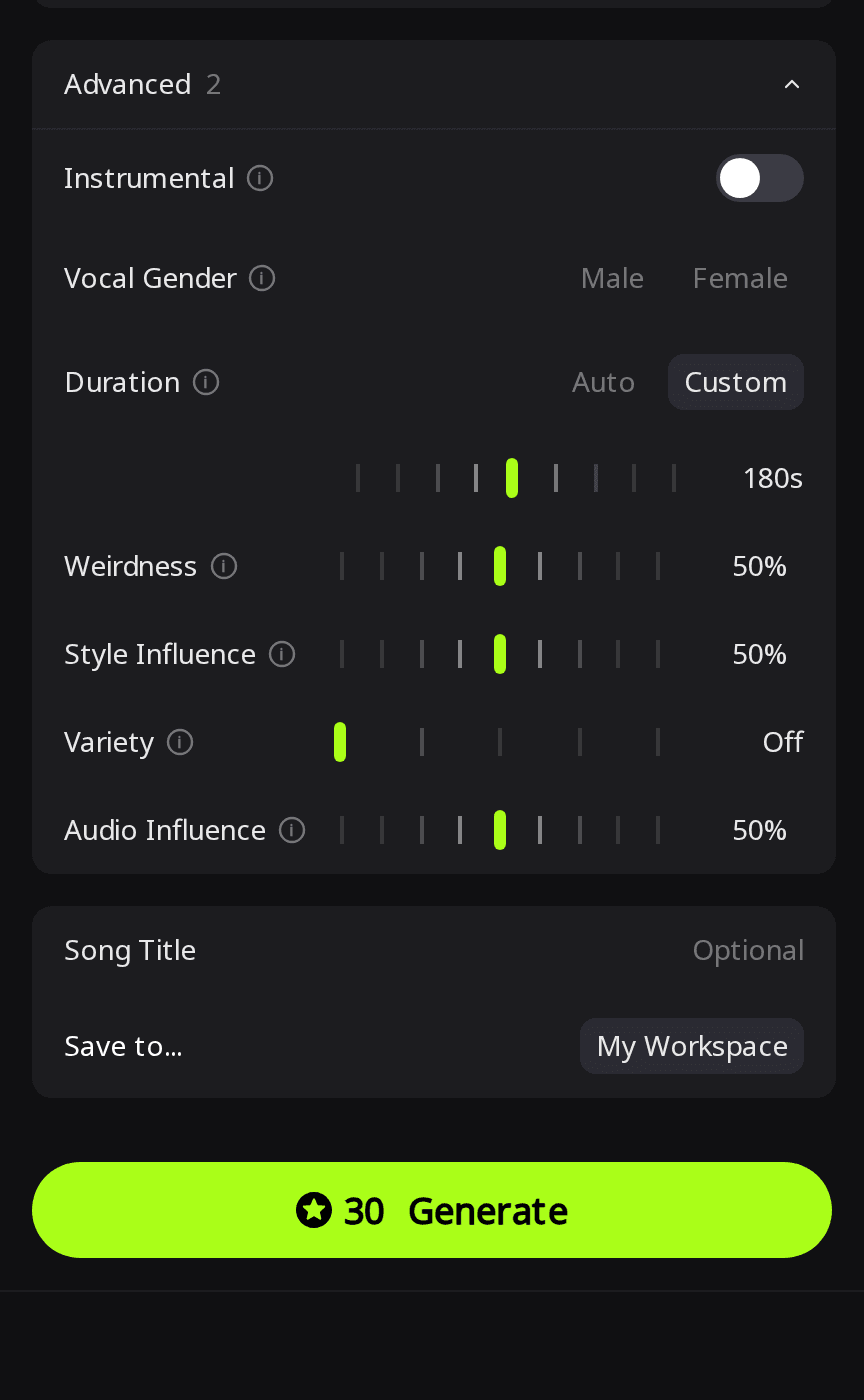
Suno v6 · Custom · Duration 180s · Variety Off · two takes (both 3:00) · style: "slow romantic waltz in 3/4 time, wedding first dance, warm male vocal, fingerpicked acoustic guitar, soft piano, light strings, gentle and intimate" · full lyrics at the end of this article
Listening note: Both takes are slow, gentle 3/4 acoustic waltzes with warm, natural instrumentation. Every lyric section is sung, the name Elena is clear, and each take ends on a soft instrumental resolve. Either one can be used as it is for a slow first dance; rehearse to the take you pick so the turns land on the same lines every time.
How do I make instrumental music for walking down the aisle?
Use a model with a fixed length and turn vocals off. ElevenLabs v2 has a Length setting (up to 5 minutes on v2) and charges 40 credits per minute, so 90 seconds costs 60 credits and returns one track. In Simple mode, turn on Instrumental and describe the instruments, the walking pace and how it should end.
ElevenLabs v2 · Simple · Instrumental · Length 90s · description: "Instrumental wedding processional for walking down the aisle: string quartet and soft piano, calm and steady walking pace, gentle build in the middle, ends on a long held chord with no fade."
Listening note: Soft piano and gentle strings build at a steady, walkable pace. The strings sound more like synthesized pads than a real quartet, and the ending fades quietly instead of holding a final chord. It suits a relaxed processional or a background montage. To have the music end as you reach the front, start it so the fade lines up with your arrival. For a firmer ending, generate again and describe the last chord in more detail. For ready-made pieces instead, see these instrumental songs to walk down the aisle to.
How do I get the song ready for the DJ and the venue?
- Download the MP3 from the song's menu; MP3 download is included on any plan.
- Trim or fade it if needed. The song menu's Clip options (Trim, Fade Out and others) cost 2 credits and save the result as a new song.
- Send the file to the DJ or the venue well before the day and ask them to play it once through their speakers. That leaves time to fix the volume or the ending, or to try another take.
- Keep a backup on your phone in case the playlist fails.
Songs you generate on RaoMusic include royalty-free commercial usage rights, so you can use the song in your wedding video and post it on social media. The commercial license page has the full terms.
How did we test?
All examples were made on RaoMusic on October 28, 2026, one generation per setting (each Suno run returns two takes): Suno v6 in Simple mode with the James description (30 credits, two takes), Suno v6 in Custom mode with the Elena lyrics, Duration 180s and Variety Off (30 credits, two takes), and ElevenLabs v2 in Simple mode with Instrumental on and Length 90s (60 credits, one track). Lengths are those of the finished files. The short listening note under a clip describes what that file sounds like; press play to judge for yourself. The name-spelling advice in the FAQ comes from an earlier RaoMusic test the same day: one Suno v6 Custom run with the name Siobhan written normally and one with it written as Shi-vawn (Variety Off, 30 credits each).
What lyrics did we use for the first-dance example?
[Verse 1]
It was raining on Ninth Street
You were laughing at the sky
I held out my blue umbrella
You said, "Thanks, I'll stay dry"
[Chorus]
Elena, dance with me
Slow, like we've got all night
Every road was leading here
To you, in this golden light
[Verse 2]
You still steal the warmest blanket
I still burn the morning toast
But of all the plans I ever made
You're the one I needed most
[Bridge]
So here's my hand, here's my promise
Through the sun and through the rain
I'd stand on Ninth Street in a storm
Just to meet you there again
[Chorus]
Elena, dance with me
Slow, like we've got all night
Every road was leading here
To you, in this golden light
[Outro]
Marcus and Elena
One more turn, one more song
[End]
Frequently Asked Questions
Yes. Write your lyrics in that language in Custom mode, or choose the language on the Love Song Generator.
Eligible free accounts (in most countries) get 50 credits every month. Suno v6 needs a subscription, but Suno v6 Wild and Suno v6 Mini do not, and ElevenLabs v2 works without one.
Yes. Change who the song is from and to, pick the memories that belong to that relationship, and set the length to the moment, for example a shorter song for a toast.
Change one thing and generate again: rewrite the style line, shorten the lyrics, or pick another model. Changing one thing at a time shows you which change helped.
Spell the name the way it sounds, split into syllables with hyphens, and use that spelling in every line of your lyrics in Custom mode. Respelling Siobhan as Shi-vawn fixed how Suno v6 sang it.