
For a routine song a small child can sing along to, keep it short, repeat one action line and use the child's name. Write two short verses and a chorus around one routine, describe a bright, bouncy style, generate it in Custom mode and keep the take that ends cleanly. This guide uses RaoMusic, where a Suno v6 run costs 30 credits and returns two takes. The examples are one toothbrushing brief, sung three ways, plus a backing track.
Last checked: November 1, 2026
How did we make the examples?
Every clip was made on RaoMusic on November 1, 2026 with Suno v6, one run per setting, around one toothbrushing brief for a 4-year-old called Leo (a sample name). Two runs used Custom mode with the same written lyric and different voice descriptions, one used Simple mode with a one-sentence description and let it write new lyrics, two used Instrumental mode to try for a backing track, and one sung take went through the Vocal Remover. The short listening note under a clip describes what that file sounds like; press play to judge for yourself. The full lyrics and settings are at the end.
Step 1: What should a kids song be about?
Give each song one job that the child already does or is learning. Three kinds work well:
- Routine songs: brushing teeth, tidying toys, putting on shoes. The words describe what the child is doing at that moment, so the song also works as the instructions.
- Learning songs: counting, colors, the days of the week, a few words in a new language. Repeat the thing being learned in every chorus.
- Name songs: a song about one child, sung for them. For the birthday version, our birthday song guide covers getting the name sung clearly.
Pick one job per song. A song that brushes teeth, counts to ten and wishes happy birthday leaves the child with no single line to remember.
Step 2: How do I write lyrics a child can sing along to?
- Short lines with a beat you can clap. Every chorus line in the example has five to seven syllables.
- One action line in the chorus, repeated word for word. "Brush, brush, brush your teeth" opens both choruses, so by the second one the child can join in.
- Steps in order. Front teeth, back teeth, tongue, spit and rinse. Counting ("one, two, three") gives the same feeling of moving forward.
- The name at the start and the end. Leo is in the first line and the last one. If a name comes out wrong, spell it the way it sounds and generate again.
- Two verses and two choruses. With this lyric, the sung takes came back at about a minute.
Mark each part with a tag such as [Verse 1], [Chorus] or [Outro], and cue the ending with [Outro] and [End] so the song lands instead of rambling. Our guide to how to make an AI song from your own lyrics covers tags and formatting in more detail.
Step 3: What should the style description say?
The Styles box sets the sound. For a song small children sing along to, name four things:
- Tempo: a bouncy, walking pace. The examples use 110 BPM.
- Mood: "major key", "bright", "simple and catchy".
- Instruments: two or three light ones, such as ukulele, glockenspiel and hand claps, with "light bouncy drums".
- Voice: "bright friendly female vocal with clear diction", so every word is easy to follow.
The Vocal Gender setting only offers Male and Female. To try for a child-like voice, describe it in Styles instead; the voice can still vary from take to take. Our line with "children's choir" came back with child-like singing in both takes, though not quite in the way we asked (you can hear both below).
Step 4: How do I generate it on RaoMusic?
- Open Create, switch to the Custom tab and choose Suno v6 in the model menu. It needs a subscription; Suno v6 Wild and Suno v6 Mini don't.
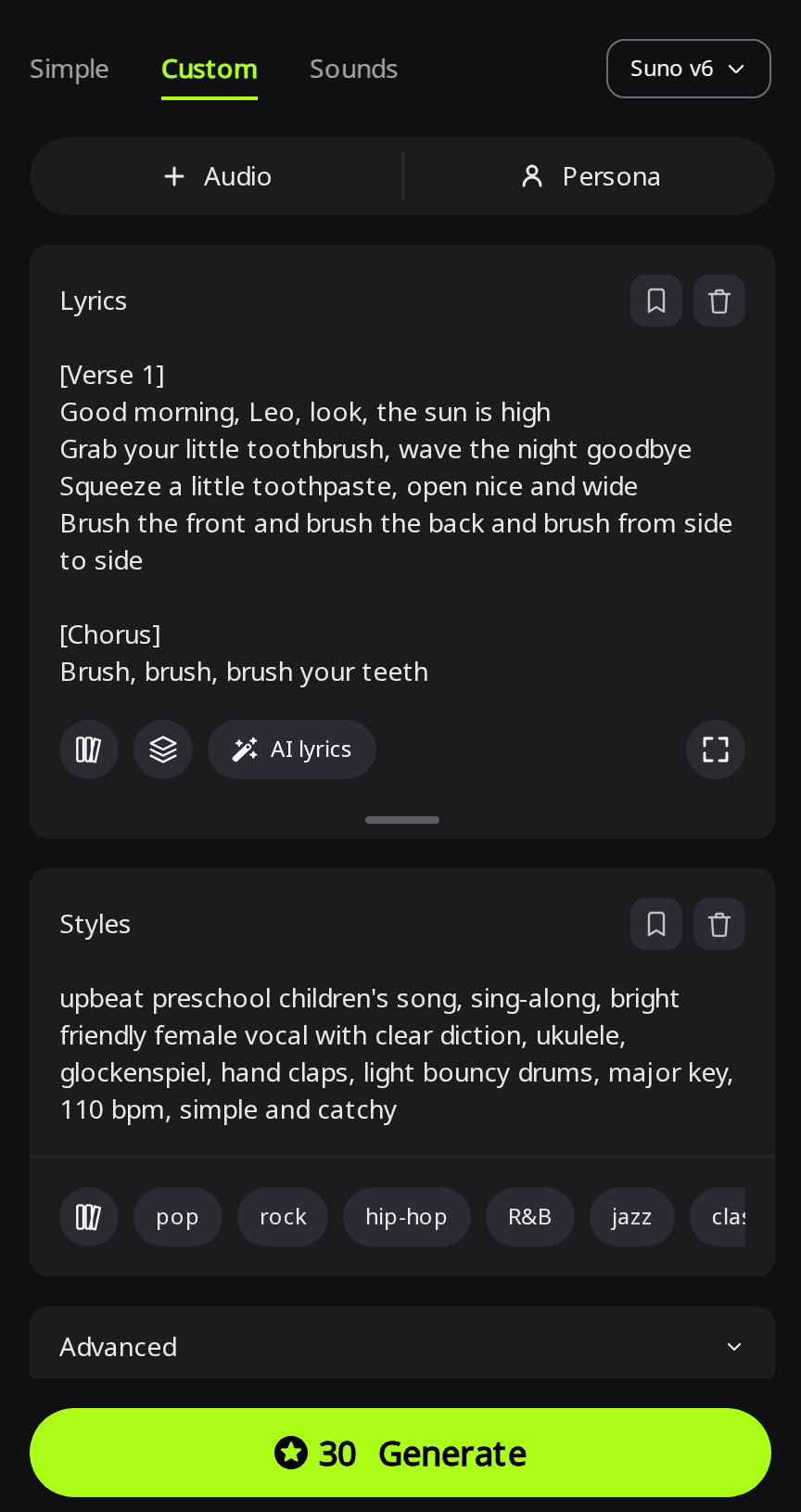
- Paste the lyrics into Lyrics and the style line into Styles.
- Open Advanced and set Vocal Gender to Female or Male. Leave it unset if Styles asks for a child's voice.
- Leave Duration on Auto so the length follows your lyrics.
- Click Generate.
Not ready to write lyrics? Switch to Simple and describe the song in one sentence, with the child's name, age and the routine. It writes new lyrics, so the steps may differ from yours (example below).
Here is how each setting came out.
What did the toothbrushing song sound like?
| Setting | Lengths | What came back |
|---|---|---|
| Custom, female vocal in Styles | 1:06 and 0:51 | Clear female vocal; the second take stops mid-outro |
| Custom, "children's choir" in Styles | 0:58 and 1:13 | Child-like solo voice; the second adds a choir on the chorus |
| Simple, one-sentence description | 1:03 and 1:01 | New lyrics written for Leo's morning routine |
Female vocal
Suno v6 · Custom · Vocal Gender Female · female vocal in Styles
Take 1
Take 2
Listening note: Both takes are bright, bouncy sing-alongs with a clear female voice, glockenspiel and claps at the asked-for tempo, and "Leo" is easy to hear. The second take cuts off partway through the outro, so use the first, or add a fade-out to the second from the song menu's Clip options before you play it at home.
Children's choir
Suno v6 · Custom · Vocal Gender unset · "children's choir singing every line in unison" in Styles
Take 1
Take 2
Listening note: Neither take is the full unison choir the style line asked for. The first has one child-like lead voice from start to finish. The second uses a child-like solo on the verses and brings in a children's choir on the chorus. Pick the second take if you want a choir on the chorus, or the first for one solo voice throughout.
Simple mode, lyrics written for you
Suno v6 · Simple · description only
Take 1
Take 2
Listening note: Both takes are cheerful preschool sing-alongs about Leo brushing his teeth in the morning, with automatically generated lyrics (the second came back titled "Morning Smile for Leo"). The AI may pick different brushing steps from yours, so check the generated lyrics before you use the song as your child's routine.
How do I make a sing-along backing track?
To sing the song yourself with your child or a class, you need the music without the voice. The way that worked was to make the sung song first and then take the voice out. Instrumental mode looks quicker, but none of the four Instrumental takes further down left room for a singer.
Remove the voice from the sung song
Open the Vocal Remover, pick the song from your library and keep the accompaniment track. Because it comes from the song with your lyrics, the music follows the tune you already know. The Vocal Remover costs 5 credits per minute, rounded up, so the 1:06 take was billed as two minutes, or 10 credits.
Vocal Remover · accompaniment of the first female-vocal take
Listening note: Ukulele, glockenspiel and claps all stay, with noticeable phasey artifacts where the voice was taken out and a distinct trace of the original voice around the one-minute mark. That is fine for singing along at home or in class; for a video you publish, use the original sung take instead.
Attempt 1: Instrumental with a melody instrument
Suno v6 · Custom · Instrumental · "glockenspiel melody" in Styles
Take 1
Take 2
Listening note: The first take puts a loud glockenspiel tune over the ukulele, claps and drums from start to finish; the second adds wordless "la la la" singing even though Instrumental was on. Neither leaves space for a voice, so keep them for background music under a video.
Attempt 2: Instrumental asking for chords only
Suno v6 · Custom · Instrumental · "ukulele strumming chords and soft piano chords only… no lead melody, no vocals, no humming" in Styles
Take 1
Take 2
Listening note: Both takes have ukulele, claps and light drums, but a busy lead melody (plucked in the first, ukulele and bells in the second) plays over most of each one, despite the request for no lead melody. That melody would fight anyone singing the lyrics, so use these as background music for a video, not as a sing-along.
Can I put a kids song on YouTube?
Songs you generate on RaoMusic come with royalty-free commercial usage rights, so you can use them in videos, class projects and posts; the commercial license page has the full terms.
On YouTube, every video needs an audience setting. YouTube's help page says: "Regardless of your location, we require you to tell us whether or not your videos are made for kids." On videos set as made for kids, YouTube lists comments, notifications and personalized advertising among the features that are not available (YouTube Help, checked November 1, 2026).
What lyrics and settings did we use?
Lyrics for both Custom runs (Leo is a sample name; swap in your child's):
[Verse 1]
Good morning, Leo, look, the sun is high
Grab your little toothbrush, wave the night goodbye
Squeeze a little toothpaste, open nice and wide
Brush the front and brush the back and brush from side to side
[Chorus]
Brush, brush, brush your teeth
Up on top and down beneath
Little circles, one, two, three
Brush your teeth along with me
[Verse 2]
Front teeth, front teeth, make them shine
Back teeth, back teeth, take your time
Tickle your tongue and say "Ahh"
Spit and rinse and shout "Ta-da!"
[Chorus]
Brush, brush, brush your teeth
Up on top and down beneath
Little circles, one, two, three
Brush your teeth along with me
[Outro]
Sparkle, sparkle, Leo, what a smile!
[End]
Settings, all on Suno v6 with Duration on Auto:
- Female vocal: Custom, title "Brush Your Teeth With Me", Vocal Gender Female, Styles: "upbeat preschool children's song, sing-along, bright friendly female vocal with clear diction, ukulele, glockenspiel, hand claps, light bouncy drums, major key, 110 bpm, simple and catchy"
- Children's choir: Custom, same lyrics, Vocal Gender unset, Styles: "upbeat preschool children's song, sing-along, children's choir singing every line in unison, ukulele, glockenspiel, hand claps, light bouncy drums, major key, 110 bpm, simple and catchy"
- Simple: Song Description: "a short, fun song for a 4-year-old named Leo about brushing his teeth in the morning, upbeat preschool sing-along"
- First backing try: Custom, Instrumental, Styles: "upbeat preschool children's song backing track, ukulele, glockenspiel melody, hand claps, light bouncy drums, major key, 110 bpm, simple and catchy"
- Second backing try: Custom, Instrumental, Styles: "simple sing-along backing track for a preschool class, ukulele strumming chords and soft piano chords only, gentle hand claps, light drums, no lead melody, no vocals, no humming, leave room for a singer, major key, 110 bpm"
Frequently Asked Questions
Yes. Write the lyrics in that language and paste them into Custom mode, then listen for the child's name and the key words before you use the song.
Yes, with a Persona, which needs a subscription. Create one from a finished song's menu to save its vocals and style, then apply it in Custom mode with any Rao or Suno model.
In Advanced, set Duration to Custom and choose a length between 10 and 360 seconds. The setting warns that the song may end early if the lyrics are short, so add a verse or an instrumental break, or use Extend on a finished song.
The steps are the same, but the style goes the other way: slow, quiet and without drums, as in our guide to making a lullaby with AI.
RaoMusic's terms say you must be at least 18 years old, or have the consent of a parent or legal guardian, to use the service. Making the song together also lets you check the lyrics before your child hears them.