
To make a song about your pet with AI, write down its name, two or three habits that are specific to it and the mood you want, then let a music generator turn that into lyrics and a track. On RaoMusic, a Simple-mode run on Suno v6 Wild costs 30 credits, returns two takes and needs no subscription. Use Custom mode when you want to write every line yourself, and keep a memorial song slow and in your own words.
Last checked: October 29, 2026
What should I write down about my pet before I start?
Specific details make the song sound like your pet instead of any dog or cat. Spend five minutes on this list:
- Name and nicknames. If the name is unusual, note how it sounds out loud (more on that in the FAQ).
- Two or three habits that are specific to your pet. "Steals socks from the laundry basket" works; "loves to play" could be any pet.
- One look detail, such as a grey tabby coat or one floppy ear.
- The mood: silly, warm, or a goodbye.
- Where you will play it. A short reel needs a shorter song than a memorial slideshow.
Then match the mood to a sound. These are the three setups used for the examples below:
| Song | Mood | Style words | Model and mode | Credits |
|---|---|---|---|---|
| Biscuit (golden retriever) | Silly, family | bouncy country-pop, banjo, handclaps | Suno v6 Wild, Simple | 30 (two takes) |
| Mochi (cat) | Cheeky | playful jazzy swing, upright bass, brushed drums | Suno v6 Mini, Custom | 20 (two takes) |
| Rosie (dog, memorial) | Tender goodbye | gentle acoustic folk, fingerpicked guitar, soft piano | Lyria 3.5, Custom | 20 (one song) |
How do I make a pet song from a short description?
- Open Create and stay on the Simple tab.
- Pick a model. On RaoMusic, Suno v6 Wild and Suno v6 Mini don't need a RaoMusic subscription.
- In Song Description, write the name, the habits and the sound in two or three sentences.
- Press Generate, play both takes and keep the one you like.
We used Suno v6 Wild in Simple mode. It returned two takes (2:08 and 1:52) from this description: "A happy, bouncy country-pop song about our golden retriever Biscuit. He steals socks from the laundry basket, howls along when the doorbell rings, and waits by the front window every day at five for the school bus. Fun and silly, banjo, handclaps, upbeat family sing-along."
Listening note: Both takes are upbeat country-pop sing-alongs with banjo and handclaps, and both sing all three habits: the stolen socks, the doorbell howl and the five o'clock bus. The second take has garbled background sounds in the doorbell section, so use the first if that part bothers you. Either works as is for a light-hearted pet reel or a family video.
The generator wrote the lyrics, and both takes use the same words; the five o'clock school-bus detail became the bridge. For an affectionate song instead of a silly one, the Love Song Generator asks only for a name, an optional message and a language, and writes a love song for the name you enter.
How do I write my own lyrics about my dog or cat?
Write the words yourself when you want an inside joke or a nickname in exactly the right place. A few rules keep the song easy to sing:
- Put the name in the chorus, twice if it is short ("Mochi, Mochi, queen of the couch").
- Give each verse one or two habits as short, concrete lines.
- Mark the sections with tags such as [Verse 1], [Chorus] and [Outro].
- End with an [Outro] line and an [End] tag. The guide to ending an AI song compares ways to stop cleanly.
Switch to the Custom tab, choose a model, paste the lyrics into Lyrics and describe the sound in Styles.
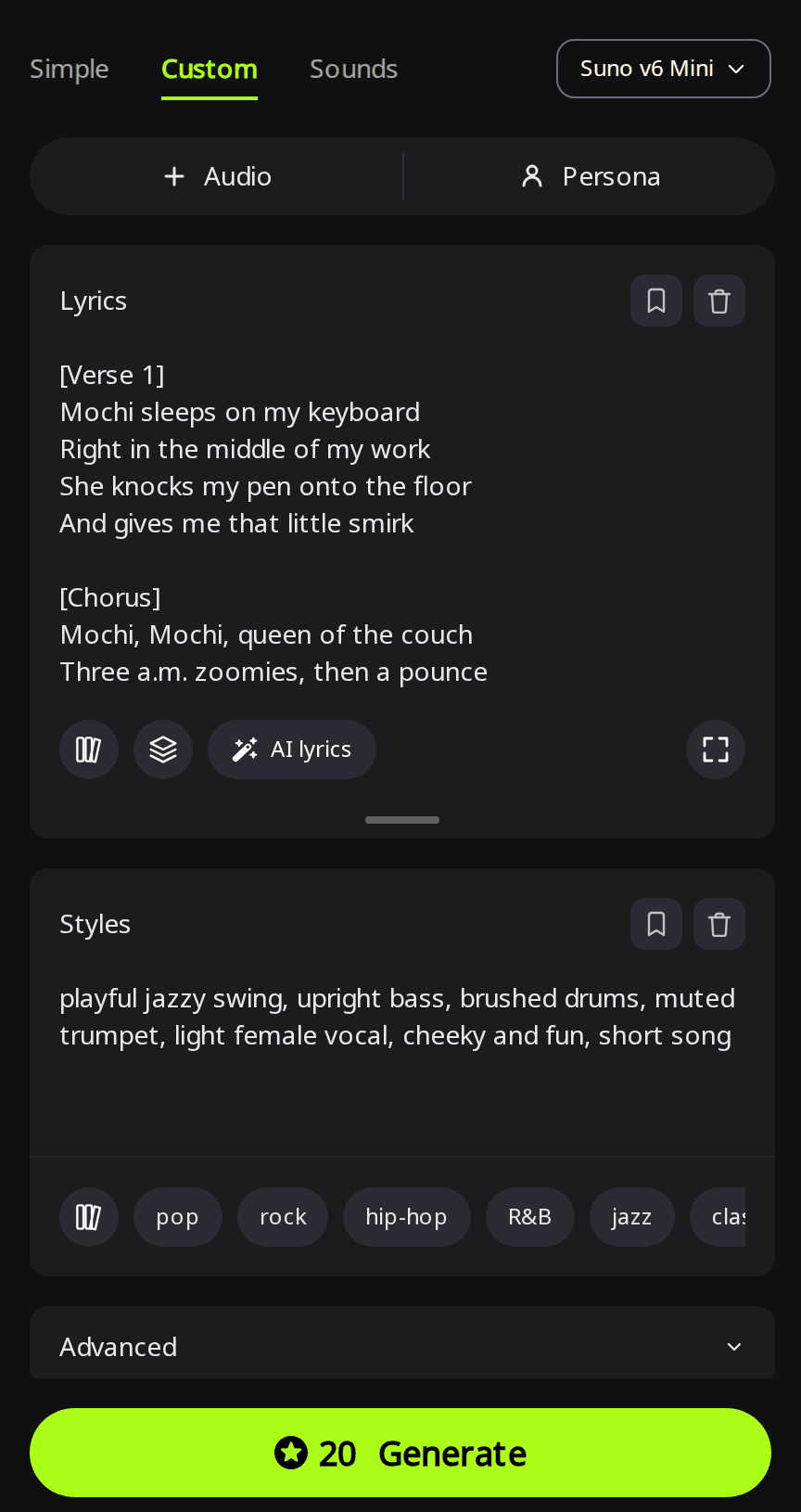
We used Suno v6 Mini in Custom mode with a female vocal and this style line: "playful jazzy swing, upright bass, brushed drums, muted trumpet, light female vocal, cheeky and fun, short song". It returned two takes (0:53 and 1:07). The full lyrics are at the end of this article.
Listening note: Both takes are playful swing tunes with a female vocal that follows the lyrics. The muted trumpet is hard to pick out in the first take and comes through as cartoon-style stabs in the second. Both are short enough for a reel as they are; if you want a real horn part, describe it on its own (for example "muted trumpet solo after the chorus") and generate again.
How do I make a memorial song for a pet that died?
Write it from your side of the story. Small daily things carry more than big statements: the leash by the door, the spot where your dog waited for you. Keep the chorus simple enough to hum, and ask for a slow, gentle sound with one or two acoustic instruments.
We used Lyria 3.5 in Custom mode with this style line: "gentle acoustic folk ballad, fingerpicked guitar, soft piano, warm male vocal, tender and bittersweet, slow tempo". Lyria's length setting is a guide only: we asked for 150 seconds and got one song of 2:38. The full lyrics are at the end of this article.
Listening note: The song follows the lyrics over fingerpicked guitar and soft piano, as the style line asked. It works as is for an online memorial post or a photo slideshow.
Can I make the song from a photo of my pet?
Yes. Image to Music takes up to 5 photos, and the model reads their mood, colors and scene to write a matching song. Image input works with the Rao and Suno models in Simple mode, and a run on Rao v1.0 costs 20 credits for two versions. You can also type a description alongside the photos; put your pet's name and habits there if you want them in the song.
How do I share the finished song?
- Shorten it if needed. The song menu's Clip options, such as Trim and Fade Out, cost 2 credits and save the result as a new song.
- Add pictures. To post it with photos or clips of your pet, see how to turn an AI song into a music video.
- Download it from the song's Download menu. The Suno examples above are MP3 files; the Lyria 3.5 song is an M4A file.
- Post it. Songs you generate on RaoMusic come with royalty-free commercial usage rights under the RaoMusic license, including social media posts; the commercial license page has the full terms.
How did we test?
All three examples were made on RaoMusic on October 29, 2026, one run per setup: Suno v6 Wild in Simple mode with the Biscuit description (30 credits, two takes), Suno v6 Mini in Custom mode with the Mochi lyrics and a female vocal (20 credits, two takes), and Lyria 3.5 in Custom mode with the Rosie lyrics and a 150-second length (20 credits, one song). Lengths are those of the finished files. The short listening note under a clip describes what that file sounds like; press play to judge for yourself. The name-spelling tip in the FAQ comes from an earlier RaoMusic test on October 28, 2026: one Suno v6 Custom run with the name Siobhan written normally and one with it written as Shi-vawn. We did not test photo input. The full Mochi and Rosie lyrics are below.
What lyrics did we use for the cat and memorial examples?
Mochi, Queen of the Couch
[Verse 1]
Mochi sleeps on my keyboard
Right in the middle of my work
She knocks my pen onto the floor
And gives me that little smirk
[Chorus]
Mochi, Mochi, queen of the couch
Three a.m. zoomies, then a pounce
You ignore me all day long
But you purr when I sing this song
[Verse 2]
She screams at birds she'll never catch
She hides inside the cardboard box
She drinks from my glass, not her bowl
And sleeps on all my clean socks
[Chorus]
Mochi, Mochi, queen of the couch
Three a.m. zoomies, then a pounce
You ignore me all day long
But you purr when I sing this song
[Outro]
Mochi, Mochi, go back to sleep
[End]
Run On, Rosie
[Verse 1]
Your leash still hangs beside the door
I still step around your bed
The park looks bigger without you
I walk the long way home instead
[Chorus]
Run on, Rosie, run on
Through the fields where the sun is warm
Fourteen years you walked beside me
Now I carry you along
[Verse 2]
You knew my car from down the street
You'd wait for me on the top stair
You never cared what kind of day I had
You were just glad that I was there
[Chorus]
Run on, Rosie, run on
Through the fields where the sun is warm
Fourteen years you walked beside me
Now I carry you along
[Outro]
Good girl, Rosie
Run on
Frequently Asked Questions
Spell the name the way it sounds, split into syllables with hyphens, and use that spelling in every line of your lyrics in Custom mode. In an earlier RaoMusic test, respelling Siobhan as Shi-vawn changed how Suno v6 sang it.
Eligible free accounts (in most countries) get 50 credits every month. On RaoMusic, Suno v6 Mini and Lyria 3.5 cost 20 credits per run and Suno v6 Wild costs 30 credits, and none of them needs a RaoMusic subscription.
Yes. Write the lyrics in that language in Custom mode. RaoMusic's lyrics guide says the lyrics can be in any language, but section tags such as [Verse] and [Chorus] should stay in English.
On the Suno v6 models, open Advanced in Custom mode and set Duration to Custom, which takes a target from 10 to 360 seconds. Write enough lyrics to fill the time, because the song may end early if the lyrics are short.
Change one thing and generate again: add a more specific habit, swap one style word, or try another model. Changing one thing at a time shows you which change helped.