

To make a memorial song with AI, write down a few specific memories (a phrase they always said, a habit, an object) and turn them into two short verses and a chorus. For a service, use Custom mode with a slow, sparse style and a fixed length. For a celebration of life, Simple mode can write the lyrics from a description. For a slideshow, use an instrumental. On RaoMusic, Suno v6 Wild costs 30 credits for two takes, no subscription.
Last checked: October 29, 2026
What should I write down before I start?
Collect a few true details first, then match the sound and length to where the song will play, then generate and check it well before the day. Swap broad praise such as "kind" or "loving" for details your family can picture. Spend ten minutes on this list, ideally with someone who knew the person too:
- The name your family used. "Grandpa Walt" sounds different from "Walter". Use the one people will say at the service.
- A phrase they repeated. It can become the chorus.
- Two habits or routines, such as Sunday pancakes or fixing things in the garage.
- One object that is still around: a cardigan on a hook, a mug, a garden chair.
- Where the song will play: during the service, at a gathering afterwards, or under a photo slideshow. That decides the mood and the length.
Which kind of song fits the occasion?
Pick the setup from where the song will be heard. These are the three setups behind the examples in this guide:
| Occasion | Feel | Style words | Setup on RaoMusic |
|---|---|---|---|
| Funeral or memorial service | Slow, quiet, one voice | slow piano ballad, soft cello, no drums, quiet ending | Suno v6 Wild, Custom mode, Duration 150 s |
| Celebration of life | Warm, grateful, upbeat | country-gospel, piano, handclaps, small choir | Suno v6 Wild, Simple mode |
| Photo slideshow | Instrumental, calm | solo piano, soft cello, no drums | ElevenLabs v2, Instrumental, Length 120 s |
How do I turn memories into lyrics?
- One memory per verse. Verse 1 can be the object that is still there; verse 2 a routine you shared.
- Build the chorus on their phrase. Grandpa Walt's "Well, that'll hold" opens the chorus, and his name comes two lines later.
- Let the bridge say the loss plainly. "There's no tape for this one" turns his habit into the goodbye.
- Keep verse and chorus lines short and even, about 8 to 11 syllables, so the melody has room at a slow tempo. A bridge can use shorter lines.
- Tag each section with [Verse 1], [Chorus], [Bridge] and so on, so the music follows your structure.
Grandpa Walt is a sample person made up for this guide; the full lyrics are at the end of the article. For more on section tags and keeping every line exactly as written, see the guide to making a song with your own lyrics.
How do I set up the service song on RaoMusic?
Use this setup when you have your own lyrics and a fixed time slot in the service. The steps below are for RaoMusic; in another AI music generator, look for the same three things: a box for your own lyrics, a style description and a length setting.
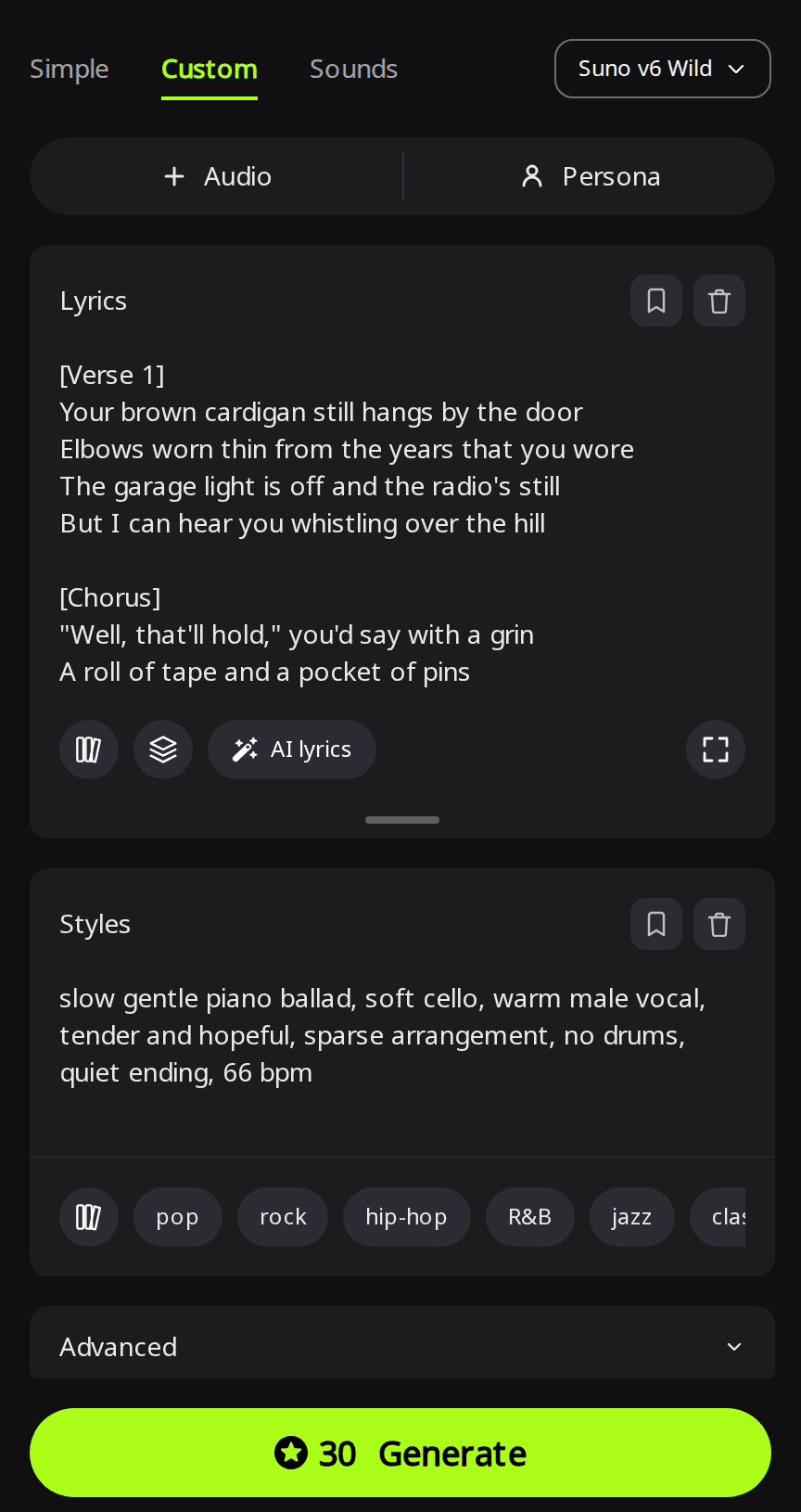
- Open Create, switch to the Custom tab and pick Suno v6 Wild in the model menu.
- Paste your lyrics into Lyrics and your style line into Styles, for example: "slow gentle piano ballad, soft cello, warm male vocal, tender and hopeful, sparse arrangement, no drums, quiet ending, 66 bpm".
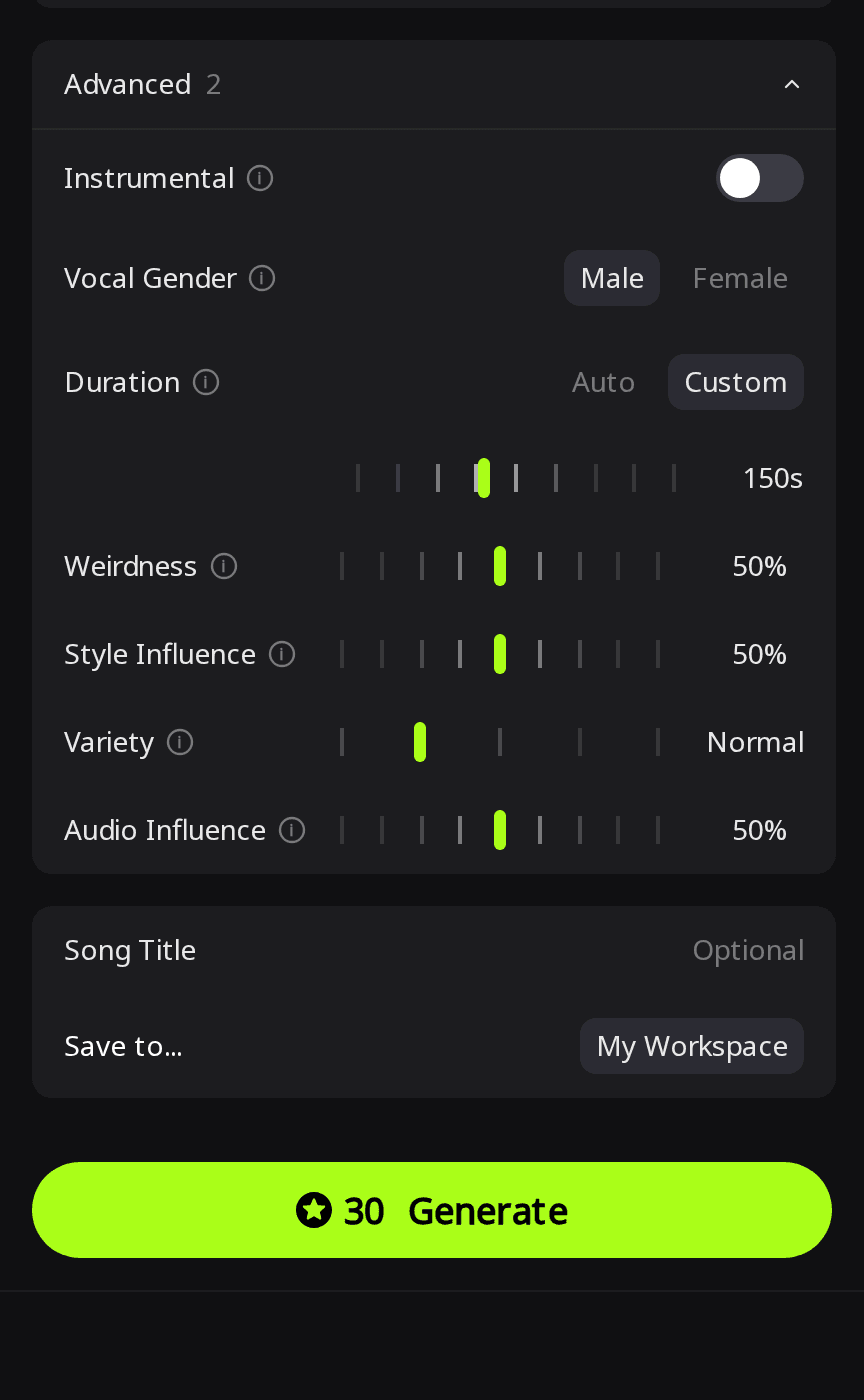
- Open Advanced. Under Vocal Gender, pick Male or Female if one fits the person better.
- Next to Duration, choose Custom and set the target length to the time slot you have. The tooltip reads: "set a target length (10-360s)", and the song may end early if your lyrics are short.
- Press Generate. The button shows 30 credits, and you get two takes.
What does the memorial service song sound like?
Service song · Custom mode · settings from the steps above
Take 1
Take 2
Both files are exactly 2:30, so the length setting held for these lyrics.
Listening note: Both takes sing the lyrics over drum-free piano with a clear, warm male vocal at a slow tempo. Take 1 has only a faint cello pad and some digital tuning on sustained notes, so choose take 2 if you want the cello clearly audible.
How do I make a celebration-of-life song from a description?
If you would rather not write lyrics, use Simple mode: describe the person and the feel in a few sentences, and the lyrics are written for you. Put the details you want sung into the description. This description goes into Song Description with Suno v6 Wild selected:
An upbeat, warm celebration-of-life song for my grandpa Walt. He fixed everything in his garage with duct tape and always said "Well, that'll hold." He whistled old swing tunes and made Sunday pancakes shaped like our initials. Glad and grateful, not sad. Country-gospel with piano, handclaps and a small choir on the last chorus, about 110 BPM.
Celebration-of-life song · Simple mode
Take 1
Take 2
Both takes use the same written lyrics, built around the coffee can of screws, the duct tape, "Well, that'll hold" and the initial-shaped pancakes. They run 3:36 and 2:39, so if the song has to fit a time slot, use Custom mode with a Duration instead.
Listening note: Take 1 is upbeat and take 2 warmer and mid-tempo; both have piano, handclaps and a choir that lifts the last chorus. Take 1's vocal sounds noticeably processed, so choose take 2 if you want the cleaner vocal; it is also the shorter one. The whistling shows up only in the lyrics. For a whistled hook, record a short whistle yourself and add it in an audio editor, or leave it as a sung line.
How do I make an instrumental for a photo slideshow?
Time the slideshow first: number of photos times seconds per photo (30 photos at 4 seconds is 2 minutes). Then pick ElevenLabs v2 in Simple mode, turn on Instrumental and set Length to that time. ElevenLabs v2 needs no subscription, costs 40 credits per minute and goes up to 5 minutes. To add the music to your photos, see how to turn an AI song into a music video.
Slideshow instrumental · ElevenLabs v2 · Simple mode · description: "Gentle instrumental for a memorial photo slideshow: slow solo piano with soft cello, warm and hopeful, no drums, ends quietly."
The file is exactly 2:00, the length requested.
Listening note: The piano and soft cello stay in the background, with no drums and a clean, quiet ending, so the track needs no trim before it goes under a slideshow.
How do I prepare the song for the service?
- Listen alone first, all the way through, before anyone else hears it.
- Fix the ending if needed. If a take stops more suddenly than you want, the song menu's Clip options, such as Fade Out and Trim, cost 2 credits and save the result as a new song. The guide to ending an AI song covers how to ask for a softer ending in the lyrics.
- Download the MP3 from the song's Download menu and play it once on the venue's speakers. Ask the venue how they play music; bringing the file on a USB drive or sending it to the funeral home ahead of time avoids relying on a phone.
- Share it afterwards with family, or post it online for people who could not be there.
How did we test?
All examples were made on RaoMusic on October 29, 2026, one run for each setup in the table above: 30 credits for each Suno v6 Wild run (two takes each) and 80 credits for the ElevenLabs track. Lengths were measured from the downloaded files. The short listening note under a clip describes what that file sounds like; press play to judge for yourself. The full lyrics are below.
What lyrics did we use for the service song?
Style line: "slow gentle piano ballad, soft cello, warm male vocal, tender and hopeful, sparse arrangement, no drums, quiet ending, 66 bpm". Title: "That'll Hold".
[Verse 1]
Your brown cardigan still hangs by the door
Elbows worn thin from the years that you wore
The garage light is off and the radio's still
But I can hear you whistling over the hill
[Chorus]
"Well, that'll hold," you'd say with a grin
A roll of tape and a pocket of pins
Grandpa Walt, you fixed what we broke
Now we hold on to every word that you spoke
[Verse 2]
Sunday pancakes in the shape of our names
Burnt at the edges, we loved them the same
You'd hum an old tune while the coffee would pour
And always make one pancake more
[Bridge]
There's no tape for this one
No glue and no pins
So we'll keep your kitchen singing
Every Sunday again
[Final Chorus]
"Well, that'll hold," we'll say with a grin
A roll of tape and a pocket of pins
Grandpa Walt, you fixed what we broke
Now we hold on to every word that you spoke
Frequently Asked Questions
Only if you have recordings of them singing. AI Voice Cloning on RaoMusic trains a voice model from 8–15 minutes of one person's clear singing (speaking won't work), from 150 credits, and the AI cover generator can then re-sing a finished song in that voice. Talk it over with the family first, since hearing that voice again can be hard for some people.
Spell the name the way it sounds in the lyrics (for example "Shi-vawn" for Siobhan) and generate again. Keep the usual spelling in the title and in any printed program.
Yes. Write the lyrics in that language and keep the section tags such as [Verse] and [Chorus] in English.
Yes. Image to Music takes up to 5 photos and writes a song from their mood, colors and scene; you can also type the name and memories alongside them. It works with the Rao and Suno models in Simple mode.
In most countries, eligible free accounts get 50 credits every month, enough for one 30-credit Suno v6 Wild run with two takes. A 2-minute ElevenLabs slideshow track costs 80 credits, so it needs more than the free monthly credits.