

To make a jingle with AI, write a few short lines that sing the brand name at least twice, paste them into Custom mode with a one-line style description, set the length to 15 or 30 seconds, and generate. Then keep the take where the name is easiest to hear and trim the tail. On RaoMusic, a 30-second jingle costs 20 to 30 credits, depending on the engine.
Last checked: October 27, 2026
How do I write jingle lyrics around a brand name?
A jingle is a short song built to make one name stick, so write every line around that name.
- Put the name in the hook. Give the brand name its own line in the chorus and repeat it. In the example below, written for a made-up bakery called Pebble Lane Bakery, the chorus sings "Pebble Lane" twice and then the full name.
- Say one thing. One benefit ("fresh every morning") and one action ("come by") are enough.
- Count words against the length. As a starting point, the example lyrics run 37 words for 30 seconds, 16 for 15 seconds and 6 for a 10-second tag.
- Tag the sections. [Verse] and [Chorus] on their own lines tell the model where the hook is.
If you're stuck on wording, the AI lyrics generator can draft lines from a short description. Edit the result so the name lands on the strongest beat.
The 30-second example lyrics, used for every engine below:
[Verse]
Warm bread on the corner, coffee on the way
Pebble Lane is open, come and start your day
[Chorus]
Pebble Lane, Pebble Lane
Fresh every morning, rain or shine
Pebble Lane Bakery
Seven days a week, come by
How do I set up a jingle in Custom mode?
- On RaoMusic, open Create and switch to the Custom tab.
- Pick an engine from the model menu at the top right. Suno v6, ElevenLabs and ACE-Step all let you set a length.
- Paste your lyrics into Lyrics and a one-line sound description into Styles: genre, two or three instruments, voice, tempo. Our guide to making a song with your own lyrics covers section tags in more detail.
- For Suno v6, open Advanced, set Duration to Custom and drag the slider to 30s (or 15s).
- Press Generate. The number on the button is the credit cost.
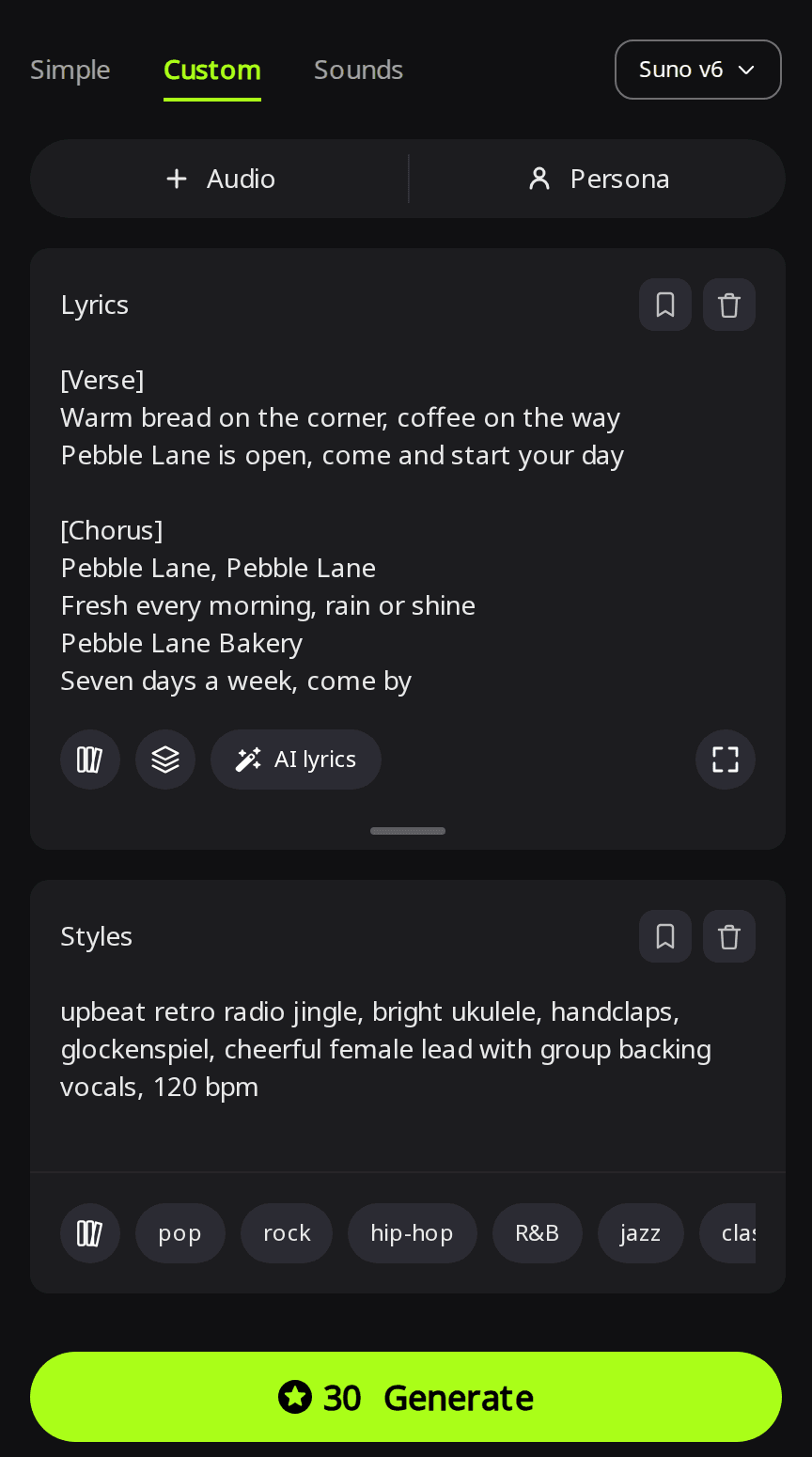
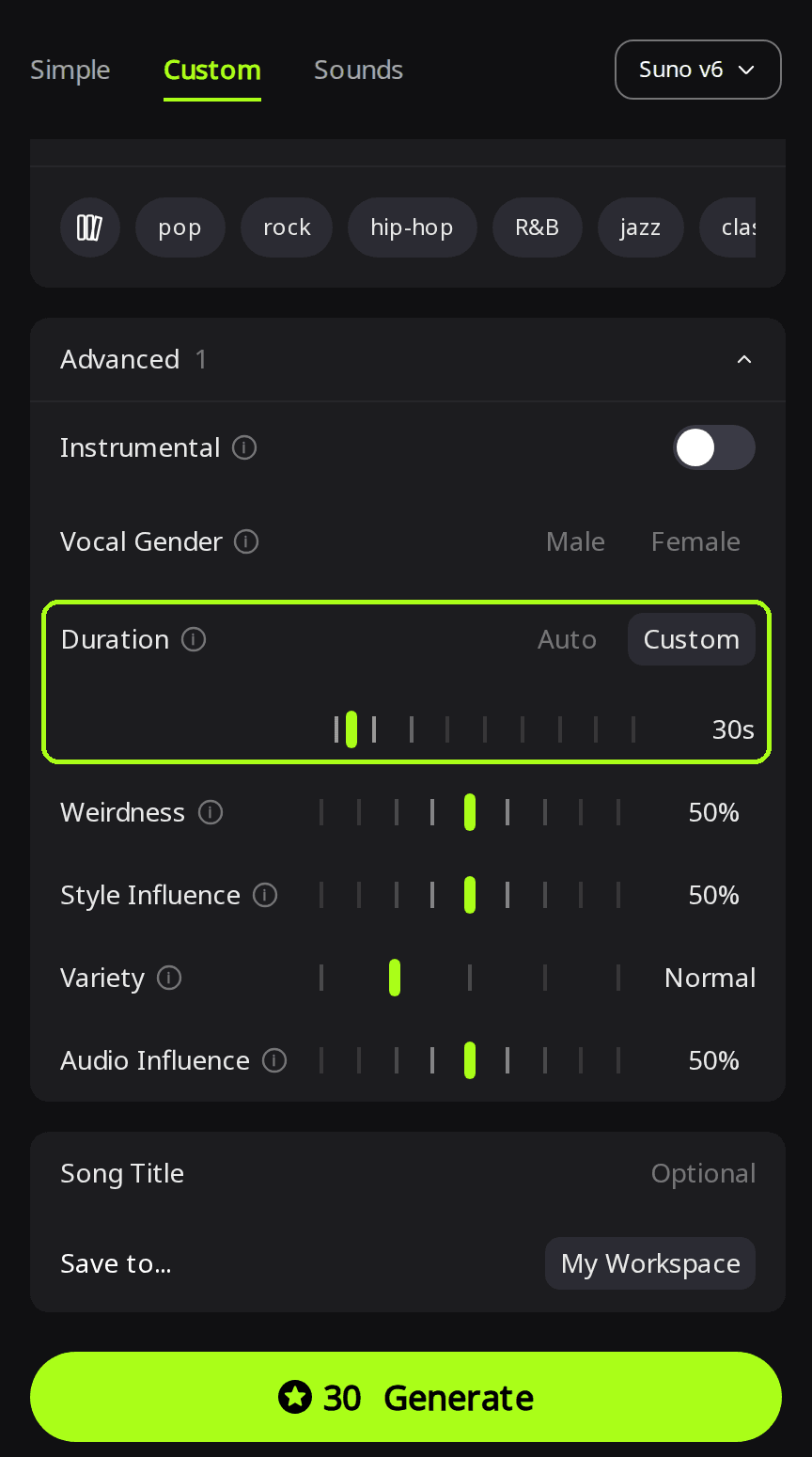
Suno's Duration tooltip on RaoMusic warns that "the song may end early if your lyrics are short." Match the amount of sung text to the slot, then check the length of the file you get.
Which engine should I use for a 30-second jingle?
For a 30-second sung jingle with the same lyrics and style line, the three engines returned:
| Engine | Credits | Takes | File length | Brand name heard? |
|---|---|---|---|---|
| Suno v6 (subscription) | 30 | 2 | 29.8 s and 30.0 s | Yes, both takes |
| ElevenLabs v2 | 20 | 1 | 30.0 s | Yes |
| ACE-Step 1.5 (Thinking on) | 10 | 1 | 30.0 s (about 23 s of music) | No vocals in this take |
Suno v6 · Custom · Duration 30s · two takes
Listening note: Both takes sing every lyric line and all four name mentions clearly over the ukulele, handclaps and cheerful vocals. The first can be used as is. The second ends with a drawn-out instrumental outro of about six seconds; trim it for a tighter spot, or keep it as room for a spoken offer.
ElevenLabs v2 · Custom · Length 30 s
Listening note: The retro style comes through with ukulele, glockenspiel, handclaps and group harmonies, and every lyric line and brand mention is clearly sung. Use it as is for a 30-second radio or social ad. See the ElevenLabs model page for its length limits and pricing.
ACE-Step 1.5 · Custom · Length 30 s · Thinking on
Listening note: This take came back with no singing at all, so the brand name is never heard. The music ends early and the rest of the file is silent. Keep it as a light instrumental bed and generate again if you need the sung version.
Which one to start with depends on the job:
- You subscribe and want options: Suno v6. Every run returns two takes, so you can keep the one where the name is clearest.
- You don't subscribe and need a sung jingle: ElevenLabs v2. Its 30-second take sang every line and the brand name clearly, for fewer credits than a Suno run.
- You only need music under a voiceover: turn on Instrumental, as in the music bed section below. The ACE-Step take here came back without vocals, so don't count on it when the name has to be sung.
Suno v6 Wild and Suno v6 Mini also have the Duration setting and need no subscription, but they weren't part of this test.
Can I make a 15-second or 10-second version?
Yes. A 15-second cut or a 10-second tag lets the same hook fit a shorter ad slot or close out a longer ad. Cut the lyrics down instead of asking for less time with the same words. For 15 seconds, keep only the chorus and set Suno v6 Duration to 15s (still 30 credits for two takes):
[Chorus]
Pebble Lane, Pebble Lane
Fresh every morning, rain or shine
Pebble Lane Bakery
Come by today
Suno v6 · Custom · Duration 15s · two takes
Listening note: In the first take "Pebble Lane Bakery" is clear and the hook resolves on time, though the tempo drags noticeably on the last line and the backing vocals are barely audible. In the second take the singer slurs the name so it sounds like "Pebble Lay"; that one is only good as a draft. Play each take without looking at the lyrics, then keep the one where the name is unmistakable.
Under each take in your song list, RaoMusic shows the style description that take used. At the default Variety (Normal), the two takes got different voice descriptions: the clear one a "high, light upper register," the slurred one a "low, dark lower-register, husky, smoky tone." If you want both takes to stay close to your own style line, set Variety to Off; its tooltip says "Off keeps both versions strictly on-style."
For a 10-second sung tag at the end of an ad, two lines are enough. On ElevenLabs v2 at a 10-second length, this cost 7 credits:
[Hook]
Pebble Lane Bakery
Fresh every morning
ElevenLabs v2 · Custom · Length 10 s
Listening note: The name is fully intelligible and the tag resolves cleanly. The phrasing is a little stiff and the ukulele is buried in the mix. It works as a closing brand tag on a radio or social ad.
How do I make a music bed for a voiceover?
If your ad has a spoken offer, you need music under the voice as well as the sung name. Turn on Instrumental and list what to leave out as well as what to put in.
ElevenLabs v2 · Simple · Instrumental · Length 30 s · first prompt: "30-second music bed to sit under a spoken radio ad for a bakery: same feel as an upbeat retro radio jingle, bright ukulele, handclaps, glockenspiel, 120 bpm, light and steady, no big drops, leaves room for a voice"
Listening note: Tempo, ukulele and claps match, but a whistled melody appears that would compete with a voice, and the music stops mid-bar at 30 seconds. Use it as a short instrumental bumper after trimming, not under speech.
ElevenLabs v2 · Simple · Instrumental · Length 30 s · second prompt adds: "Accompaniment only: no lead melody, no whistling, no vocals, keep the midrange clear for a voice. Ends on a clean final chord."
Listening note: Ukulele strumming, light claps and soft glockenspiel with no lead line or vocals. The midrange leaves room for speech, so it can go under a voiceover as is.
How do I trim, fade and download the jingle?
Open the song's menu in your library and choose Clip. Trim keeps the part you select, and Fade Out lowers the volume over the last 0.5 to 10 seconds. Each edit costs 2 credits and is saved as a new song, so the original stays untouched. A trimmed result has to be at least 5 seconds long.
Use Trim to cut an instrumental outro with no singing, such as the end of the second 30-second Suno take, or the silent end of the ACE-Step file (which then leaves an instrumental bed, still with no singing). Use Fade Out when the music stops mid-bar. Neither edit fixes a slurred name or an unwanted melody; regenerate for those. For more on clean endings, see our guide to ending an AI song cleanly.
MP3 download is included on any plan. Lossless WAV export needs an active subscription and is offered for the Suno takes, not for the ElevenLabs ones.
Can I use an AI jingle in a paid ad?
RaoMusic's license wording describes songs you generate as including "worldwide, royalty-free commercial usage rights for videos, ads, podcasts, games, social media, client work, and other projects," with no subscription required. Subscribers can also download a license certificate PDF as proof.
What it doesn't cover: it is a usage license, not a transfer of copyright; it doesn't cover audio you upload or songs made from an upload; and it gives you no rights to someone else's trademark, slogan or lyrics. Use a business name and slogan you have the right to use, and get permission for anything you didn't write. The full terms are on the commercial license page.
How did we test?
All clips were made on October 27, 2026 on RaoMusic with a fictional bakery name. Each setting ran once: Suno v6 at 30 s and 15 s (two takes per run), ElevenLabs v2 at 30 s and 10 s, ACE-Step 1.5 at 30 s with Thinking on, and two ElevenLabs v2 instrumental beds. Suno v6 Wild and Suno v6 Mini were not tested. Every vocal clip used the same style line: "upbeat retro radio jingle, bright ukulele, handclaps, glockenspiel, cheerful female lead with group backing vocals, 120 bpm." File lengths and the silent tail were measured from the downloaded files. Credits are what our account was charged. The short listening note under a clip describes what that file sounds like; press play to judge for yourself.
Frequently Asked Questions
Generate again and keep only a take where you can hear the name clearly without reading the lyrics. If every take gets it wrong, try spelling the name in the lyrics the way it should sound.
Subscribers can save the vocals and style of a finished Rao or Suno song as a Persona and apply it to new Rao or Suno tracks, which helps your Suno versions sound alike. It does not carry over to other engines such as ElevenLabs.
Write the lyrics in that language and paste them into Custom mode. ACE-Step 1.5 also has a Vocal language setting with English, Chinese, Japanese, Korean, Spanish, French and German.
No. Each run makes new takes, even with the same lyrics and style. When you find a take you like, keep it and edit that file instead of regenerating.
Set Suno v6 Duration to Custom, or move the Length slider on ElevenLabs or ACE-Step, to the length of the slot. All three start at 10 seconds. If the file comes back longer than the slot, trim it.