

Google Lyria 3.5 is Google DeepMind's music generation model. It turns a text description, or your lyrics plus a style, into a song of up to about 3 minutes. Google offers it in Flow Music, the Gemini app and the Gemini API ($0.08 per song). On RaoMusic it costs 20 credits per song without a subscription. In our five test songs, three landed within 8 seconds of the target length; a 60-second request came back at 2:56.
Last checked: October 25, 2026. How we tested: five songs generated on October 25, 2026 through RaoMusic's connection to Lyria 3.5 on an account without a subscription, with prompts, modes and target lengths varied on purpose. Five single runs show what can happen, not typical results. We did not time the generations or score sound quality.
What is Google Lyria 3.5?
Lyria 3.5 is the music model behind Google's current song features. Its model card, published July 29, 2026, calls it "Google's most capable music generation model to date", lists text as the input and music plus lyrics as the output, and says it uses latent diffusion "applied to temporal audio latents". In plain terms, it generates a compressed representation of the audio over time and then decodes it into sound.
Google launched it in Flow Music on July 29, 2026, then made it available "in the Gemini app and the Gemini API" on September 4, 2026, with the app open to all users globally on web and mobile and developer access through Google AI Studio and Google Vids (Google blog).
The DeepMind Lyria page says songs are "now up to 3 minutes long" and that every track carries an inaudible SynthID watermark. Google's Lyria page and the Gemini API docs also describe image prompts, while the model card lists text as the input; RaoMusic's Lyria form takes text only.
| Where you can use it | Price (as published) | Notes |
|---|---|---|
| Gemini app | No per-song price published | Web and mobile, open to all users globally (Google blog, Sep 4, 2026); usage limits not published on the pages we checked |
| Google Flow Music | Pricing not verified | Launch platform for Lyria 3.5 (July 29, 2026) |
Gemini API (model lyria-3.5) | $0.08 per song, no free tier | Gemini API pricing, checked Oct 25, 2026 |
| RaoMusic | 20 credits per song (credit pricing) | Simple and Custom modes, no subscription needed |
What is new in Lyria 3.5?
Google's launch post lists four upgrades over the previous version: "richer, more complex melodic structures", better lyrics through "improved prompt adherence and structural awareness", "more realistic and emotionally nuanced vocals, plus improved pronunciation", and the ability to "more easily control the tempo and duration". The model card adds that audio fidelity "improved significantly compared to Lyria 2". Google has not published numeric benchmarks for Lyria 3.5.
What does Lyria 3.5 sound like?
Each player is the M4A file included with that 20-credit generation, unedited; every run returned one song. Examples 1 and 2 show what Simple mode does with a one-line description, examples 3 and 4 were submitted with our own English and Spanish lyrics, and example 5 uses a style prompt with no lyrics. The full input lyrics, written for this test, are printed under examples 3 and 4. Listen and compare.
1. Simple mode, short description
Prompt: cinematic ambient piano with soft strings for a rainy evening, slow and warm · Engine: Google Lyria 3.5 · Simple mode · 20 credits, M4A · target length 60 s · result 2:56; instrumental, no lyrics
2. Simple mode, Lyria writes the lyrics
Prompt: upbeat indie pop with bright guitars and handclaps, summer road trip feeling · Engine: Google Lyria 3.5 · Simple mode · 20 credits, M4A · target length 240 s · result 3:01; Lyria wrote English lyrics
Neither prompt mentioned vocals. Lyria made the piano piece an instrumental and wrote English verses and a chorus for the indie pop song.
3. Custom mode, English lyrics
Lyrics: 16-line original, "Porch Light" · Style: warm acoustic pop, female vocals, fingerpicked guitar, soft piano, 96 BPM · Engine: Google Lyria 3.5 on RaoMusic · Custom mode · 20 credits, M4A · BPM 96 · target length 120 s · result 2:03
[Verse 1]
Gravel on the driveway, engine ticking slow
Twelve hours on the highway with the windows rolled down low
Every song on the radio was one we used to know
And every one of them was you
[Chorus]
Leave the porch light on, leave the porch light on
I can see it shining from the end of the road
Leave the porch light on, I won't be long
Keep a little warm for me, I'm coming home
[Verse 2]
Your coat is on the hook and there's a note beside the door
Says the kettle's on the stove like a hundred times before
I don't need a lot of things, I don't need anything more
Than the yellow glow that's you
[Chorus]
Leave the porch light on, leave the porch light on
I can see it shining from the end of the road
Leave the porch light on, I won't be long
Keep a little warm for me, I'm coming home
4. Custom mode, Spanish lyrics
Lyrics: 8-line original in Spanish, "Vuelve Despacio" · Style: acoustic bolero, warm male vocals, nylon-string guitar, soft percussion · Engine: Google Lyria 3.5 on RaoMusic · Custom mode · 20 credits, M4A · target length 120 s · result 2:07
[Verse]
La luna se quedó dormida en tu ventana
y yo cuento las horas hasta la mañana
Tu nombre en el café, tu risa en la escalera
la casa tiene todavía tu primavera
[Chorus]
Vuelve despacio, vuelve cuando quieras
la puerta sigue abierta, la luz sigue encendida
Vuelve despacio, que aquí nadie te espera
con tanto amor como esta vieja guitarra mía
The lyrics Lyria returned with this song follow our verse and chorus, then repeat the chorus and add an outro line. Google says the model "generates lyrics in the language of your prompt" (Gemini API docs) but does not publish a list of supported languages.
5. Custom mode, no lyrics
Lyrics: left blank · Style: lo-fi hip hop, mellow Rhodes piano, vinyl crackle, soft drums · Engine: Google Lyria 3.5 on RaoMusic · Custom mode · 20 credits, M4A · BPM 80 · target length 90 s · result 1:38; instrumental, no lyrics
How long are Lyria 3.5 songs?
Google advertises songs of up to 3 minutes. On RaoMusic the target length is advisory: the Target length slider runs from 30 to 240 seconds, and its tooltip says the model "decides the final length". The table compares the target and the actual length for our five songs.
| Example # (sorted by target) | Target length | Actual length | Difference |
|---|---|---|---|
| 1. Ambient piano (Simple) | 60 s | 176 s | +116 s |
| 5. Lo-fi, no lyrics (Custom) | 90 s | 98 s | +8 s |
| 3. English lyrics (Custom) | 120 s | 123 s | +3 s |
| 4. Spanish lyrics (Custom) | 120 s | 127 s | +7 s |
| 2. Indie pop (Simple) | 240 s | 181 s | −59 s |
The three Custom mode songs with targets between 90 and 120 seconds landed within 8 seconds of the target. The two extremes did not: the 60-second request came back almost three minutes long, and the 240-second request stopped at 3:01, close to Google's advertised three minutes. Because prompts and modes differed, this does not show that one mode follows the target better than the other. A longer target also did not guarantee a longer song. If a song comes back too long, shorten it with Clip, which appears in the song menu of every Lyria song (see the menu screenshot below). If it comes back too short, generate again or extend the song; neither guarantees an exact length.
How do I use Lyria 3.5 in the Gemini app?
According to Google's September 4, 2026 announcement, Lyria 3.5 is open to all users in the Gemini web app and mobile app. In the app you can:
- select or describe a genre, and choose a vocal or instrumental style;
- start from templates, for example background music or a custom birthday track;
- choose a short or a longer track.
The announcement does not mention pasting your own lyrics, setting a BPM or per-song limits. If you want to use your own lyrics, set a BPM, aim for a length between 30 and 240 seconds, and download M4A or WAV files with a commercial usage license, the next section shows the same model on RaoMusic.
How do I use Lyria 3.5 on RaoMusic?
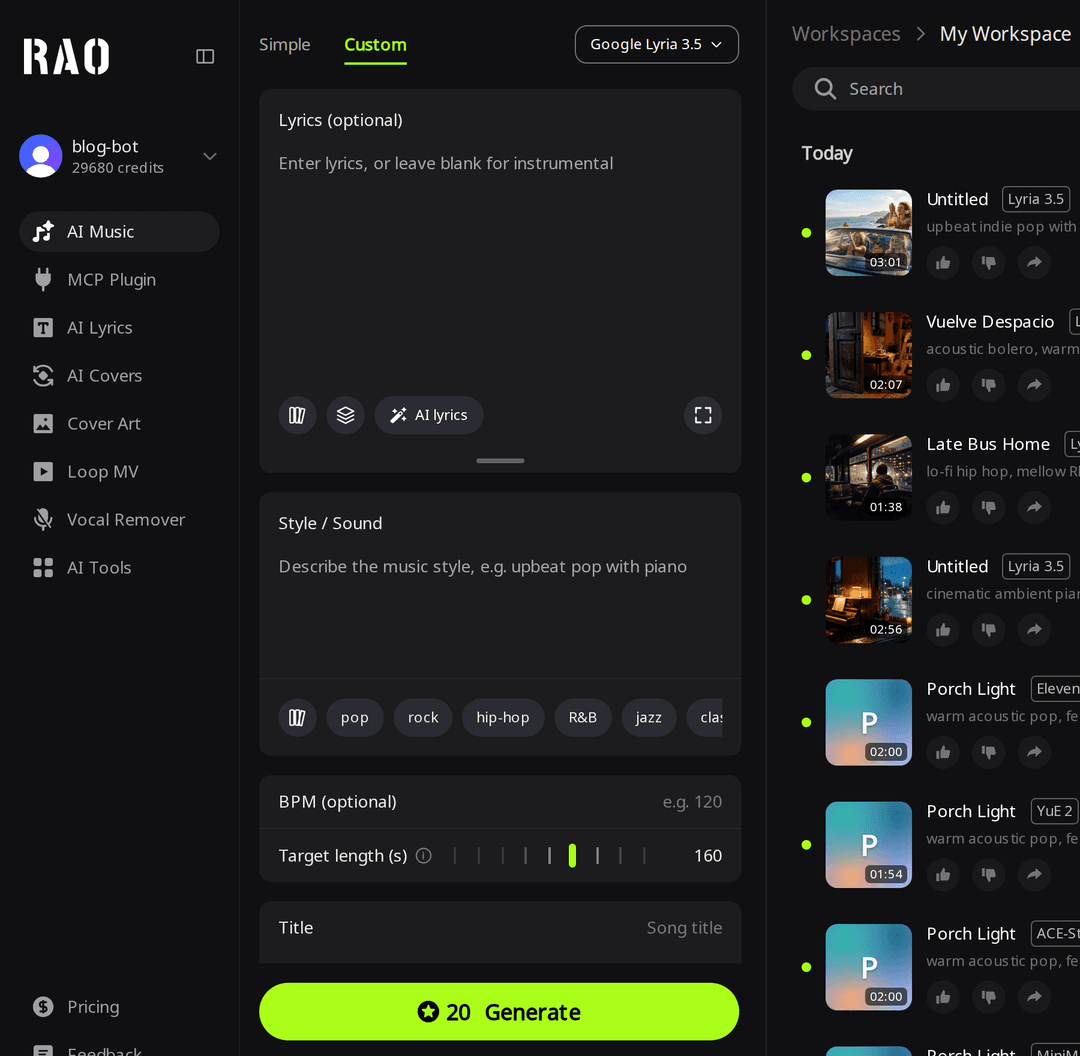
- Open Create and pick Google Lyria 3.5 from the engine menu at the top of the form.
- For a quick idea, stay in Simple mode and describe the music in one or two lines. You do not write lyrics here; Lyria decides whether to add them, and one of our two Simple mode songs came back instrumental.
- For your own words, switch to Custom mode, paste lyrics (up to 3,000 characters) or leave them blank for an instrumental, and describe the style.
- Optionally set BPM (Custom mode only) and the target length, then click Generate. Each run costs 20 credits and returns one song.
The Google Lyria model page has more example prompts, and our guide to turning your own lyrics into a song covers how to format verses and choruses.
Which files can I download from a Lyria 3.5 song?
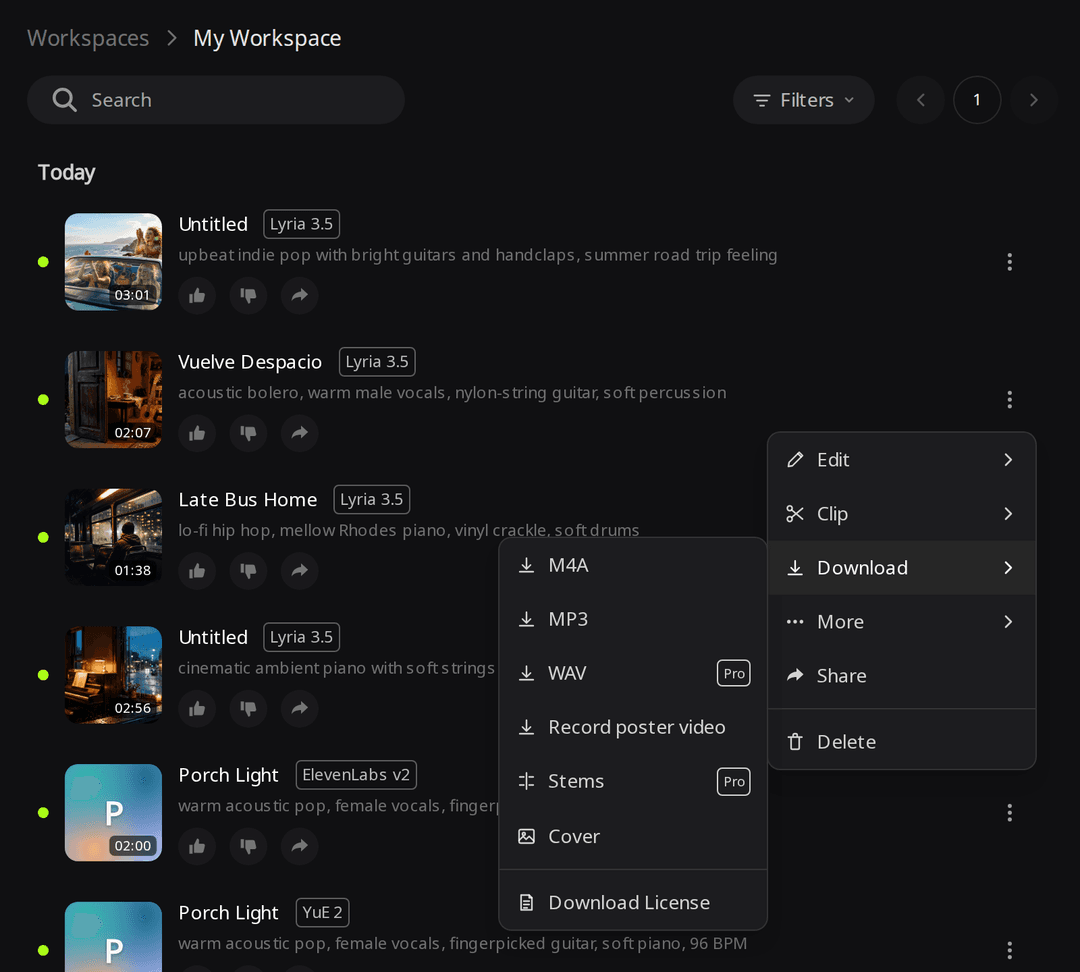
| Format | Cost on RaoMusic | What we measured |
|---|---|---|
| M4A | Free with every song | AAC, 1.4 to 2.4 MB for our five songs |
| MP3 | 5 credits the first time, then free | Converted on request |
| WAV | Subscription, no extra credits | Header of the example 5 WAV: 16-bit, 48 kHz stereo. The example 1 WAV (2:56) is 33.8 MB |
For comparison, the Gemini API returns MP3 by default and can return WAV, at "44.1 kHz high-fidelity stereo" according to Google's music generation docs. A 48 kHz file is not evidence of higher quality than the API output; it only describes the file RaoMusic delivers.
Is Lyria 3.5 music watermarked, and can I use it commercially?
Google says all Lyria tracks carry SynthID, an imperceptible watermark, and the Gemini API docs state that "all generated audio includes a SynthID audio watermark". We did not test for the watermark on our files. The Google model pages we checked do not state commercial-use terms for songs made in the Gemini app, so check the terms of the service you generate with.
Songs you generate on RaoMusic, including Lyria 3.5 songs, come with royalty-free commercial usage rights without a subscription, under the RaoMusic license terms. Subscribers can also download a license certificate PDF as proof. The license is a usage license, not a copyright transfer. It does not cover audio you upload or songs made from an upload, and you still need the rights to any lyrics you paste in. The terms are on the commercial license page.
Frequently Asked Questions
Google says the Gemini app version is open to all users globally, but the pages we checked publish no price or usage limits for it, so we could not confirm free use. The Gemini API has no free tier and charges $0.08 per song. On RaoMusic each song costs 20 credits; eligible accounts get 50 free credits every month in most countries, and availability varies by region.
Google's Gemini API docs say it blocks requests for specific artist voices and copyrighted lyrics. Describe the genre, mood and instruments instead of naming an artist.
On RaoMusic the song menu has Clip for trimming, and Lyria songs can also be extended, covered or mashed up. Google's Gemini API docs describe music generation through the API as a single-turn process.
No. Lyria RealTime is a separate Google model for interactive, live music creation that you steer while it plays. Lyria 3.5 generates a finished song from a prompt.
On RaoMusic each Lyria 3.5 run returns one song. If you want two takes per run, the Suno and Mureka engines return two.